

Garbled terrain and unit graphics
Moderators: Slitherine Core, BA Moderators, WH40K Armageddon moderators

Garbled terrain and unit graphics
Game was patched to v1.03. After playing about 10 rounds in a hotseat multiplayer test game the terrain started disappearing. It looked like the disappearing parts got replaced by little colored tags. A few turns later units also started disappearing. Thought I took a print screen, but alas, that standard button isn't supported in the game. I also noticed the background changed to the same multicolor "theme", both in game and in the buy screen.

Re: Garbled terrain and unit graphics
Have you restarted the game? Are you still experiencing the same issue?
Re: Garbled terrain and unit graphics
Haven't noticed it since, but I'm guessing this is some kind of progressive memory corruption issue, potentially encountered during long play sessions. The same "wrong" colorful background image did occur before though during campaign play.
Re: Garbled terrain and unit graphics
Check you graphic card temperature as it might be overheating...
Re: Garbled terrain and unit graphics
Not at all, it's not even increasing the fan speed during the game. This is a 2D game, so that's not so surprising 
Re: Garbled terrain and unit graphics
The last patch set the fps limit to 60, as some people were having issues with the initial release of the game:
http://slitherine.com/forum/viewtopic.php?f=324&t=54409
So I was wondering if you had the same problem.
http://slitherine.com/forum/viewtopic.php?f=324&t=54409
So I was wondering if you had the same problem.
Re: Garbled terrain and unit graphics
Don't think so; at least I haven't heard any increased action on the fans.
Re: Garbled terrain and unit graphics
Can you take a screenshot showing the graphic corruption?
Re: Garbled terrain and unit graphics
If it happens again, I will. The standard Prt Scr function didn't work at the time, although it does now 
Re: Garbled terrain and unit graphics
Got the colorful background again.
Re: Garbled terrain and unit graphics
Sorry, no idea what this can be.
Could you please attach a DxDiag report file?
Could you please attach a DxDiag report file?
Re: Garbled terrain and unit graphics
Here you go. Ran it in 64bit mode, no problems found.
- Attachments
-
 DxDiag_Shrike.zip
- (9.85 KiB) Downloaded 286 times

Re: Garbled terrain and unit graphics
It looks like a "missing picture". As we see in tests when a graphics file is missed. Instead of the missed graphics I see such a colorful icon or background.Shrike wrote:Got the colorful background again.
Re: Garbled terrain and unit graphics
I would agree, if only this was a consistent issue. However, it's not specific for a particular screen, but only seems to happen after prolonged play sessions. My guess would go towards slow memory corruption. The next steps after this weird background are gradually disappearing map objects like I've described in the initial post. Unfortunately, I don't have any screenshots of that.
Re: Garbled terrain and unit graphics
Are there white squares they fill the background of the map? I noticed that one time in the first Beta. On my slower computer.Shrike wrote:I would agree, if only this was a consistent issue. However, it's not specific for a particular screen, but only seems to happen after prolonged play sessions. My guess would go towards slow memory corruption. The next steps after this weird background are gradually disappearing map objects like I've described in the initial post. Unfortunately, I don't have any screenshots of that.
-
nexusno2000
- Sr. Colonel - Wirbelwind
- Posts: 1709
- Joined: Mon Feb 24, 2014 5:15 pm
- Contact:
Re: Garbled terrain and unit graphics
I got the same playing the beta:
(I'm chancing its ok to post, since it gives nothing away)
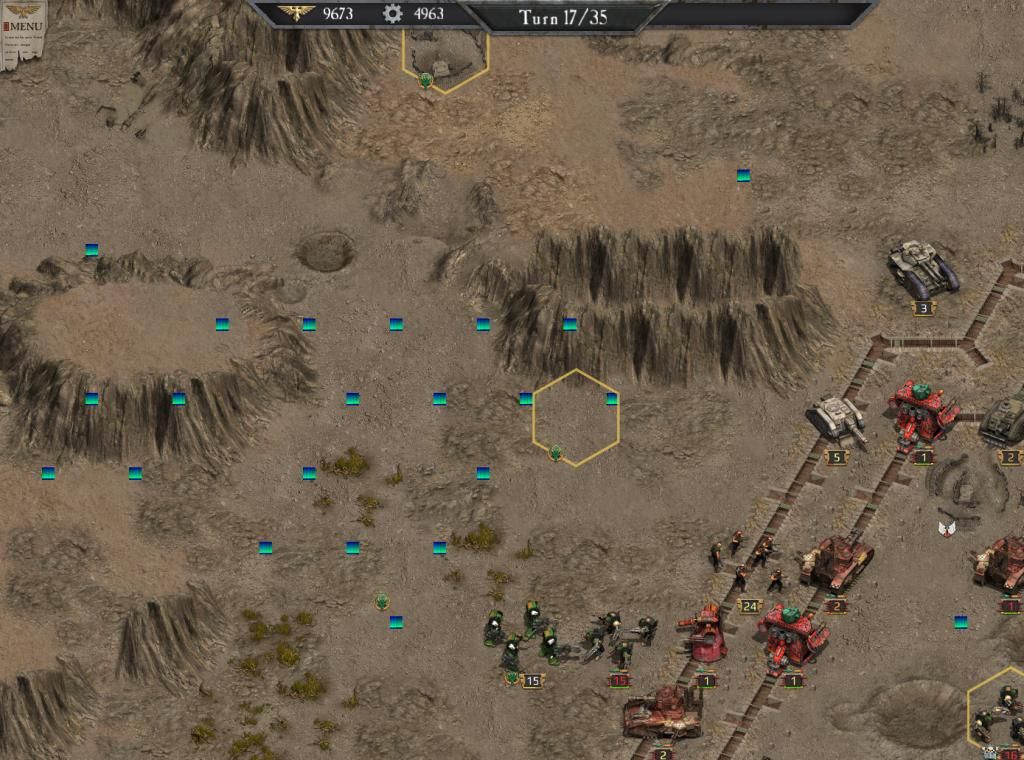
Mostly it's the Salamander-held town that's missing.
When reloading I got the same bluish background in the load screen.
Afterwards the town was ok, but on the far right side of the map some other buildings were gone.
The problem disappeared when I quit the game, restarted and reloaded. So it's not a save game issue. Maybe a memory glitch of some sort.
(I'm chancing its ok to post, since it gives nothing away)

Mostly it's the Salamander-held town that's missing.
When reloading I got the same bluish background in the load screen.
Afterwards the town was ok, but on the far right side of the map some other buildings were gone.
The problem disappeared when I quit the game, restarted and reloaded. So it's not a save game issue. Maybe a memory glitch of some sort.
Green Knight
https://www.youtube.com/c/GreenKnight2001
https://www.youtube.com/c/GreenKnight2001
Re: Garbled terrain and unit graphics
@nexusno2000 and @fsx: I think you're both confirming varying degrees of the same issue I encountered.


Re: Garbled terrain and unit graphics
I got the same bug. I now play vulcan dlc and save game almost each turn and this bug occurs much more frequent than before. It is possible some memory leak occurs then game saves game save files? I got the same bug in original game but after very prolonged play and it doesnt bothered me much.