

 I would also like to know how to do it.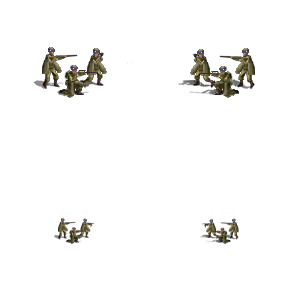
SLVK_Mnt.png (,-) (-,-) (,) (,) Mountain1 Mountain2 Mountain3 Leg_Mountain_1
Thanks.

Moderators: Slitherine Core, Panzer Corps Design, Panzer Corps Moderators
 I would also like to know how to do it.

 But your animation is only for a 2 rifle shots.
 I love you.the_iron_duke wrote:I think you'd need to create a new animation as the graphic you've made doesn't match the standard mountain gunfire animation templates.
If you look at a standard mountain infantry graphic, the two figures firing are both standing and on the left, as in your graphic (if the unit is facing to the right like your image above). However, your shooters are in different positions, with one of the shooters kneeling.
With the grid co-ordinates offset you can move around the animation. However, if you've got more than one source of gunfire, like an infantry unit, you can't move each point of gunfire independently, only the animation frames as a whole. So if you have more than one gunfire spot and their relative positions don't match up with a template then you'd have to create a new one.
It's not that hard with a graphics editing program. In both the standard mountain template and your graphic there are two rifles firing. So you could duplicate the standard mountain animation and have them as two graphic layers. Then erase one of the gunfire spots in each animation layer, for every frame. Then you have two independent gunfire animation layers, one for each shooter.
Then create a new layer and paste exactly one quarter of the standard 296 x 296 pixel unit graphic - the top left with your mountain infantry facing right (a square of 148 x 148 pixels). Paste it exactly in the top-left hand corner of the animation sheet. Then you can move around the two animation layers and match them up to the ends of the rifles. When they are in the right position, you can erase the mountain infantry graphic and then merge down the two animation layers into a single new animation graphic. Then give it a new custom name and then use the same animation name in the efx file. You might need to duplicate the mountain infantry attack sound files and give the copy the same name as your new custom animation.

