

Unexpected Crashes - Causes PC to shut down
Moderators: Slitherine Core, BA Moderators

Unexpected Crashes - Causes PC to shut down
Experiencing unusual crashes that causes the PC to shut down when it crashes as if someone just unplugged it. In additon, the France campaign is still not calculating the VP points correctly. In the 3rd scenario, it will stop around the 15th turn and indicate the bridge has fallen while no French units are even close. Using the 1.5.1 build. Any advice other than stop playing the game?
-
IainMcNeil
- Site Admin

- Posts: 13558
- Joined: Fri Apr 01, 2005 10:19 am
Can you post your specs. Obviously this doesnt happen for other people so its not a game specific issue but ssomethign related to your install or hardware. Maybe a reinstall woudlhelp but its unlikely because this sounds like something more serious. I'd run the usual checks on your hardware to test the RAM and HD for error.

Sudden PC shut downs can be cause by the CPU core overheating or power supply issues (i.e., voltage drops or spikes). CPU core overheating occurs most often during heavy load; for example, running the game. Power supply issues would be random and more independent of load. The first thing I would check would be to see if my CPU is overheating. If this is the case the shutdown is a safety feature to protect your CPU and motherboard. Some machines come with utilities that monitor both temperature and voltage. If not, you could check your manufacture site to see if they have one or could recommend one for you to use.
I've posted two screen caps of what my utility looks like. For this cap my CPU core temperature was 90F, which is lower than the high temperature for most summer days around here. But notice that there's a yellow and red zone. My red zone begins around 152F. Fortunately for me my CPU under constant load runs about 128F. But, my cooling failed and it were to get into the red zone then the computer would shut itself down as a safety feature.
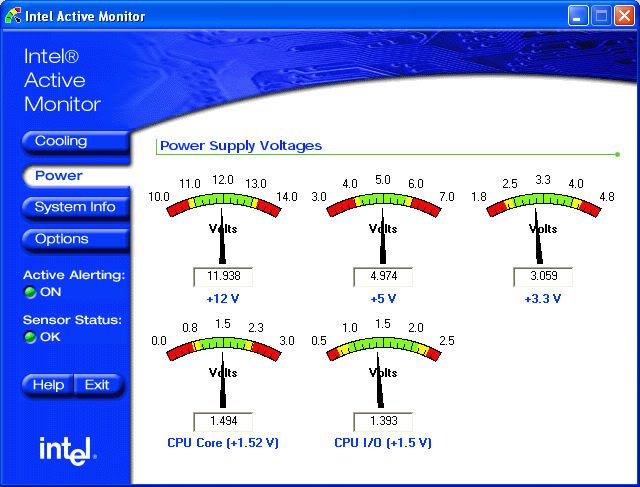
The second cap shows voltages. Notice that there's a range and below and above that are red zones. Again, if voltages drop too low or spike too large then the machine will shut itself down for safety reasons.
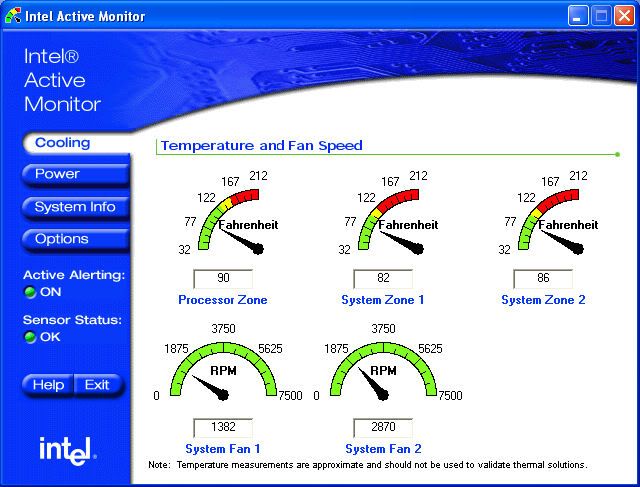
I've posted two screen caps of what my utility looks like. For this cap my CPU core temperature was 90F, which is lower than the high temperature for most summer days around here. But notice that there's a yellow and red zone. My red zone begins around 152F. Fortunately for me my CPU under constant load runs about 128F. But, my cooling failed and it were to get into the red zone then the computer would shut itself down as a safety feature.
The second cap shows voltages. Notice that there's a range and below and above that are red zones. Again, if voltages drop too low or spike too large then the machine will shut itself down for safety reasons.