

Im using an Asus STRIX ROG RTX 2080Ti on an ASUS PG453UQ 43 inch monitor at 4k refresh rate 120Hz
the game starts to launch but when I hit play it give me a tall narrow splash page and none of the button on the
bottom of the image responds.
I have enclosed the DxDiag that is requested.
Cannot get the game to respond
Moderator: Panzer Corps 2 Moderators
-
immagikman
- Lance Corporal - Panzer IA

- Posts: 11
- Joined: Wed Oct 19, 2011 7:35 pm
Cannot get the game to respond
- Attachments
-
 DxDiag.7z
- Requested DXDIAG
- (15.66 KiB) Downloaded 72 times

Re: Cannot get the game to respond
C:\Users\XXXXXXX\Documents\My Games\Panzer Corps 2
In this directory, there is a file labeled
options.json
open it with a text editor (Notepad ++ works best)
near the bottom of the file, there is a line that looks like
"windowed" : 0
what value do you see here?
If it's 0, try setting to 1. If already 1, try setting to 0.
Other potential solutions involve manually configuring
"resolution_x" : 0,
"resolution_y" : 0,
To your precise monitor resolutions.
These are temporary fixes for a rare problems a small amount of players have, and hopefully a future patch can correct this so it doesn't have to be done on an individual user basis.
In this directory, there is a file labeled
options.json
open it with a text editor (Notepad ++ works best)
near the bottom of the file, there is a line that looks like
"windowed" : 0
what value do you see here?
If it's 0, try setting to 1. If already 1, try setting to 0.
Other potential solutions involve manually configuring
"resolution_x" : 0,
"resolution_y" : 0,
To your precise monitor resolutions.
These are temporary fixes for a rare problems a small amount of players have, and hopefully a future patch can correct this so it doesn't have to be done on an individual user basis.
-
PoorOldSpike
- Sr. Colonel - Battleship

- Posts: 1661
- Joined: Sun Aug 08, 2010 6:06 pm
- Location: Plymouth, England
Re: Cannot get the game to respond
And check that your splashes look like mine below-
After clicking 'Play' on the top one, the bottom one comes up.
Which are the buttons that don't work for you?-
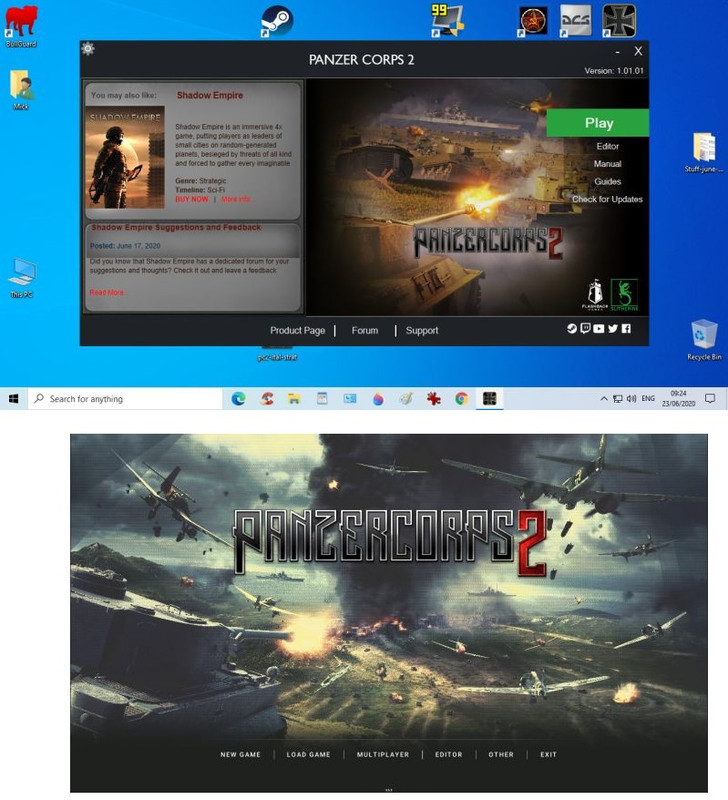
After clicking 'Play' on the top one, the bottom one comes up.
Which are the buttons that don't work for you?-
-
immagikman
- Lance Corporal - Panzer IA
- Posts: 11
- Joined: Wed Oct 19, 2011 7:35 pm
Re: Cannot get the game to respond
The JSON contents is only 32 lines and doesnt show anything like "windowed"
- Attachments
-
- contents.PNG (139.46 KiB) Viewed 1132 times
-
- Files.PNG (8.07 KiB) Viewed 1132 times
-
immagikman
- Lance Corporal - Panzer IA
- Posts: 11
- Joined: Wed Oct 19, 2011 7:35 pm
Re: Cannot get the game to respond
Deleted all files from Documents folder and Steam folder unistalled the game, re-installed
and I got the same json file and this splash screen
and I got the same json file and this splash screen
- Attachments
-
- contents.PNG (139.46 KiB) Viewed 1130 times
-
immagikman
- Lance Corporal - Panzer IA
- Posts: 11
- Joined: Wed Oct 19, 2011 7:35 pm
Re: Cannot get the game to respond
this is the splash I hope.
Nope the splash doesnt show up for some reason it is a png file as requested. Bottom commans are:
Product Page Forum Support
the right hand verticle buttons are
PLAY
Editor
Manual
Guides
when I click on PLAY it take me to another Splash (your second splash screen) but none of the click areas function
Deleted all files from Documents folder and Steam folder unistalled the game, re-installed
and I got the same json file and and when I clicked Play I got your second splash screen and nothing
responded to my clicks.
Resolution = 3840 x 2160
Nope the splash doesnt show up for some reason it is a png file as requested. Bottom commans are:
Product Page Forum Support
the right hand verticle buttons are
PLAY
Editor
Manual
Guides
when I click on PLAY it take me to another Splash (your second splash screen) but none of the click areas function
Deleted all files from Documents folder and Steam folder unistalled the game, re-installed
and I got the same json file and and when I clicked Play I got your second splash screen and nothing
responded to my clicks.
Resolution = 3840 x 2160
- Attachments
-
- DXDIAG 2.PNG (85.46 KiB) Viewed 1128 times
-
- DXDIAG info.PNG (53.39 KiB) Viewed 1128 times
Last edited by immagikman on Sun Jun 28, 2020 4:49 am, edited 1 time in total.
Re: Cannot get the game to respond
There is one more potential fix that could work:
In the directory where the options.json file exists.
There is a folder called 'Cache'
Try deleting the entire contents of that folder (which should be a folder called blank_nopz1map)
In the directory where the options.json file exists.
There is a folder called 'Cache'
Try deleting the entire contents of that folder (which should be a folder called blank_nopz1map)
-
immagikman
- Lance Corporal - Panzer IA
- Posts: 11
- Joined: Wed Oct 19, 2011 7:35 pm
Re: Cannot get the game to respond
Im sorry but almost nothing you have given me is laid out like you seem to think. I attached
two PNG files the one that shows the json file is in the My Games folder entry and the much larger
list of files is in my Stam - Steamapps - Game folder.
two PNG files the one that shows the json file is in the My Games folder entry and the much larger
list of files is in my Stam - Steamapps - Game folder.
- Attachments
-
- Capture.PNG (20.28 KiB) Viewed 1107 times
-
- Capture2.PNG (57.21 KiB) Viewed 1107 times
-
immagikman
- Lance Corporal - Panzer IA
- Posts: 11
- Joined: Wed Oct 19, 2011 7:35 pm
Re: Cannot get the game to respond
I had it working when I had a GTX 1080 Ti card and was running @ 3440 x 1440 resolution when I switched to a 4k set up with the RTX 2080 ti @ 2160p it stopped working. (New Monitor and new GFX card) If there is no way to set the resolution please have the coders make a patch to fix this.