Editor issues 4.1.4

Moderators: Order of Battle Moderators, The Artistocrats

Post Reply
Erik2
Order of Battle Moderator
Posts: 9633
Joined: Thu Jul 14, 2011 12:59 pm
Location: Norway

Editor issues 4.1.4

Post by Erik2 »

Map cropping

I have a 64x86 map and want to remove the bottom 36 hexes.
As far as I know the command #crop 64 50 0 -36 should work, but the game just hangs and I have to restart it.

If I use #crop 64 86 0 -36, the bottom map is cropped correctly (but 50 hexes are added to the top of the map).

So either I'm doing something wrong or a small bug cropped up :roll:
bebro
Slitherine
Slitherine
Posts: 4576
Joined: Sun Nov 19, 2006 12:50 pm

Re: Editor issues 4.1.4

Post by bebro »

I haven't tried this yet - but maybe try to crop in two steps removing less hexes in each? Maybe it gets confused when it has to remove big chunks in one go...other than that if it turns out to be a serious issue I'm afraid the more tech-savy guys have to help you on that...
bebro
Slitherine
Slitherine
Posts: 4576
Joined: Sun Nov 19, 2006 12:50 pm

Re: Editor issues 4.1.4

Post by bebro »

FWIW I had a simlar prob recently trying to crop a larger map. It did work in 2 steps then (each removing ca. 10 hexes in one direction only).

So this may serve as workaround for now...
terminator
Field Marshal - Gustav
Posts: 6115
Joined: Mon Aug 15, 2011 12:48 pm
Location: the land of freedom

Re: Editor issues 4.1.4

Post by terminator »

It looks like it is impossible to add one or several columns to the left and all the locations have disappeared.
bebro
Slitherine
Slitherine
Posts: 4576
Joined: Sun Nov 19, 2006 12:50 pm

Re: Editor issues 4.1.4

Post by bebro »

After you cropped go to the _crop folder (in your my games/scenario folder of OOB WWII).

In there you'll find the text_english.txt file for the map you cropped most recently. Copy this into the folder of the newly saved (cropped) map - it should have the names. Works fine for me.

Be aware that this txt gets overwritten if you crop again and again. So crop once, copy the txt over. Only then crop again (or another scn) if needed and copy the new txt again.

In general, keep a backup of the original scn before cropping.


Haven't checked yet to add one column, but never had a problem with adding more - might be a problem of finding the right offset.
terminator
Field Marshal - Gustav
Posts: 6115
Joined: Mon Aug 15, 2011 12:48 pm
Location: the land of freedom

Re: Editor issues 4.1.4

Post by terminator »

Here is an example :
The base map :
map0.jpg
map0.jpg (153.67 KiB) Viewed 2641 times
We want to add a column to the right :
map1.jpg
map1.jpg (105.2 KiB) Viewed 2641 times
:arrow: We want to add a column to the left (doesn't work :!: ) :
map2.jpg
map2.jpg (174.47 KiB) Viewed 2641 times
Last edited by terminator on Sat Sep 16, 2017 5:31 am, edited 3 times in total.
terminator
Field Marshal - Gustav
Posts: 6115
Joined: Mon Aug 15, 2011 12:48 pm
Location: the land of freedom

Re: Editor issues 4.1.4

Post by terminator »

We want to add a line at the top :
map3.jpg
map3.jpg (176.69 KiB) Viewed 2641 times
We want to add a line below :
map4.jpg
map4.jpg (177.16 KiB) Viewed 2641 times
terminator
Field Marshal - Gustav
Posts: 6115
Joined: Mon Aug 15, 2011 12:48 pm
Location: the land of freedom

Re: Editor issues 4.1.4

Post by terminator »

bebro wrote:In there you'll find the text_english.txt file for the map you cropped most recently. Copy this into the folder of the newly saved (cropped) map - it should have the names. Works fine for me.
Hi bebro,
I was a little bit sceptical on this matter. It seemed too simple and I have some basic notions in programming (the computing is one of my passions).
Each HexName have an indexation.

In my scenario Petsamo 1939, the town Svanvik has the indexation hex_35 :
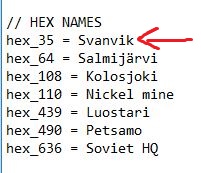
HexNames.JPG
HexNames.JPG (25.99 KiB) Viewed 2629 times
On the map, it looks like this :
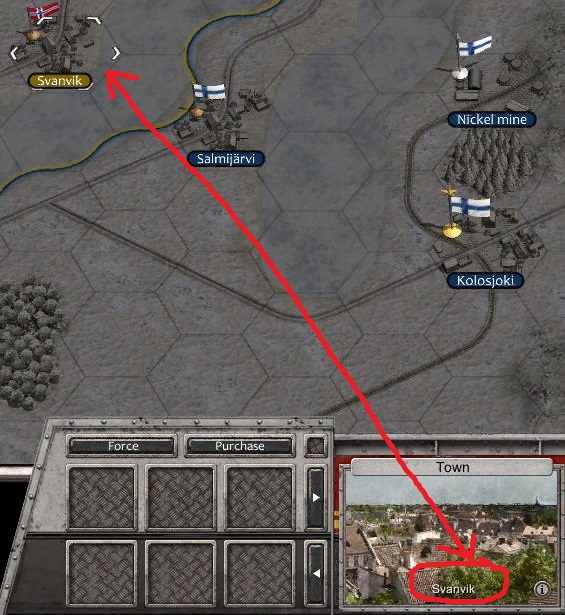
HexName(1).jpg
HexName(1).jpg (136.86 KiB) Viewed 2629 times
If you add a column to the right, it works fine.

But if you add a lign to the top or below , it changes the indexation of the map.
In this example, I add a lign below, it doesn't work, The name of the city is moved below :
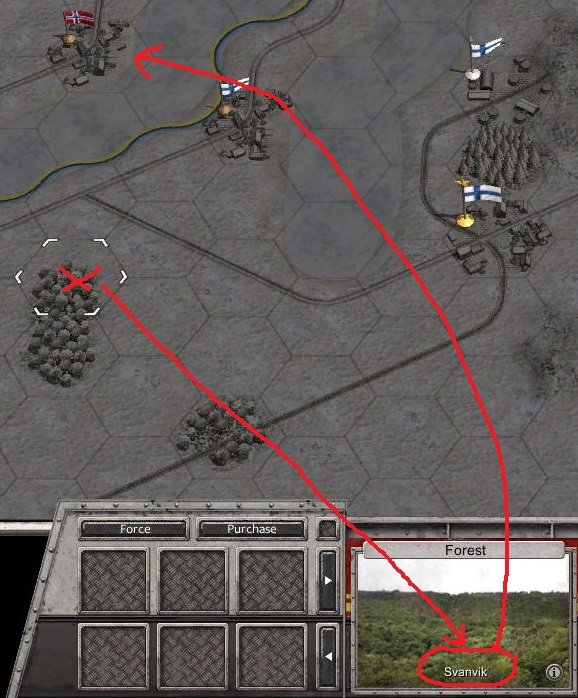
HexName(2).jpg
HexName(2).jpg (160.41 KiB) Viewed 2629 times
terminator
Field Marshal - Gustav
Posts: 6115
Joined: Mon Aug 15, 2011 12:48 pm
Location: the land of freedom

Re: Editor issues 4.1.4

Post by terminator »

How works the indexation ? (Maybe that it interests anybody?)

The indexation is made in the bottom at the top(1) and from left to right(2) from the hex at the very bottom and to the left :
Indexation.jpg
Indexation.jpg (89 KiB) Viewed 2622 times
bebro
Slitherine
Slitherine
Posts: 4576
Joined: Sun Nov 19, 2006 12:50 pm

Re: Editor issues 4.1.4

Post by bebro »

terminator wrote:
bebro wrote:In there you'll find the text_english.txt file for the map you cropped most recently. Copy this into the folder of the newly saved (cropped) map - it should have the names. Works fine for me.
Hi bebro,
I was a little bit sceptical on this matter. It seemed too simple and I have some basic notions in programming (the computing is one of my passions)
Then you kow more about programming than me :)

I can help you with design/editor-usage matters, but coding/tech related stuff Ad can answer much better :)
Post Reply

Return to “Order of Battle : World War II - Scenario Design”