
Want more details about your potential attack outcomes?

PC : Battle Academy is a turn based tactical WWII game with almost limitless modding opportnuities.

Moderators: Slitherine Core, BA Moderators

Post Reply
robc04_1
Senior Corporal - Ju 87G
Posts: 98
Joined: Mon May 16, 2011 2:26 pm
Contact:

Want more details about your potential attack outcomes?

Post by robc04_1 »

One thing that frustrates me (a lot) about this game is the lack of transparancy about how things are calculated. So I started looking into the scripts and decided to create a tooltip that has the details of the calculation and thought I would put up a screenshot as an example of what can be done. There are a couple reasons I may not continue beyond this.
1- It would be slightly time consuming to do for all areas of the game.
2- It would be a big hassle to merge them back in every time there is a patch.

I'm curious though. How many people would like tooltips like this?
Is there any chance they could be incorporated into the base game?

What do you think?

I have a more detailed writeup of attacking a soft target works at, for those who are interested: http://oneguytoomanygames.blogspot.com/ ... ltips.html
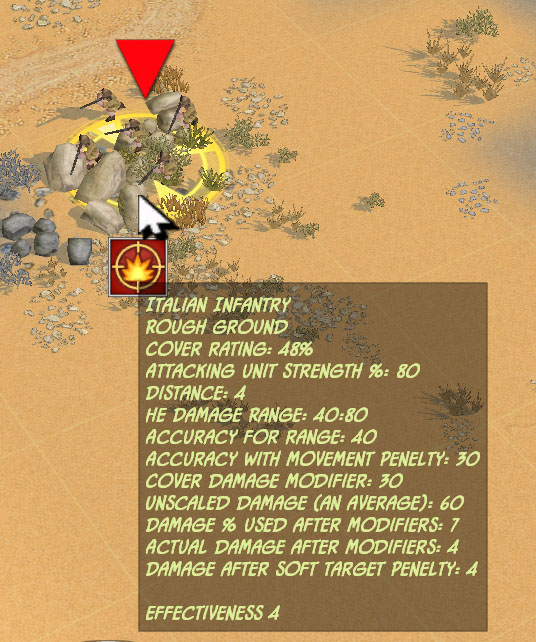

Image
Because I play too much,
One Guy, Too Many Games
robc04_1
Senior Corporal - Ju 87G
Posts: 98
Joined: Mon May 16, 2011 2:26 pm
Contact:

I added a tooltip

Post by robc04_1 »

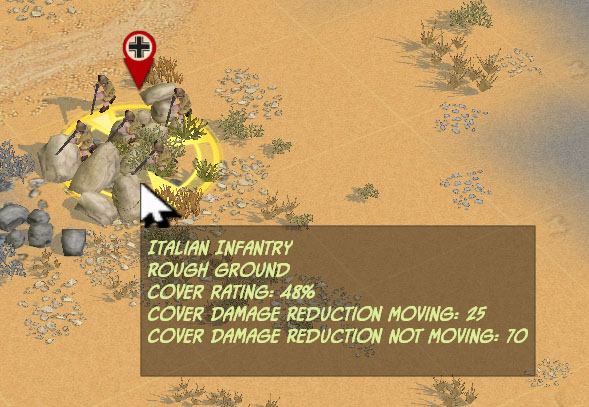
I added a tooltip to show the actual terrain cover values too. There are separate cover values depending if the occupying unit moved or not.

Image
Because I play too much,
One Guy, Too Many Games
pipfromslitherine
Site Admin
Site Admin
Posts: 9934
Joined: Wed Mar 23, 2005 10:35 pm

Post by pipfromslitherine »

Cool - having advanced tooltips would be pretty easy to do. The next update (well, probably not the next one, as that will probably be mainly for iPad compatibility) will have some additional interfacing to allow more options switches, and advanced tooltips could easily be one.

One thing to bear in mind is that altering the main game scripts will cause problems in multiplayer, so you will want to switch them back if you intend to go online.

Cheers

Pip
robc04_1
Senior Corporal - Ju 87G
Posts: 98
Joined: Mon May 16, 2011 2:26 pm
Contact:

Post by robc04_1 »

pipfromslitherine wrote:Cool - having advanced tooltips would be pretty easy to do. The next update (well, probably not the next one, as that will probably be mainly for iPad compatibility) will have some additional interfacing to allow more options switches, and advanced tooltips could easily be one.

One thing to bear in mind is that altering the main game scripts will cause problems in multiplayer, so you will want to switch them back if you intend to go online.

Cheers

Pip
An advanced tooltip switch would be a great addition to the game.
Because I play too much,
One Guy, Too Many Games
Merr
Captain - Heavy Cruiser
Posts: 903
Joined: Mon Aug 16, 2010 2:00 pm

Post by Merr »

Hey Rob,

You might be able to make your own Advanced Tooltip without overriding the current tooltip. I haven't tried it yet but you might be interested in the concept.

Ok ... You know how to change the tooltip. Now, instead of replacing the code, add your code to that function and make a condition that calls your code when a certain key is pressed.

In the Battle/Scripts folder, you'll see a BSF called "Keys". You can create a new function, e.g. "function KEYBOARD_RobcTips".

By itself, adding key commands with a certain action brings wonders to "advanced" features.

- Merr
robc04_1
Senior Corporal - Ju 87G
Posts: 98
Joined: Mon May 16, 2011 2:26 pm
Contact:

Post by robc04_1 »

Merr wrote:Hey Rob,

You might be able to make your own Advanced Tooltip without overriding the current tooltip. I haven't tried it yet but you might be interested in the concept.

Ok ... You know how to change the tooltip. Now, instead of replacing the code, add your code to that function and make a condition that calls your code when a certain key is pressed.

In the Battle/Scripts folder, you'll see a BSF called "Keys". You can create a new function, e.g. "function KEYBOARD_RobcTips".

By itself, adding key commands with a certain action brings wonders to "advanced" features.

- Merr
Ahh, I see. This may be a nice way to do it. I had stuck my unit details tooltip code in FUNCTION HELPER_TILE_TOOLTIP. But I think your way may be better. Thanks.

Edit: This only works when a unit is selected, so it wouldn't work for my unit info tooltip because I want to show the tooltip when you hover over any unit.
Because I play too much,
One Guy, Too Many Games
Post Reply

Return to “Battle Academy”