RC3 Menu/Infoscreen

Open beta forum.

Moderators: Slitherine Core, The Lordz, Panzer Corps Moderators, Panzer Corps Design

Post Reply
Panzer3L
Corporal - Strongpoint
Posts: 54
Joined: Sun Feb 06, 2011 4:32 pm

RC3 Menu/Infoscreen

Post by Panzer3L »

Alot of things have improved since during the last view weeks and this game has great potential.

However two problems which i and some others already mentioned still remain,in fact haven't improved
at all since vers 0.94.

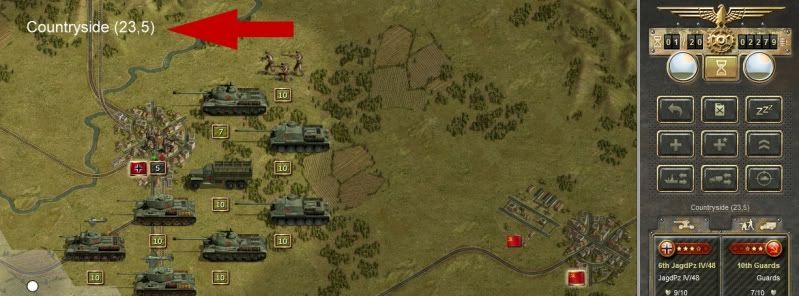
1. The Font size.

Its still too small.
Not just in the game menu but also in the scenario description and the weather info at the beginning of a scenario,basicly everywhere u use that
small font for text.
Ok i admit in some places in don't even bother to try and read them because it contains info i already know but in some cases i want to get the info clearly and kinda "in your face".

The hex info text for example is very important imo.
So i strongly recommend to either increase the entire ingame fontsize to at least 150%,or give us the possibility to "switch on" a larger version of this text in the middle of the screen.
This is not a matter of taste or style its a matter of functionality for me.

Image


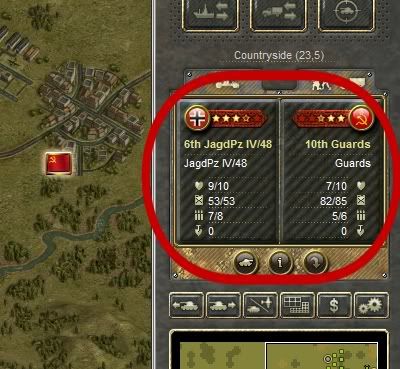
2.The Unit info menu

Image


Not only that the icons and fonts are too small to be much of use,it also shows "unimportant" infos while missing important info.

It shows the units strenght--completly unecessary since one can see the strenght better below each unit in the game.
Amo and Fuel--since there's the excellent low amo/fuel icon next to the strenght indicator of a unit,this is unecessery info while playing.
The entrechment info is usefull but as a said too small.

Hard attack,soft attack,ground defens,range and movement would be much more needed infos (i know atm theres just room for 3 values to acompany entrenchment so take your pick).

Atm one is forced to toggle the stats panel all the time or right cklicking the enemy unit.

It realy hurts at 1920x1200 when u see all the free/empty space below the minimap while the info is cramped and small at the top and one even has to scrifice a small portion of the main map view to get some quick infos.

I understand that u can't optimize the game for HD screens only,but all i ask i for is the possibility to customize things for the players screen and taste.
I for one would be happy to trade that useless(sorry) minimap for a permanent stats panel with bigger fonts and icons.


OK beside these points i'm very glad how things have improved during the beta.
I was a bit sceptic at first but now i see realy great potential in PzC especially because its so modder friendly.
Great Job!

2cents
skarczew
Administrative Corporal - SdKfz 232 8Rad
Posts: 164
Joined: Sat Jan 15, 2011 5:15 pm

Re: RC3 Menu/Infoscreen

Post by skarczew »

Panzer3L wrote: 2.The Unit info menu

Image
Not only that the icons and fonts are too small to be much of use,it also shows "unimportant" infos while missing important info.

It shows the units strenght--completly unecessary since one can see the strenght better below each unit in the game.
Amo and Fuel--since there's the excellent low amo/fuel icon next to the strenght indicator of a unit,this is unecessery info while playing.

The entrechment info is usefull but as a said too small.

Hard attack,soft attack,ground defens,range and movement would be much more needed infos (i know atm theres just room for 3 values to acompany entrenchment so take your pick).

Atm one is forced to toggle the stats panel all the time or right cklicking the enemy unit.

It realy hurts at 1920x1200 when u see all the free/empty space below the minimap while the info is cramped and small at the top and one even has to scrifice a small portion of the main map view to get some quick infos.

I understand that u can't optimize the game for HD screens only,but all i ask i for is the possibility to customize things for the players screen and taste.
I for one would be happy to trade that useless(sorry) minimap for a permanent stats panel with bigger fonts and icons.
I get the same feelings while playing ...
The only things that I find useful in current unit info are the Entrenchment and Suppression.
Rudankort
FlashBack Games
FlashBack Games
Posts: 3836
Joined: Sat Aug 21, 2010 2:23 pm
Contact:

Post by Rudankort »

Hi Andy! Thx for your message, and I do agree with you. I have good news and bad news. The bad news is, the situation is unlikely to change before release which is fast approaching now. Smallish text and big unused areas on hi-rez monitors are complex problems, and fixing them will require a lot of work and rethinking on our part. We are committed to improve hi-rez support in the future, but it will have to wait. This is exactly the reason why resolution switch was added as a temporary measure until we can provide something better.

Now the good news: game's UI is already completely moddable. You can remove the minimap, place stats instead of it, replace strength/fuel/ammo lines with attack/defense ratings, replace round weather icons with square ones etc. It is all in UI/main.htm file in HTML format, and so can be edited in any text editor, including Notepad.

If you have any specific questions how to do this, feel free to ask.
Panzer3L
Corporal - Strongpoint
Posts: 54
Joined: Sun Feb 06, 2011 4:32 pm

Post by Panzer3L »

Rudankort wrote: Now the good news: game's UI is already completely moddable. You can remove the minimap, place stats instead of it, replace strength/fuel/ammo lines with attack/defense ratings, replace round weather icons with square ones etc. It is all in UI/main.htm file in HTML format, and so can be edited in any text editor, including Notepad.

If you have any specific questions how to do this, feel free to ask.
Hi Alex

Yes i've already tried to mod it with two different HTML editors but it didn't work out so well and my HTML knowledege is close to zero.
However i know people who can help me with this i just hoped if the game is already good at this aspect i won't have to go into the HTML stuff
too much since i've got plenty of work ahead of me already with terrain mod,mapmaking,scenarios etc.
Ok i deal with that later.

Btw is there a HTML u can recommend?

Thanx

See ya
Rudankort
FlashBack Games
FlashBack Games
Posts: 3836
Joined: Sat Aug 21, 2010 2:23 pm
Contact:

Post by Rudankort »

Panzer3L wrote: Btw is there a HTML u can recommend?
I guess you are asking about an HTML editor? Well, I use Notepad myself. :oops: All UI you see in the game was done this way. One of the reasons is that the UI library I use (HTMLayout) supports some extensions to HTML language, and so you won't see some PzC screens properly if you load them into a standard editor. However, all pages should display correctly in browse.exe available from the developer of HTMLayout (see Demo Applications at http://www.terrainformatica.com/htmlayout/main.whtm). I often use this program to quickly check my files while working on them.

Here is documentation on limitations and extensions of HTMLayout, compared to the "big" HTML standard:
http://www.terrainformatica.com/htmlayout/cssmap.whtm
Panzer3L
Corporal - Strongpoint
Posts: 54
Joined: Sun Feb 06, 2011 4:32 pm

Post by Panzer3L »

Yes i meant html editor.

Not beeing able to see the main menu properly in the html editors i ve tried was the problem.

Thanx for the infos,i will look into this asap.

See ya
andy
Post Reply

Return to “Panzer Corps Open Beta”