

Paratroop purchase screen flickers
Moderators: firepowerjohan, Happycat, rkr1958, Slitherine Core
-
Blathergut
- Field Marshal - Elefant
- Posts: 5882
- Joined: Tue Jan 22, 2008 1:44 am
- Location: Southern Ontario, Canada
Paratroop purchase screen flickers
Have noticed just since the last update, when the paratroop screen pops up to purchase one, it flickers quite noticably. Anyone else see this? You can still click the options and such, but seems to flicker to the screen behind.

Re: Paratroop purchase screen flickers
Yes, I have this problem too. For me it was really frustrating because no one else on the dev team had this issue. My computer is long in the tooth. I personally built it back in 2003 and it does what I need it to do so I see no need to replace it.Blathergut wrote:Have noticed just since the last update, when the paratroop screen pops up to purchase one, it flickers quite noticably. Anyone else see this? You can still click the options and such, but seems to flicker to the screen behind.
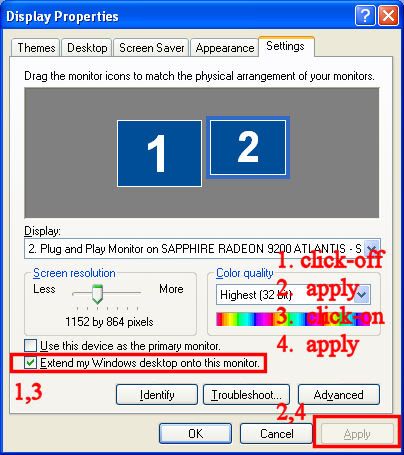
Anyway, quite by accident I found a workaround that works for me. The nature of the workaround points to some compatibility issue between my video card/video drivers and GS. I suggest you try something "similar". Unless you're running dual monitors you will NOT be able to try exactly what I do that works for me. But; you should be able to experiment and see if you find something that works. As strange as it is here's what works for me. If fact, the flickering before I do this is so bad that I can't even see the yes/no dialog box to click on it. Afterwards no flickering.
I start up the game, select my desktop (e.g., alt-tab), I right click anywhere on my desktop and select properties. Note the screen cap below shows both desktops for both of my monitors. I then select video properties, got to settings, select my second monitor, click off and apply. The video to my second monitor goes black and it goes dark. I then reselect my second monitor, click it on and apply. My second monitor comes back. I then play GS without any flickering.
Every time I close and restart the game (NOT load a turn) I do this. Why this works ... I do not know ... but it works. I tell you this so you might try something similar with changing a video setting and then changing it back WHILE GS is running. Strange I know and I came across this quite by accident.

-
Blathergut
- Field Marshal - Elefant
- Posts: 5882
- Joined: Tue Jan 22, 2008 1:44 am
- Location: Southern Ontario, Canada