

Hi folks
This is perplexing and very intermittant but I would like to stop it happening.
The vast majority of the time I have no problem with FoG but every once in a while I get a display flicker usually on/off on/off and then either the programme freezes and cursor disappears or display blacks out with no response to any of the usual keystrokes.
Sometimes crash is accompanied by an error message in dialog box - 'nvidia openglide too many errors application must close'. Never been able to screen grab this as crash and need to reboot follows.
Occasionally FoG has remained active but the mouse cursor disappears and I have to use keystrokes to close the application by switching to windows and tabbing to the task bar menu.
I know this is likely to be a problem with my setup or with the display hardware but am hoping that you might have come across the problem elsewhere and know the best fix.
What I have tried;-
Updating display drivers.
Nvidia knowledge base.
Disabling any background applications including my antivirus software.
Non of these have given me a permanent solution and every once in a very long while the crash occurs and after one, occasionally two reboots, I have another period of days or weeks of crash free gaming.
System is Pentium 4 2.8GHz with 2Gb RAM and a GeForce 6200 display driver still running windows XP.
Intermittant Crash
Moderators: Slitherine Core, FoG PC Moderator, NewRoSoft

some thing looking the same happens to me too.
it is not crashing, but as I am constantly alt-tabbing (btw, run in windowed mode option?), sometime the FoG application remains hanging out with the screen completely turned black and with the system not responding to any keyboard command (CTRL+ALT+DEL; CTRL+ESC; ALT+TAB and so on) for 5-10 seconds, after which FoG finally alt-tabs and everything's back to normal. this behavior I've never encountered in any other application/game/normal use of my current operating system
this is weird as a lock of the operating system like this shouldn't happen on Windows 7 64 bits system.
the computer is an Acer Aspire 5740G laptop, Intel Core i3 330M (2.13 GHz, 1066 MHz FSB), 4 Gb RAM, ATI Mobility Radeon HD 5470 with 500 VRAM, ATI Catalyst 10.7 64 bits video driver.
it is not crashing, but as I am constantly alt-tabbing (btw, run in windowed mode option?), sometime the FoG application remains hanging out with the screen completely turned black and with the system not responding to any keyboard command (CTRL+ALT+DEL; CTRL+ESC; ALT+TAB and so on) for 5-10 seconds, after which FoG finally alt-tabs and everything's back to normal. this behavior I've never encountered in any other application/game/normal use of my current operating system
this is weird as a lock of the operating system like this shouldn't happen on Windows 7 64 bits system.
the computer is an Acer Aspire 5740G laptop, Intel Core i3 330M (2.13 GHz, 1066 MHz FSB), 4 Gb RAM, ATI Mobility Radeon HD 5470 with 500 VRAM, ATI Catalyst 10.7 64 bits video driver.
Triarus,
Since you've updated your graphics driver already, maybe it would be worth checking if you graphics card is overheating. One utility that can do this is GPU-Z, which you can download here:
http://download.cnet.com/GPU-Z/3000-209 ... 88513.html
cothyso,
There isn't a preference for running in a window, but if you want, you can press ` (the key to the left of 1 on most keyboards), then type full-screen 0 then press enter. The game should then run in a window. The disadvantage of this is you can't scroll around the map by nudging the edge of the screen with the mouse cursor; you have to use the minimap instead. Performance might by slightly reduced by running in a window.
We have noticed a black screen and a short delay when alt-tabbing with newer ATI cards. Can you alt-tab instantly, and with no black screen, from other games that are full-screen and use hardware graphics acceleration? Also, does it ever crash completely, or does it always come back after a delay?
Since you've updated your graphics driver already, maybe it would be worth checking if you graphics card is overheating. One utility that can do this is GPU-Z, which you can download here:
http://download.cnet.com/GPU-Z/3000-209 ... 88513.html
cothyso,
There isn't a preference for running in a window, but if you want, you can press ` (the key to the left of 1 on most keyboards), then type full-screen 0 then press enter. The game should then run in a window. The disadvantage of this is you can't scroll around the map by nudging the edge of the screen with the mouse cursor; you have to use the minimap instead. Performance might by slightly reduced by running in a window.
We have noticed a black screen and a short delay when alt-tabbing with newer ATI cards. Can you alt-tab instantly, and with no black screen, from other games that are full-screen and use hardware graphics acceleration? Also, does it ever crash completely, or does it always come back after a delay?
Yes, the alt tab works fine on other games using hardware acceleration (Starcraft 2, Mafia 2, Heroes of Newerth and Hegemony are the latest hardware accelerated games I am running on my laptop, and they all are alt tabbing all right).
Also, it works fine on FoG most of the times too. The black screen lock happens only now and then, and the game never crashes. It just stays 10-15 secs in the black screen, with no Windows key combination working (CTRL+ALT+DEL to bring up the Windows Options menu, CTRL+ESC, windows +D and so on), then switches to the desktop, with the FoG game running fine and minimized on the taskbar.
Also, it works fine on FoG most of the times too. The black screen lock happens only now and then, and the game never crashes. It just stays 10-15 secs in the black screen, with no Windows key combination working (CTRL+ALT+DEL to bring up the Windows Options menu, CTRL+ESC, windows +D and so on), then switches to the desktop, with the FoG game running fine and minimized on the taskbar.
EricEricS wrote:Triarus,
Since you've updated your graphics driver already, maybe it would be worth checking if you graphics card is overheating. One utility that can do this is GPU-Z, which you can download here:
http://download.cnet.com/GPU-Z/3000-209 ... 88513.html
cothyso,
There isn't a preference for running in a window, but if you want, you can press ` (the key to the left of 1 on most keyboards), then type full-screen 0 then press enter. The game should then run in a window. The disadvantage of this is you can't scroll around the map by nudging the edge of the screen with the mouse cursor; you have to use the minimap instead. Performance might by slightly reduced by running in a window.
We have noticed a black screen and a short delay when alt-tabbing with newer ATI cards. Can you alt-tab instantly, and with no black screen, from other games that are full-screen and use hardware graphics acceleration? Also, does it ever crash completely, or does it always come back after a delay?
Thanks for this and I will try.
However I had thought of this but ruled it out for two reasons
1) the crash happens shortly after start-up and in first few moves. When I reboot the system will then run and run (sometimes for a few hours of gaming as FoG is so addictive
 )
)2) I have had no such problem with any other operations at all.
Hi Eric
Downloaded and run - a rinkydinky little utility thankyou - The card is currently running at 63 to 66 centigrade over a 10 minute period.
I ran this with FoG open and minimised.
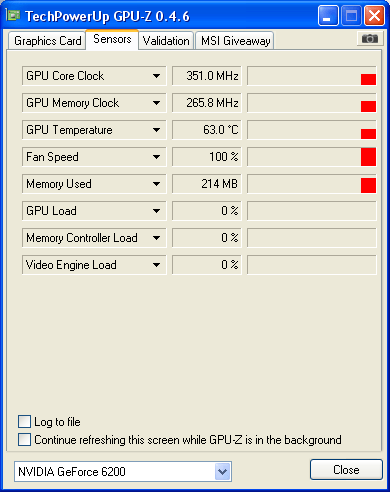
I will try running it immediately after any future hang/crash but it does seem unlikely to be the cause.
Regards
Mike
Downloaded and run - a rinkydinky little utility thankyou - The card is currently running at 63 to 66 centigrade over a 10 minute period.
I ran this with FoG open and minimised.
I will try running it immediately after any future hang/crash but it does seem unlikely to be the cause.
Regards
Mike