BETA randomised maps PLUGIN

Modders can post their questions on scripting and more.

Moderators: Slitherine Core, BA Moderators

Merr
Captain - Heavy Cruiser
Posts: 903
Joined: Mon Aug 16, 2010 2:00 pm

Post by Merr »

Amaris,

Well done ... speed is now 2-7 seconds, depending on map size :) .

Ah ... since you changed map size (width/height) code .... There is still a bug. :cry:

Bug .... When you generate subsequent map (requiring old map to be removed), it won't remove tiles at maximum X/Y.
This is most noticable with bulge/desert tileset ... outer edge of maximum X/Y not removed.

Also, I think it creates ***WARNING*** in my error log because of this ??... see below ...

Code: Select all

CPU String: GenuineIntel
Stepping ID = 5
Model = 14
Family = 6
Extended model = 1
CLFLUSH cache line size = 64
APIC Physical ID = 6
CPU Brand String: Intel(R) Core(TM) i7 CPU         860  @ 2.80GHz
Cache Size = 256K
UNKNOWN TAGS IN: Config/system.txt
Unknown Tag: MOVIEMODE
Unknown Tag: DYNAMICENV
Unknown Tag: LAYOUTKILLSENEMYX,
END: Config/system.txt
Found DirectX Version Number: 4.09.00.0904
Creating Device.....
MonkeyInitStart
MIS: Found DD
MIS: IsHW
MIS: SetCoop
MIS: Setting Disp Mode
MIS: Done Init 3D Device
MIS: Tex Enum
MIS: SDRS
MIS: Init Decal Render
INITIAL LOAD 12667
Playing as: 0
SIDE 0
Still refed: C:\Program Files\Slitherine\Battlefield Academy\Battlefield Academy\DATA\UI\UnitInfoPopup.BSF
Playing as: 0
SIDE 0
**WARNING**: GetTileData Invalid tile: 96, 44
**WARNING**: GetTileData Invalid tile: 96, 65
**WARNING**: GetTileData Invalid tile: 96, 36
**WARNING**: GetTileData Invalid tile: 96, 51
**WARNING**: GetTileData Invalid tile: 96, 53
**WARNING**: GetTileData Invalid tile: 96, 51
**WARNING**: GetTileData Invalid tile: 96, 38
**WARNING**: GetTileData Invalid tile: 96, 58
**WARNING**: GetTileData Invalid tile: 96, 28
**WARNING**: GetTileData Invalid tile: 96, 62
**WARNING**: GetTileData Invalid tile: 96, 28
**WARNING**: GetTileData Invalid tile: 96, 24
**WARNING**: GetTileData Invalid tile: 96, 54
**WARNING**: GetTileData Invalid tile: 96, 56
**WARNING**: GetTileData Invalid tile: 96, 65
**WARNING**: GetTileData Invalid tile: 96, 64
**WARNING**: GetTileData Invalid tile: 96, 22
**WARNING**: GetTileData Invalid tile: 96, 45
**WARNING**: PlaceTile Tile off map: 65, 32
**WARNING**: SetTileData Invalid tile: 65, 32
**WARNING**: PlaceTile Tile off map: 65, 33
**WARNING**: SetTileData Invalid tile: 65, 33
**WARNING**: PlaceTile Tile off map: 65, 34
**WARNING**: SetTileData Invalid tile: 65, 34
**WARNING**: PlaceTile Tile off map: 65, 31
**WARNING**: SetTileData Invalid tile: 65, 31
**WARNING**: PlaceTile Tile off map: 65, 30
**WARNING**: SetTileData Invalid tile: 65, 30
**WARNING**: PlaceTile Tile off map: 65, 29
**WARNING**: SetTileData Invalid tile: 65, 29
**WARNING**: PlaceTile Tile off map: 65, 29
**WARNING**: SetTileData Invalid tile: 65, 29
**WARNING**: PlaceTile Tile off map: 65, 30
**WARNING**: SetTileData Invalid tile: 65, 30
**WARNING**: PlaceTile Tile off map: 65, 31
**WARNING**: SetTileData Invalid tile: 65, 31
Still refed: C:\Program Files\Slitherine\Battlefield Academy\Battlefield Academy\DATA\UI\UnitInfoPopup.BSF
Still elements in Fonts
KERNEL MEMORY CHECKING IS **OFF**
Merr
Captain - Heavy Cruiser
Posts: 903
Joined: Mon Aug 16, 2010 2:00 pm

Post by Merr »

Amaris,

Correction ...... ***WARNING*** will only occur when you build map after a map size change.
Warning message unrelated to last X/Y not being removed or tiles added.

So yes ... No more warning message unless you change map size, then build.
Amaris
Captain - Heavy Cruiser
Posts: 929
Joined: Fri Jul 23, 2010 11:08 am
Location: France
Contact:

Post by Amaris »

Ok I'll check that. Thanks again
Merr
Captain - Heavy Cruiser
Posts: 903
Joined: Mon Aug 16, 2010 2:00 pm

Post by Merr »

Amaris,

Fortification still bugged ....

It is centered, yes :) .... but tile no longer reads terrain type FORTIFICATION :cry:
Amaris
Captain - Heavy Cruiser
Posts: 929
Joined: Fri Jul 23, 2010 11:08 am
Location: France
Contact:

Post by Amaris »

Oh dam :o

I hate debugging :twisted:

Well today I'm working on something else but as I advanced quickly :P I will also work on the plugin.
Merr
Captain - Heavy Cruiser
Posts: 903
Joined: Mon Aug 16, 2010 2:00 pm

Post by Merr »

Amaris wrote:Oh dam :o

I hate debugging :twisted:

Well today I'm working on something else but as I advanced quickly :P I will also work on the plugin.

IMO .... Forget about fancy objects (forts, rubble, etc). :)

As long as you have the basic map elements (road, building, tree, etc) ... I think that is enough to jump start a map for PLUGIN. Let the player add fancy objects.

Of course, for your random map scenario .... yes, fancy objects mandatory :) , PLUGIN not mandatory.
Amaris
Captain - Heavy Cruiser
Posts: 929
Joined: Fri Jul 23, 2010 11:08 am
Location: France
Contact:

Post by Amaris »

I found the problem with last X/Y tiles.

I even removed some **WARNING**: GetTileData Invalid tile and **WARNING**: SetTileData Invalid tile.
It is possible that remains. But I think they are very few.

More than a bug with the fortifications, there is a general bug with objects / resize map. :shock:

When changing the size of the map in the editor a new empty map will appear.
And if the map is generated with the plugin, all objects are shaded. And the fortifications, but also the buildings, do not change the type of terrain (open ground tiles.)

Against by using the Tip of Merr:
To prevent error ...
1. After resetting map size, save the BAM.
2. exit editor.
3. start editor.
4. load saved BAM.
5. use plugin.

Like that, there is no problem with objects !

I do not know why this happens :roll:
pipfromslitherine
Site Admin
Site Admin
Posts: 9928
Joined: Wed Mar 23, 2005 10:35 pm

Post by pipfromslitherine »

So you're saying that the terrain types don't update when you resize a map?

Cheers

Pip
Merr
Captain - Heavy Cruiser
Posts: 903
Joined: Mon Aug 16, 2010 2:00 pm

Post by Merr »

pipfromslitherine wrote:So you're saying that the terrain types don't update when you resize a map?

Cheers

Pip
Yes .... After resizing the map, the objects that have "cover flag values of 1", (e.g. buildings, fortifications, etc) shade to grey. This includes new objects placed on the map after a resize (the problem that Amaris and myself see with plugin).

I tested this and the only way to get the terrain type (on cursor tooltip) to display correctly was to place a unit within LOS (6-tiles) of the object, however, it remained the "out-of-los" grey shade (if using tank unit) but the terrain type updated to read correctly. Furthermore, the effect marker ( :?: ) also appears above the object in question.

You can duplicate this easily with any BAM loaded, or with a "new scenario" bam. Running the PLUGIN isn't necessary.

The good news is that if you save the BAM, then reload it, the tile's will display properly. So, at least it's correctly writing it to the bam despite otherwise.

EDIT : If using a tank unit type, the object will stay grey (obviously, since tank has no coverlos)
Last edited by Merr on Thu Aug 04, 2011 2:10 am, edited 2 times in total.
Merr
Captain - Heavy Cruiser
Posts: 903
Joined: Mon Aug 16, 2010 2:00 pm

Post by Merr »

Amaris,

I found the bug .... It's an LOS bug after a map resize ... So, I created a new function and ran it when you create a new map.

How to add ;

Add this new function ... (call it whatever you want :wink: ) ... ClearLOSmerr() ...

Code: Select all

	//button create
	if( IsUIObject(id, "AMA_RM_GO") == 1 )
	{
		ClearMap();
		Ama_MapRandom() ;
		ClearLOSmerr() ;
	}
This is the new function ;

Code: Select all

FUNCTION ClearLOSmerr()
{
	int x ;
	int y ;

	for(x=0; x<=GetMapWidth(); x++)
	{
		for(y=0; y<=GetMapHeight(); y++)
		{
			SetTileLOS(x, y, 0, 1) ; 			
		}
	}
}
It works for me ... no more "open ground" when fort or building on tile after map resize 8) .
Merr
Captain - Heavy Cruiser
Posts: 903
Joined: Mon Aug 16, 2010 2:00 pm

Post by Merr »

Pip and Amaris,

I know that "clearing the LOS" everytime is overkill, but at least we know what's wrong.

Perhaps Pip can fix this by clearing the LOS automatically after a map resize occurs?

EDIT: ... Amaris? ... Perhaps the name of the new function should read ... ClearMapLOS() ... that is a more appropriate name :wink:
pipfromslitherine
Site Admin
Site Admin
Posts: 9928
Joined: Wed Mar 23, 2005 10:35 pm

Post by pipfromslitherine »

I believe the H key toggles the LOS for the whole map when in the editor mode - that might do the trick also? I will check it out - it's certainly possible that the LOS doesn't get recalced as it should on a resize. But it you have a workaround for now, that is good :).

Cheers

Pip
Merr
Captain - Heavy Cruiser
Posts: 903
Joined: Mon Aug 16, 2010 2:00 pm

Post by Merr »

pipfromslitherine wrote:I believe the H key toggles the LOS for the whole map when in the editor mode - that might do the trick also? I will check it out - it's certainly possible that the LOS doesn't get recalced as it should on a resize. But it you have a workaround for now, that is good :).

Cheers

Pip
Pip,

I just tried the H key (using original Amaris Plugin script) .... no luck ... Objects are still grey :cry:

So, for now, it appears you have to force a SetTileLOS to clear the LOS for objects after a resize, however, my script will only clear the LOS on the playing area.

In either case, the good news is that it saves to the BAM correctly ... So, it's just a visual glitch :D
Amaris
Captain - Heavy Cruiser
Posts: 929
Joined: Fri Jul 23, 2010 11:08 am
Location: France
Contact:

Post by Amaris »

I made a little break :wink:

So, it's just a visual glitch, this is good news !
And I have Merr's solution :P It's really great.
I think integrating function ClearLOSmerr :wink: It solves the problem and it's cheap I guess.
Once again thank you Merr!

I will test this. Add variety to the objects (for example by using all the houses instead of just four models.)
I expect a new version tomorrow at the latest.
Amaris
Captain - Heavy Cruiser
Posts: 929
Joined: Fri Jul 23, 2010 11:08 am
Location: France
Contact:

Post by Amaris »

Version 3:
- Again bugs fix.
- Greater diversity for the objects.

Download: https://sites.google.com/site/bbcbaamar ... dom-plugin


No warning in the log. Or a few. :wink: Anyway it is warning, nothing bad in itself (if there is not much.)

With ClearLOSmerr function :P, no problem when changing the size.
Merr
Captain - Heavy Cruiser
Posts: 903
Joined: Mon Aug 16, 2010 2:00 pm

Post by Merr »

Amaris,

Thank you for update! Variety is better :wink: .

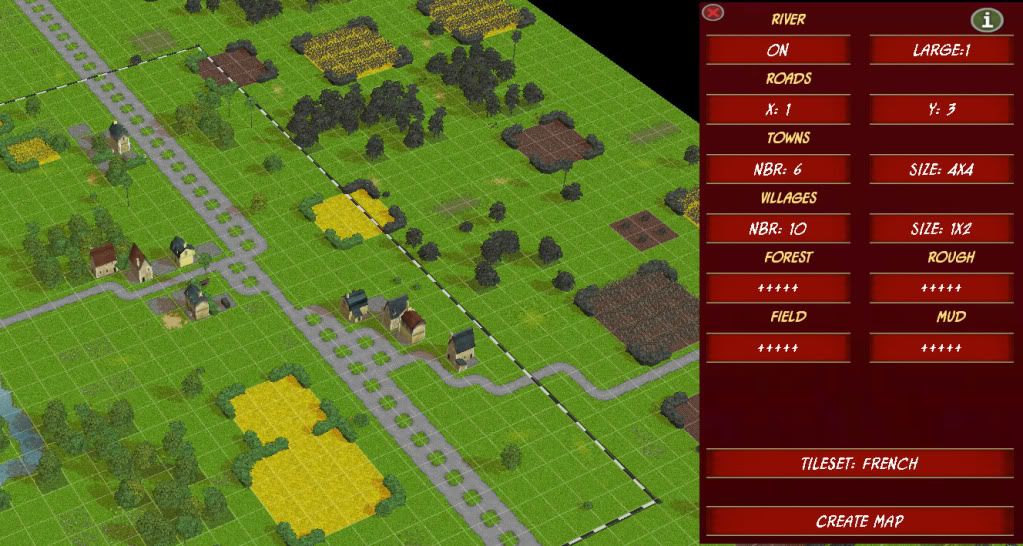
Comment (see screenshot) ... If road X (and/or) road Y is >= 3, then roads begin to run parallel too much than previous version of plugin, see below.
It's not too annoying but if you use logic for random map script, it may get too ugly? :cry:

However, your roads are still better than my random Box-of-Chocolates moose tracks :wink:

Oh ... Can you add a CHURCH ? Perhaps for every 3 Towns (or 5 Villages) = 1 Church building?

Image
Amaris
Captain - Heavy Cruiser
Posts: 929
Joined: Fri Jul 23, 2010 11:08 am
Location: France
Contact:

Post by Amaris »

I had already thought of the church :wink: A large one for town and small one for villages.

Each road is actually more right than before. Specially the y-axis roads. I simplified the generation of roads when I was looking bugs. I wanted to see if there was any gain in execution time.

Now bugs are an old story, and there is no worry on the generation time. So I can see how to improve roads :P
It will be the last big work I think. I would also use the different types of roads (road, street, tracks.)
Amaris
Captain - Heavy Cruiser
Posts: 929
Joined: Fri Jul 23, 2010 11:08 am
Location: France
Contact:

Post by Amaris »

Version 4:
- Add church into town / village.
- Better generation of roads.

Download: https://sites.google.com/site/bbcbaamar ... dom-plugin

Well roads are a little better.They are still both too right, especially with a river (there is less space to put the road.)
I'm afraid I can't do much better.
So I forget to use the different types of roads... It should rewrite the whole generation of roads for this, and I don't really have time for that :roll:
I think I'll stop here for roads :wink: if it seems correctly now.
Merr
Captain - Heavy Cruiser
Posts: 903
Joined: Mon Aug 16, 2010 2:00 pm

Post by Merr »

Amaris,

In version 4 , the new churches look great! ...
... But, 2 bugs from church :cry:
... And 1 bug from house (model problem, can be fixed)

Church Bugs ;
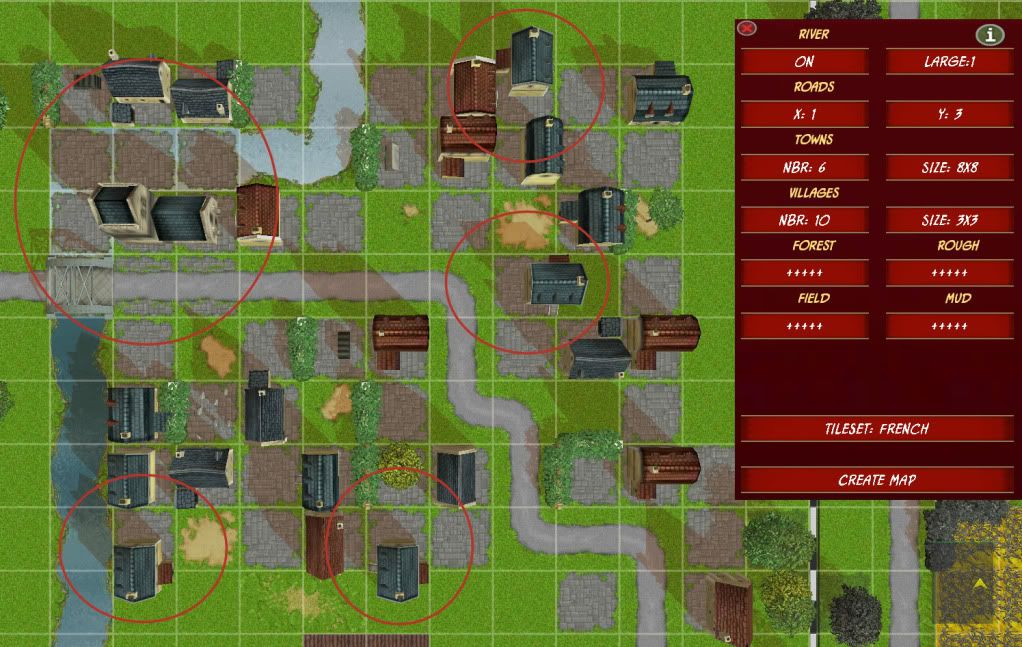
1. Adjacent church cobblestone tiles generate on river.(screenshot)
2. Very rare bug, a wall/hedge will appear between center church building and adjacent small church building. Only appears when all 4 church buildings are not present.

House Bug ; (see screenshot)
This is a problem with the "STONE_TOWN_HOUSE1" model. The model's center origin not in middle of house. I had this problem on my map too!
The problem will cause the house to rotate off center.

Can be fixed 2 ways :
1. Don't use the house :wink:
2. Specifically set the objects placement X/Y 100th's under the following settings (rotation specific) ;

- IF rotation = 0 , then y = 75.
- IF rotation = 157, then x = 25.
- IF rotation = 314, then y = 25.
- IF rotation = 471, then x = 75.

Image
Merr
Captain - Heavy Cruiser
Posts: 903
Joined: Mon Aug 16, 2010 2:00 pm

Post by Merr »

Amaris,

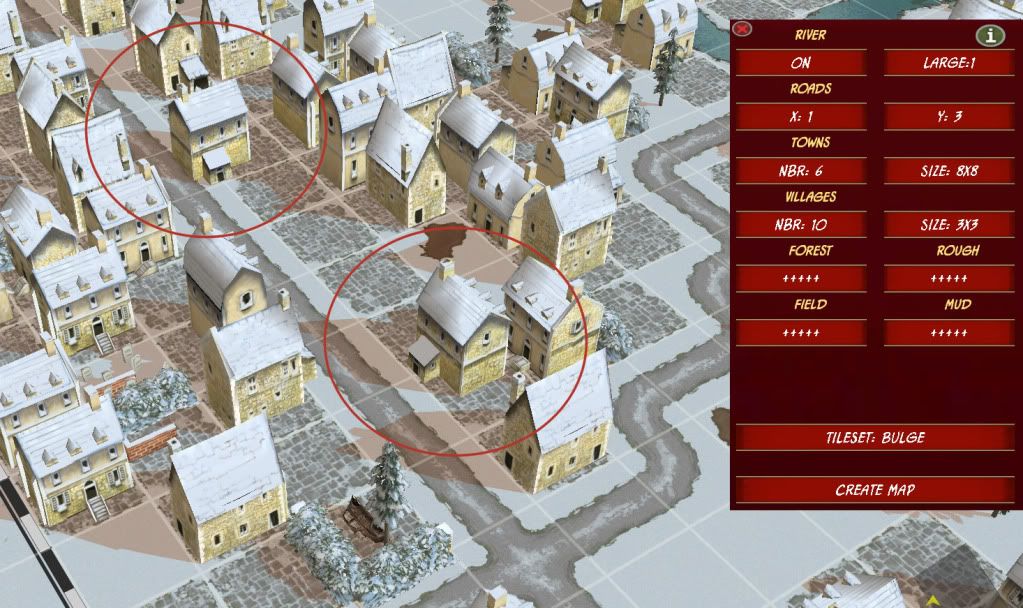
wrt House1 .... I assume the object in Bulge object set to be ... "ardennes_stone_town_house1".
I'm unsure because I haven't tested bulge on my map.

So far, this model bug appears to only be with that object.

Image
Post Reply

Return to “Battle Academy : Modders Corner ”