Page 1 of 3
Couple of questions
Posted: Wed Feb 14, 2018 4:57 am
by PoorOldSpike
Hi guys I got OOB and some DLC's recently and am totally hooked on the supply system, it's great fun trying to chop enemy supply lines while protecting your own..

Question 1- I'm going through the manual with a fine tooth comb but in case I've missed it, can anybody explain this?-
The pic on the left shows the unit has got an attack strength of '6' against mech targets, but when I click the 'info' button it displays the pic on the right, where the mech attack rating is now '6-10'.
Why are there
two numbers 6 and 10? (I looked through a bunch of other infantry units of various nationalities, and they all have similar two-number rating of various strengths in their info panel and I can't figger out why) (sniffle).
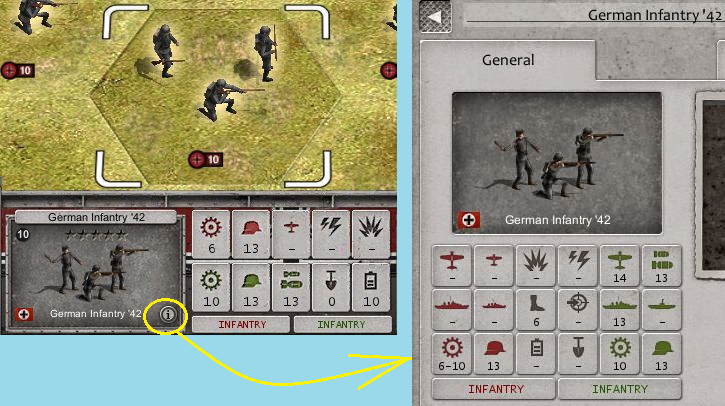
Question 2- As an editor nut I'm having fun learning the editor, made a tad difficult by the fact that there's no editor manual, so I'm having to learn by trial and error what all the bells and whistles do. Is there an option to assign an 'appearance percentage' to a unit, say 50%, so that every time you play the finished scen there's a 50% chance that it might or might not be in the game? That way there'll be a "surprise" factor every time you play the finished scenario and every game will be different because you'll never know what you and the enemy are gonna get.
PS- And can I squeeze in one more question on the same "surprise" theme?- Is it possible to assign a "location radius" to units, for example if you place a unit in the editor and assign '3 radius' to it, there'll be a random chance that it'll appear 0/1/2/3 hexes away from that location?
Re: Couple of questions
Posted: Wed Feb 14, 2018 5:41 am
by Andy2012
Hi Pooroldspike, 6-10 means a damage range against all armoured targets.
As for all editor questions, bru and Erik are the masters of that. They will be around shortly. (bru wrote a manual)
Re: Couple of questions
Posted: Wed Feb 14, 2018 9:23 am
by Erik2
Despite Andy's claims, I still feel like a noob in the editor.
Bru on the other hand is quite good with the triggers/events.
And he wrote this excellent editor manual, about half way down the thread below. (The devs should add this to the content box on the game menu).
http://www.slitherine.com/forum/viewtop ... 74&t=70345
Re: Couple of questions
Posted: Wed Feb 14, 2018 11:11 am
by 13obo
Andy2012 wrote:Hi Pooroldspike, 6-10 means a damage range against all armoured targets.
As for all editor questions, bru and Erik are the masters of that. They will be around shortly. (bru wrote a manual)
In addition, it is important to note that the 6-10 is the range of attack when attacking a hex in 0% - 100% cover. The order of the numbers is important too as the attack can be decreasing when more cover is available. In your example, the infantry will do 6 mechanical attack against a tank in open terrain, while it will do 10 in closed quarters with 100% cover. If the hex has 50% cover, the infantry will have 8 attack. You can see the cover values of the hex by examining the information panel for it.
Most infantries have a ranging Mechanical Attack, but a static Infantry attack, while tanks often have ranging Infantry attack and static Mechanical attack. In addition, a tank often has less Infantry attack in covered space though (for example 16-12), so infantry are very dangerous against tanks in covered terrain because they get less damage from tanks, and do more damage themselves.
EDIT: Once you understand the system, you will find the system quite good in simulating closed/open terrain and much better than the PzC actually.
Re: Couple of questions
Posted: Wed Feb 14, 2018 11:13 am
by Horst
If attack values have a range then they go from cover-free (0, like Open Terrain) to full cover (100, like City) terrain.
Infantry gets a bonus in close terrain against mech/hard targets, while non-flamethrower tank units usually do lesser damage against infantry/soft targets in close terrain. The same rule also applies to some other classes like artillery units which don’t do as much general damage into close terrain. It sometimes works a bit different for other classes with the damage ranges.
The affected terrain is only the one which is attacked into, so it doesn't matter from where an attack comes from, except from non-frozen river hexes for direct attacks. There is also an info-button for terrain hexes which shows how much cover a terrain has and how the damage values are modified for attacker and defender.
PS: better two explanations than none, I guess?
Re: Couple of questions
Posted: Thu Feb 15, 2018 6:36 am
by PoorOldSpike
Thanks guys for the editor manual link and the data panel info, with your help I just played US Pacific > Battle of Bataan right through in one 3-hour sitting as the American defender against the Jap AI and managed to scrape a win by holding one primary obj at the end so I must be doing something right, although admittedly it was only at difficulty level 3..

Re: Couple of questions
Posted: Sat Feb 17, 2018 4:40 am
by PoorOldSpike
Gentlemen, can I throw a few more questions at you if you don't mind?
1- If a unit moves into a hex that contains the town's name banner, the banner vanishes. Is there a key to toggle the banner back above the unit?
2- In Boot Camp you get a dollop of purchase points added to your pool when you enter an enemy town, but I haven't seen that happen yet in any of the full scenarios I've played, so is it just a Boot Camp thing? Is there a key that displays the purchase points value of towns (if any) in scens?
3- Is there any way to find out how many automatically-incoming purchase points the enemy is getting each turn or is it a state secret?
4- Is it possible to load stock scens into the editor to examine them to pick up tips on how the gods of scen creation do things?
("Their art is of such power" to paraphrase The Tempest)
5- How does the game engine determine who fires first in combat, and does the first-firer get a combat bonus?
6- If we move a unit and have second thoughts, is there an option to cancel the move and return it to its start position?
Re: Couple of questions
Posted: Sat Feb 17, 2018 8:30 am
by Andy2012
PoorOldSpike wrote:Gentlemen, can I throw a few more questions at you if you don't mind?
1- Is there an easy quick way to find out where your and the enemy's units (including aircraft) are on the map? Zooming out and toggling the Air layer on and off helps a bit by making them blink which helps, but it's still possible to miss one or two if they're well-camouflaged.
2- If a unit moves into a hex that contains the town's name banner, the banner vanishes. Is there a key to toggle the banner back above the unit?
3- In Boot Camp you get a dollop of purchase points added to your pool when you enter an enemy town, but I haven't seen that happen yet in any of the full scenarios I've played, so is it just a Boot Camp thing? Is there a key that displays the purchase points value of towns (if any) in scens?
4- Is there any way to find out how many automatically-incoming purchase points the enemy is getting each turn or is it a state secret?
5- Is it possible to load stock scens into the editor to examine them to pick up tips on how the gods of scen creation do things?
("Their art is of such power" to paraphrase The Tempest)
6- How does the game engine determine who fires first in combat, and does the first-firer get a combat bonus?
7- If we move a unit and have second thoughts, is there an option to cancel the move and return it to its start position?
Yes, you may ask all the questions. ALL of them.
1 - Getting a specialisation for extended radar range helps. But apart from cheating, I fear that controlling the skies means patroling with fighters. (Just like real life.)
2 - I dont think there is an option for that. (Anybody else?)
3 - No, OoB gives you points per turn and sometimes points for extra objectives. But conquering towns does rarely give you extra credits. However, you gain supply and the enemy loses it.
4 - I guess you have to load the mission in the editor to find out.
5 - Yes, you can do that. However, I refer you to the gods of the editor, bru and mighty Erik, once again.
6 - Hm. I think it is initiative, but this isnt Panzercorps. Hm. Anybody?
7 - Unfortunately, there is no 'undo' button for now. (I guess it is on the TO-DO list) For now, I suggest you save extensively. I save on the campaign screen, after starting a mission, after repairing and deployment and then each turn. Each in a separate file. In turns, I quicksave often. (No joke) This has paid dividends and saved me from a lot of frustration having to redo a lot of stuff after stupid mistakes or being overambitious.
Hope this helps.

Re: Couple of questions
Posted: Sat Feb 17, 2018 8:35 am
by bebro
PoorOldSpike wrote:Gentlemen, can I throw a few more questions at you if you don't mind?
1- Is there an easy quick way to find out where your and the enemy's units (including aircraft) are on the map? Zooming out and toggling the Air layer on and off helps a bit by making them blink which helps, but it's still possible to miss one or two if they're well-camouflaged.
Check the "unit glow" settings in options.
2- If a unit moves into a hex that contains the town's name banner, the banner vanishes. Is there a key to toggle the banner back above the unit?
The city names go away when occupied because they could interfere with the unit labels, can't be changed.
3- In Boot Camp you get a dollop of purchase points added to your pool when you enter an enemy town, but I haven't seen that happen yet in any of the full scenarios I've played, so is it just a Boot Camp thing? Is there a key that displays the purchase points value of towns (if any) in scens?
RP to purchase stuff are not per se given by taking cities in scenarios, they are goven per turn, then can be assigned to achieving objectives, and/or are added at the start of the scn as a rough number to allow the player to equip/reinforce. In bootcamp they were just scripted that way, but in campaigns it may be totally different.
4- Is there any way to find out how many automatically-incoming purchase points the enemy is getting each turn or is it a state secret?
You could load the scn into the editor and check settings/alliance tab where each nation participating (human and AI) is set.
5- Is it possible to load stock scens into the editor to examine them to pick up tips on how the gods of scen creation do things?
("Their art is of such power" to paraphrase The Tempest)
Yes. They need to be in the scenarios folder though, so you might have to copy campaign scenarios there before you can load these.
Edit: hehe Andy was quicker....
Re: Couple of questions
Posted: Sat Feb 17, 2018 9:22 am
by PoorOldSpike
Thanks guys, and I just discovered a useful feature when I right-clicked on the small strategic map and it changed into a fullscreen 2D map with all my units clearly marked in pretty colours to make it easy to find them, and another click returns to 3D..
There's another couple of important questions I'd like to throw into the playpen-
Firstly, my dull brain can understand how different terrain reduces each units hitting power from 1.0, for example here it's 0.65 for the attacker and 0.8 for the defender which makes sense because the defender is getting a cover advantage from hiding behind treetrunks, BUT what on earth is the 70% concealment rating for? What does it DO?
I've read about it in the manual and have also read posts in this forum but I still can't get my head round what it's for (sniffle)

Lastly, about trenches, the manual says we should resist the temptation to attack adjacent units if we're entrenched, or we'll lose the trench bonus, but I'm not buying that at all unless somebody can explain why it's good advice.
I mean, if I want to clobber an adjacent unit with a "spoiling attack" or "pre-emptive strike" and the predicted results are in my favour, why should I want to pass up the chance to bust his ass?
Are we supposed to sit passively in our trenches munching popcorn and let the enemy carefully deploy his units into an attacking posture without interference?
Re: Couple of questions
Posted: Sat Feb 17, 2018 10:33 am
by Andy2012
PoorOldSpike wrote: BUT what on earth is the 70% concealment rating for? What does it DO?
Lastly, about trenches, the manual says we should resist the temptation to attack adjacent units if we're entrenched, or we'll lose the trench bonus, but I'm not buying that at all unless somebody can explain why it's good advice.
I mean, if I want to clobber an adjacent unit with a "spoiling attack" or "pre-emptive strike" and the predicted results are in my favour, why should I want to pass up the chance to bust his ass?
Are we supposed to sit passively in our trenches munching popcorn and let the enemy carefully deploy his units into an attacking posture without interference?
Not sure about the concealment rating either. bebro, adherbal?
I think spoiling attacks are fine. Dont follow the manual word by word. You just give up entrenchment when attacking from an already fortified position. I think this might factor into an attack decision when facing down multiple enemy units which will attack you in the next few turns and an intact entrenchment might come in handy then. All about the timing.
Re: Couple of questions
Posted: Sat Feb 17, 2018 10:38 am
by Horst
See my first post about my (useless?) explanation of the cover system related to attack (damage) ranges.
Attack value X <-> Y = 0% cover <-> 100% cover. Many units have such damage range.
If a unit has Damage 1-2 then 1 is used on 0-90% cover, 2 on 100% cover
Attack value 1-3: 1 on 0-40%, 2 on 50-90%, and 3 on 100% cover
Attack value 1-4: 1 on 0-30%, 2 on 40-60%, 3 on 70-90%, and 4 on 100% cover
and so on...
You are going to loose 3 entrenchment levels if you attack. You get normally get 3 levels if a unit stays idle and isn't involved in combat until the next turn. Units with the digger trait increase the entrechment level building by +2, hence 5 levels per turn until 10.
If I read the formula right, you normally get +4% defense for each level of entrenchment, +5% defense on river hexes.
It's often true that attacking on the defense can cause trouble as your unit is most likely getting damaged thus becoming weaker and you are loosing a little defense bonus from entrenchment. It's sometimes more wise to stay idle and keep reinforcing defending units while your arty in the back and aircraft harass your attackers. The right moment for a counter-attack is when all the attackers have low red strength numbers (low efficiency) and you know for sure there aren't more fresh attackers waiting in the back. This is something you have to learn while playing the game for some time.
I hope it helps.
Re: Couple of questions
Posted: Sat Feb 17, 2018 8:00 pm
by PoorOldSpike
Horst wrote:See my first post about my (useless?) explanation of the cover system related to attack (damage) ranges..
The fault's mine mate, I'm a maths dummy and am just a neanderthal grunt wargamer not an accountant..
Anyway Andy says he can't figure out the Concealment thing either, so I'm not alone.
I'll set up some tests in the editor to get to the bottom of it (including trench tests etc) and publish the results later in this sensational thread.
PS- I hear there are more OOB DLC's on the way which is good news as the possibilities are endless, eg Modern War, Korean War, North Africa, Falklands, Arab-Israeli Wars etc, and of course Nam. Uncle Ho is calling us out!-
Re: Couple of questions
Posted: Sun Feb 18, 2018 8:59 am
by Horst
No worries! The answers sometimes come by just playing and doing mistakes.
The scenario editor is certainly a good way to check and test things. When I started, I simply copied the original US boot camp scenario from the installation folder over to the user folder and started modifying it to check on things. It still serves me well to test things years later when I'm too lazy to create completely new scenario maps.
There is still long trip of development ahead until WW2 is finished with future DLCs not necessarily in that particular order:
- German Afrika Korps
- German Endkrieg
- US Liberation
- Soviet
Maybe then is time for some other directions, but most likely not with this Order of Battle WW2 game; maybe a new OOB game with the same engine.
Re: Couple of questions
Posted: Sun Feb 18, 2018 8:34 pm
by gunnyjs
Hey PoorOldSpike,
Anything to do with purchase points is dependent upon the person who made the scenario. For example, they can have the scenario give more purchase points (which are Requisition Points - the gold coin thing used to "Acquire Reinforcements) .... they can have the scenario give more purchase points than are currently being given from for example turns 5 - 10 There is an editor screen where in the Requisition points given per turn are set at a fixed amount for each turn then this can then be changed also during the scenario. Also for example 500 can be given at the start of a scenario and then say 15 each turn this can easily be done on the Alliances screen of the editor any thing done after that involves making the correct Trigger via the Triggers screen of the editor making this trigger from scratch where you tell the scenario at what point to give extra and I am assuming in the event the desire is to give less then less Requisition Points can be given too.
Also this same stuff can be done with Command points but they can not be easily give per turn unless done through Triggers. But usually command points are just needed in lump some and then maybe some more given later on if that is what the scenario designer wishes.
Before I forget remember the letter J this is used when editing and or making a scenario in the event you have on the map many different AI teams you can click on a unit and press the letter j and WHAM you see which teams have what AI number (when you make an ai team you give it an number)
Regarding making scenarios don't forget you can edit any scenario you own - let's say for example you are playing as the Marines but you want 3 more Command points in the scenario you can edit this scenario and do that. You can even add or subtract the number of turns.
Much of this can be done via using what they refer to as "Cheats" I refer to them as enjoyment enhancements. Using cheats you can have the entire map revealed this though can affect the AI more importantly you can add some Requisition points instantly. ***Important the best way during scenario testing is to use the reveal command in a trigger in order to properly observe the enemy AI etc to make sure it is doing what you want it to do.
Regarding the undo turn - I hope at some point this gets put in often when an air unit is over a ground unit I freak out click wrong and then the wrong unit does something that is utterly stupid cause I thought I had clicked the correct unit or I move a unit not realizing that it is NOT going to get out of its truck - cause I'm in a hurry - then wham the guys are sitting inside of a truck looking out the window at a tank - whoo hooo.
Fortunatelly there is a great save system meaning it is easy to save each turn or a particular turn and type plenty of text about the save because of how the save system was made.
You may find a few bugs in the editor but those may already have gotten fixed.
Re: Couple of questions
Posted: Wed Feb 21, 2018 4:17 am
by PoorOldSpike
Thanks Horst and Gunnyjs, yes I'm having great fun exploring and testing things in the editor..
Here's a test I did in the editor to find out how terrain affects combat, I simply placed a line of German Infantry '45 in every terrain type including rivers and bridges, then lined up an attacking force of Brit Infantry '45 and logged the predicted readouts one by one.
The units stats are evenly matched-
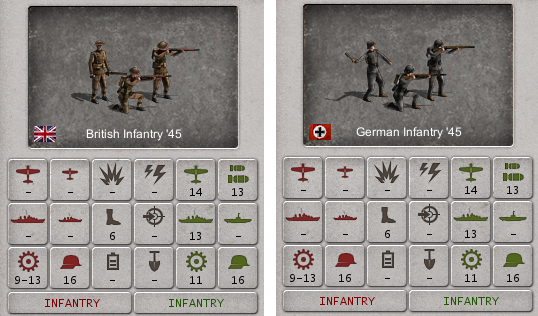
Old hands will already know all this of course, so the chart is mainly aimed at myself and newcomers.
(If anybody wants to comment on anything in it that I may have overlooked, please go ahead)..
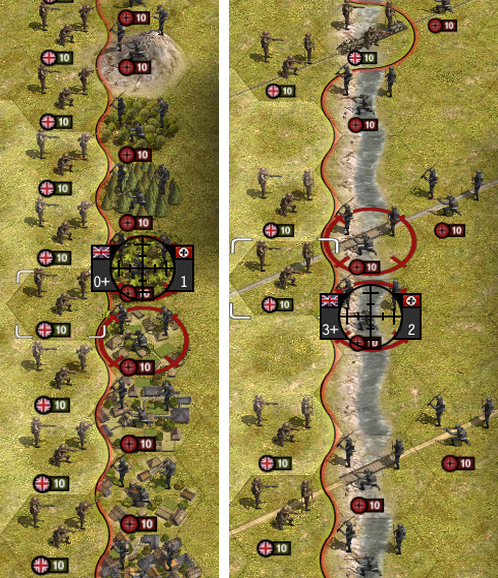 BRITISH INF 45 attacking GERMAN INF 45
Both 10 strength, 10 efficiency,no experience,clear dry summer, no trenches.
(Note there's an Asian Town and an Asian Village, both different)
RANKINGS, best defensive terrain from top (best) to bottom (worst)
(Red figures mean the attackers losses will probably be higher than the defenders losses, so if we're the defender
the reds are definitely the best ones to hunker in)
0 0+ MOUNTAIN
0+ 1 JUNGLE
2 2+ EURO VILLE/ ASIAN VILL
2 3+ DEFENDER ON BANK
1+ 2 FOREST/ TOWN/ ASIAN TOWN
1 1+ DIFFICULT TERR/ DENSE FOREST/ CITY
2 2 SWAMP
2+ 2+ RICE
3 3 OPEN/FARMLAND/BEACH/TROP VILL/AIRFLD/SCORCHED/BOTH UNITS IN RIVER
3+ 2 DEFENDER IN RIVER
(Note: In winter/snow a defender on a river bank still gets a combat bonus if attacked by a unit which is standing in the frozen river, but not as big a bonus as in summer)
---------------------------------------------
Bridges have no effect on combat.
Below: Cities, towns and villages on rivers are still bad places to defend in because the defenders feet will be wet.
2 1 CITY on river
2+ 1 TOWN/ ASIAN TOWN on river
3 1+ EURO VILL/ ASIAN VILL on river
3+ 2 TROP VILL on river
Re: Couple of questions
Posted: Wed Feb 21, 2018 11:48 am
by GabeKnight
@PoorOldSpike
Thanks for this useful test.
I think you and Horst will become buddies real fast...
PoorOldSpike wrote:Cities, Towns and villages on rivers are still bad places to defend in because his feet will be wet.
Important. Remember this. Entrenching units and defending on such hexes (often VP!) is not advisable if not absolutely neccessary to the mission. It' always better to move one hex to the bank, wait for the AI to take the hex and
then crush them and recapture. Way cheaper.
Re: Couple of questions
Posted: Thu Feb 22, 2018 3:46 pm
by PoorOldSpike
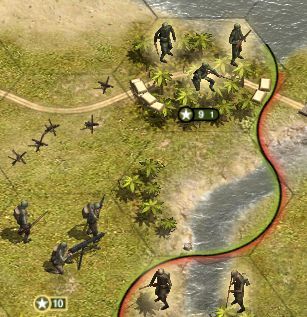
I'm probably making a fool of myself by asking, but why do some units have two numbers like this Marine (top right) in US Pacific > Guadalcanal?
I know the '9' is his current strength, but what's the '1' for?
And note the other unit doesn't have two numbers, just a straight '10'
PS- and by the way, is there any hotkey or tweak or mod to make the number plates bigger and easier to see? (my poor 60-year-old eyeballs are feeling the strain)
Re: Couple of questions
Posted: Thu Feb 22, 2018 3:54 pm
by Shards
The smaller number is their "supply stash". Marines and Paras carry enough supplies to operate behind enemy lines for a few turns without losing efficiency (1 for Marines, 3 for Paras).
Re: Couple of questions
Posted: Thu Feb 22, 2018 3:55 pm
by Horst
It's normally the fuel value/countdown of aircraft, but some ground units can also have this, like paratroopers when airdropping into enemy territory without supply line, or British Chindits troops. It's also a few feature of Marines. I guess they did this to somewhat ease the landing stress on beachheads.
This "fuel" won't immediately reduce a unit's efficiency when out of supply sources. The number indicates how many turns are left until the efficiency-hammer strikes.