Page 1 of 1
Need help with efx file.
Posted: Tue Feb 18, 2014 2:16 am
by AugustinMalar
Please can someone match this efx line with this icon to make it work properly ?

I would also like to know how to do it.
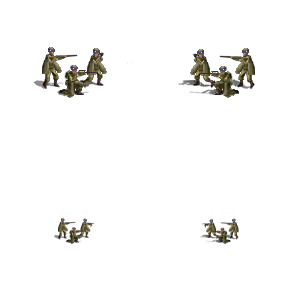
SLVK_Mnt.png (,-) (-,-) (,) (,) Mountain1 Mountain2 Mountain3 Leg_Mountain_1
Thanks.

Re: Need help with efx file.
Posted: Tue Feb 18, 2014 4:58 am
by Razz1
Nice Slovakian Mountain unit.
SLVK_Mnt.png (,-) (-,-) (,) (,) Mountain1 Mountain2 Mountain3 Leg_Mountain_1
You can copy it from the AT and AA Mod. It has the line for the EFX and the equipment file.
Open up in Note pad copy and paste into your file while it is open in Note pad
Re: Need help with efx file.
Posted: Tue Feb 18, 2014 5:48 am
by Razz1
I think I know your problem. Rename the icon SLVK_Mnt
Re: Need help with efx file.
Posted: Tue Feb 18, 2014 4:15 pm
by AugustinMalar
What I meant is that the fire gun shots are coming out from the wrong places.
They're coming out from the binoculars and from the middle of the sniper gun.
I wanna fix that by changing the data of the efx line. But I don't know how.
Re: Need help with efx file.
Posted: Tue Feb 18, 2014 5:27 pm
by the_iron_duke
I think you'd need to create a new animation as the graphic you've made doesn't match the standard mountain gunfire animation templates.
If you look at a standard mountain infantry graphic, the two figures firing are both standing and on the left, as in your graphic (if the unit is facing to the right like your image above). However, your shooters are in different positions, with one of the shooters kneeling.
With the grid co-ordinates offset you can move around the animation. However, if you've got more than one source of gunfire, like an infantry unit, you can't move each point of gunfire independently, only the animation frames as a whole. So if you have more than one gunfire spot and their relative positions don't match up with a template then you'd have to create a new one.
It's not that hard with a graphics editing program. In both the standard mountain template and your graphic there are two rifles firing. So you could duplicate the standard mountain animation and have them as two graphic layers. Then erase one of the gunfire spots in each animation layer, for every frame. Then you have two independent gunfire animation layers, one for each shooter.
Then create a new layer and paste exactly one quarter of the standard 296 x 296 pixel unit graphic - the top left with your mountain infantry facing right (a square of 148 x 148 pixels). Paste it exactly in the top-left hand corner of the animation sheet. Then you can move around the two animation layers and match them up to the ends of the rifles. When they are in the right position, you can erase the mountain infantry graphic and then merge down the two animation layers into a single new animation graphic. Then give it a new custom name and then use the same animation name in the efx file. You might need to duplicate the mountain infantry attack sound files and give the copy the same name as your new custom animation.
Re: Need help with efx file.
Posted: Wed Feb 19, 2014 4:29 am
by Razz1
Your best bet is to remake the icon by moving the Binocular man higher or lower
Re: Need help with efx file.
Posted: Thu Feb 20, 2014 3:10 am
by guille1434
Hi Agustin!
Following the very detailed explanation given by The Iron Duke, I made this "quick" animation file... I would like you to test it. To do so, you have to add a new line in the efx.pzdat file with the unit icon name in the first column (I named it Slv_Mtn_Inf.png, but if you rename the icon file you should use the new name you gave the file), and then add the name of the attached file (which is Slv_Mountain1.png) in the column named "Ground Attack Animation" in the sub-column Anim1. The other cells of this new unit line can be completed with same values as the ones found in the regular Gebirsjager.png row. I think this should do the trick.
I hope I was clear enough with the instructions. Good luck!
Re: Need help with efx file.
Posted: Thu Feb 20, 2014 4:52 am
by AugustinMalar
Thanks ! I will try it.

Re: Need help with efx file.
Posted: Thu Feb 20, 2014 12:46 pm
by guille1434
Ok! And please, keep me informed how it worked... It was my first attempt, and if it went good, it will be useful for me as sometime in future i will have to make some custom animations for some of my "non standard" icons... Thanks!
Re: Need help with efx file.
Posted: Fri Feb 21, 2014 3:49 pm
by AugustinMalar
It worked.
But your animation is only for a 2 rifle shots.
I also had to rename the Mountain1.wav which is a 2 rifle shots sound to make it work with your animation file.
I haven't used Mountain2.wav and Mountain3.wav which are both 3 rifle shots sound. They both need another animation file for a 3 rifle shots.
Re: Need help with efx file.
Posted: Fri Feb 21, 2014 6:48 pm
by guille1434
Ok, try this three-rifle shot animation, and tell me what happened!
Re: Need help with efx file.
Posted: Sat Feb 22, 2014 5:16 am
by AugustinMalar
It worked.
Thanks again.
Re: Need help with efx file.
Posted: Sat Feb 22, 2014 5:50 pm
by guille1434
Ok! Glad to be able to help you!
Re: Need help with efx file.
Posted: Sat Jul 12, 2014 3:24 pm
by danijocker90
the_iron_duke wrote:I think you'd need to create a new animation as the graphic you've made doesn't match the standard mountain gunfire animation templates.
If you look at a standard mountain infantry graphic, the two figures firing are both standing and on the left, as in your graphic (if the unit is facing to the right like your image above). However, your shooters are in different positions, with one of the shooters kneeling.
With the grid co-ordinates offset you can move around the animation. However, if you've got more than one source of gunfire, like an infantry unit, you can't move each point of gunfire independently, only the animation frames as a whole. So if you have more than one gunfire spot and their relative positions don't match up with a template then you'd have to create a new one.
It's not that hard with a graphics editing program. In both the standard mountain template and your graphic there are two rifles firing. So you could duplicate the standard mountain animation and have them as two graphic layers. Then erase one of the gunfire spots in each animation layer, for every frame. Then you have two independent gunfire animation layers, one for each shooter.
Then create a new layer and paste exactly one quarter of the standard 296 x 296 pixel unit graphic - the top left with your mountain infantry facing right (a square of 148 x 148 pixels). Paste it exactly in the top-left hand corner of the animation sheet. Then you can move around the two animation layers and match them up to the ends of the rifles. When they are in the right position, you can erase the mountain infantry graphic and then merge down the two animation layers into a single new animation graphic. Then give it a new custom name and then use the same animation name in the efx file. You might need to duplicate the mountain infantry attack sound files and give the copy the same name as your new custom animation.
I love you.

Thanks a lot for the info.