Page 1 of 1
commanders question
Posted: Mon Jun 15, 2020 10:16 am
by kondi754
Hi,
Is it possible to add a commander to your own and AI unit in Editor? If so, is there any possibility to add a commander (and change the name of unit) for the unit which will appear on the map in the future (after activating the correct trigger)?
(Probably not possible, but I want to make sure

)
Re: commanders question
Posted: Mon Jun 15, 2020 11:52 am
by ColonelY
I'm not at all an expert about this, but I think it's perfectly possible to add some customized commanders and, later on, of course use them - but I'm almost sure that you need first to create a mod which would contain the "new info" you want to actually use.
Re: commanders question
Posted: Mon Jun 15, 2020 12:15 pm
by bebro
Yeah, if it's about adding completely new custom commanders to the pool of commanders -- this is possible, with modded files tho. You need an entry in the commanders file in data, plus the pics needed for this.
If it's about adding a commander by trigger in the scn editor to AI and player units it depends:
- you can always add a commander to a preplaced AI or player unit in editor by trigger
- you can also add commanders to spawned units by trigger, AI or player
- adding a commander to a unit in the player's core/deployment pool may be impossible as you don't know what players purchase (in this case the commander should just be unlocked by trigger like normal, so that the player can assign him as he wishes)
Re: commanders question
Posted: Mon Jun 15, 2020 12:23 pm
by kondi754
ColonelY wrote: Mon Jun 15, 2020 11:52 am
I'm not at all an expert about this, but I think it's perfectly possible to add some customized commanders and, later on, of course use them - but I'm almost sure that you need first to create a mod which would contain the "new info" you want to actually use.
I plan to create new commanders and change the names of units to historical, but this applies to existing game content
So I'll put it all together in a new Mod folder, but I don't know how to do it technically (attach a commander before the battle, at the creation stage)
Re: commanders question
Posted: Mon Jun 15, 2020 12:26 pm
by kondi754
bebro wrote: Mon Jun 15, 2020 12:15 pm
Yeah, if it's about adding completely new custom commanders to the pool of commanders -- this is possible, with modded files tho. You need an entry in the commanders file in data, plus the pics needed for this.
If it's about adding a commander by trigger in the scn editor to AI and player units it depends:
- you can always add a commander to a preplaced AI or player unit in editor by trigger
- you can also add commanders to spawned units by trigger, AI or player
- adding a commander to a unit in the player's core/deployment pool may be impossible as you don't know what players purchase (in this case the commander should just be unlocked by trigger like normal, so that the player can assign him as he wishes)
Many thanks, it makes a lot easier.

I understand that the key is to create complete content in commander file inside Mod

Re: commanders question
Posted: Tue Jun 16, 2020 4:20 pm
by kondi754
All clear and done, BUT...
I don't see the name of the commander in the Editor (Trigger panel), only "commander_109"
Any hints


Re: commanders question
Posted: Tue Jun 16, 2020 5:08 pm
by bebro
kondi754 wrote: Tue Jun 16, 2020 4:20 pm
All clear and done, BUT...
I don't see the name of the commander in the Editor (Trigger panel), only "commander_109"
Any hints
Yeah you need a name string for him.
Go into the language folder, there you have the files for localized text strings in english, french etc.
In there are name strings for commanders, units etc. (in various of them, as each new DLC adds more)
For Red Steel we added english_16, starting with:
commander_125 = Vasily Chuikov
(then the rest of Sov cmdrs so far)
If you only use the game in english, open it and add (best below the last Soviet guy)
commander_109 = yournewguysname
The ID musn't be in use already and if you or other players want to have the name in other languages too add similar entries to the other language files (so then at the same position in german_16, french_16 etc.).
You may only have to watch out if new content is released if the IDs collide. My own new commanders for the next #cough *censored*
don't use 109, but you never know what will be used at some pt. down the road ...
Re: commanders question
Posted: Tue Jun 16, 2020 5:14 pm
by kondi754
bebro wrote: Tue Jun 16, 2020 5:08 pm
kondi754 wrote: Tue Jun 16, 2020 4:20 pm
All clear and done, BUT...
I don't see the name of the commander in the Editor (Trigger panel), only "commander_109"
Any hints
Yeah you need a name string for him.
Go into the language folder, there you have the files for localized text strings in english, french etc.
In there are name strings for commanders, units etc. (in various of them, as each new DLC adds more)
For Red Steel we added english_16, starting with:
commander_125 = Vasily Chuikov
(then the rest of Sov cmdrs so far)
If you only use the game in english, open it and add (best below the last Soviet guy)
commander_109 = yournewguysname
The ID musn't be in use already and if you or other players want to have the name in other languages too add similar entries to the other language files (so then at the same position in german_16, french_16 etc.).
You may only have to watch out if new content is released if the IDs collide. My own new commanders for the next #cough *censored*
don't use 109, but you never know what will be used at some pt. down the road ...
Thanks for hints and suggestion
So my new commander will be number 301
Re: commanders question
Posted: Wed Jun 17, 2020 2:55 pm
by kondi754
Another questions

1. how to change a color of fonts ?
2. is there a way to make historical name of unit on top and the name of commander at the bottom of the unit panel for AI units ?
(see screenshot below)
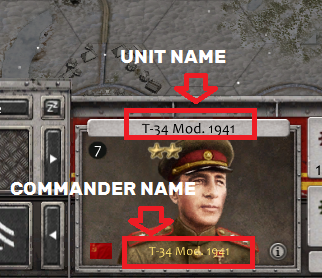
- hero.png (169.84 KiB) Viewed 1592 times
Re: commanders question
Posted: Sat Jun 20, 2020 12:22 pm
by kondi754
bebro wrote: Mon Jun 15, 2020 12:15 pm
Yeah, if it's about adding completely new custom commanders to the pool of commanders -- this is possible, with modded files tho. You need an entry in the commanders file in data, plus the pics needed for this.
I added new commanders pics and info in data and languages folders inside BoB Mod and everything works (by Mod's editor) but when added this content inside main game folder and tried to work by game's editor, editor doesn't see this new commanders...
What did I do wrong?
Re: commanders question
Posted: Sat Jun 20, 2020 1:09 pm
by bebro
Hm, it *should work in main folder, provided you have all the needed stuff set up correctly.
The only prob is that you need to edit main game files then, so backup original files somehwere.
Is the commander set to a specific nation/faction which is in Bob mod only?
Re: commanders question
Posted: Sat Jun 20, 2020 2:06 pm
by kondi754
bebro wrote: Sat Jun 20, 2020 1:09 pm
Is the commander set to a specific nation/faction which is in Bob mod only?
Bingo
Of course, I've set new commanders to a specific faction
Thank you a lot