Page 1 of 1
Can't launch the campaigns
Posted: Thu May 21, 2020 8:50 pm
by KushumAydin
-can't launch any of the campaigns - simply can't play the game
-much of the descriptions have gone (i.e. specifications descriptions)
-exit to dekstop does not activate although you press the button
-"I" letters on the main screen does not display
I play on 8.4.4 version on steam
Re: Can't launch the campaigns
Posted: Sun Jun 14, 2020 11:51 am
by KushumAydin
Can't anyone give help at this? Neither at steam nor here I received help and it has been some time now.
Re: Can't launch the campaigns
Posted: Sun Jun 14, 2020 12:52 pm
by bebro
Hi,
could you provide a bit more info:
1. Did you own the game before v8.4.4, and did those campaigns work for you earlier?
2. Or did you just get the game recently? Pls. note that most campaigns can be played only if you purchase and unlock particular DLCs. Otherwise you can only access free content, like the Bootcamp campaign.
Also, if you bought any DLC here at Slitherine you need to redeem Steam Keys to get them activated with your Steam installation. But of course you can also buy DLCs at Steam directly.
Re: Can't launch the campaigns
Posted: Tue Jun 23, 2020 10:25 pm
by KushumAydin
Hi,
1. Yes, I did own the game before v8.4.4 and had some DLCs too. I could play it fine. I loaded v8.3.0 through steam and I can play it although it's an outdated version. So an update messed things?
2. I have another computer that I tried playing it. But still the same issue arose once I started it.
Re: Can't launch the campaigns
Posted: Wed Jun 24, 2020 7:08 am
by bebro
Unfortunately we cannot reproduce this issue.
If you haven't already, a very simple thing you may try is to "validate game files" in Steam.
Other than that I'd recommend to check if all DLC are correctly installed and enabled. You can do that in Steam via Library > Manage (my) DLC, pls. see pic:
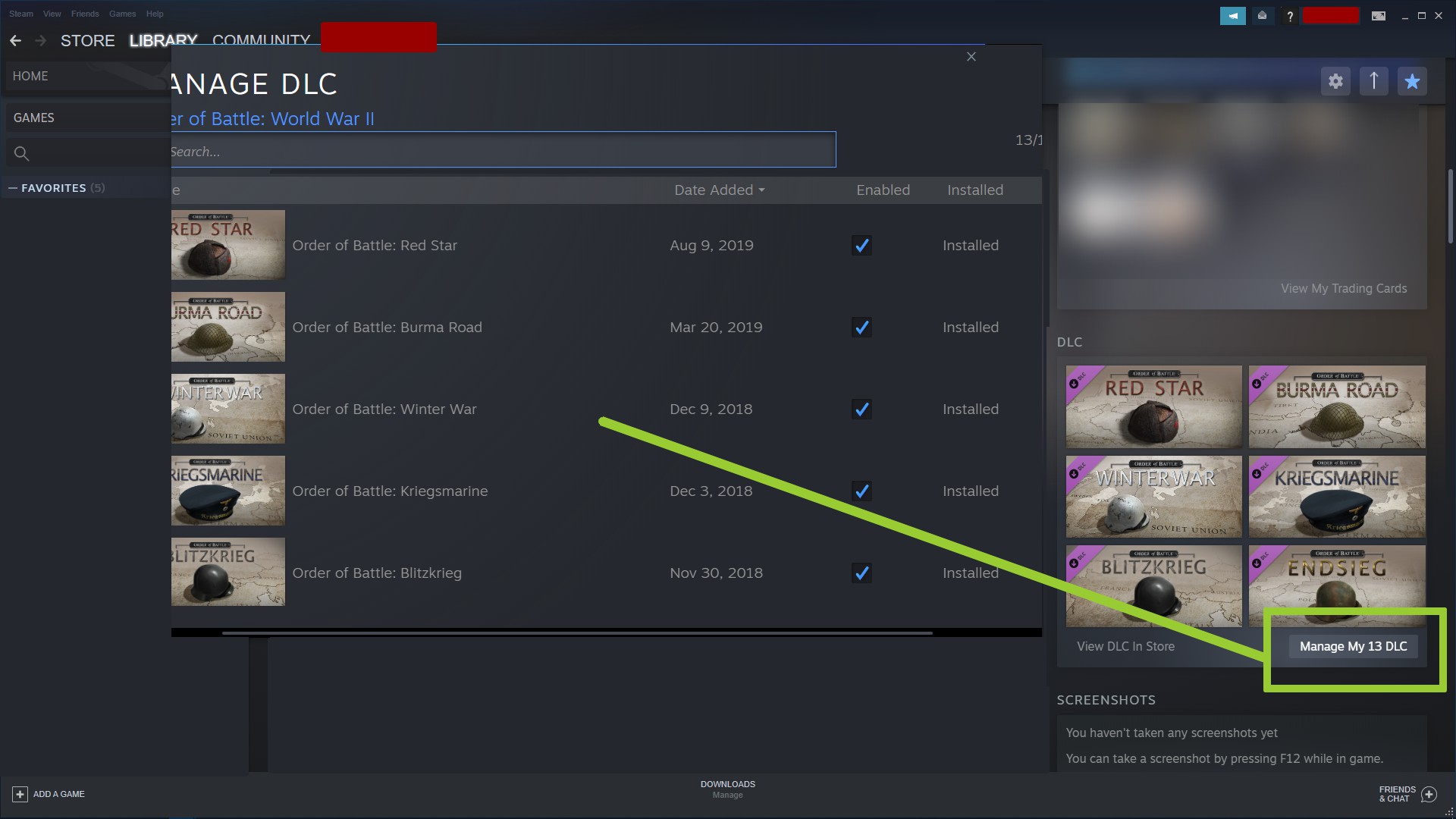
- Steam_DLCs.jpg (235.61 KiB) Viewed 2008 times
What does actually happen when you want to start a DLC? Are the icons in the campaign selection greyed out? This would point to DLCs not correctly installed or unlocked.
However if you purchased them you could just reinstall and unlock them using the keys you have.
Also, since your OP notes text or display issues - in what language are you playing the game?
Re: Can't launch the campaigns
Posted: Wed Jun 24, 2020 7:57 pm
by KushumAydin
So I tried validating game files but unfortunately it didn't solve the problem.
All DLCs are installed and enabled. In campaign selection the DLCs I bought are colored.
I was playing the game on English before, now it is still English I think though texts are weird (you can look at the Menu.png in the zip file to see it).
I can open all the DLCs. Campaign Map opens but I can't close the Newspaper when they open. In Kriegsmarine and Winter War I get stuck on the map, cant launch the battles. In Blitzkrieg, Panzerkrieg, and Endsieg I can launch the battles but get stuck on loading screen (which doesn't display loading tips properly, it writes loadingtip_1 etc.). In Sandstorm and Bootcamp Battle opens but I can't do purchases, place units, and the minimap also looks weird (You can see them in Campaign_Menu.png and Battle.png).
In OP I actually meant battles do not work properly, campaigns start. Sorry for the confusion.
Re: Can't launch the campaigns
Posted: Tue Jun 30, 2020 1:55 pm
by bebro
Since you mention zip and png files - did you attempt to attach those files here?
If the problem persists you could also send those files plus a description to
support@slitherine.co.uk
Re: Can't launch the campaigns
Posted: Wed Jul 01, 2020 2:46 am
by GabeKnight
I think that deleting the "\Users\...\Documents\My Games\Order of Battle - WW2\Settings" folder solved this issue for some.
Re: Can't launch the campaigns
Posted: Wed Jul 01, 2020 4:03 pm
by KushumAydin
Tried deleting settings folder but the problem still remains unsolved

.
I attached screenshots again to this post, hopefully, I did it right this time.
Also another thing I realized is that I can actually change the language by clicking on flags at the bottom of the screen. I clicked on the German flag and then switched to English and text were finally normal, campaign names, loading tips, specialisations, descriptions, settings etc.. I immediately tried to launch a battle but it still doesn't work properly

. I tried my luck on the editor to see whether if I could launch a battle there but all units, terrain types, and decorations are gone for some reason.
Re: Can't launch the campaigns
Posted: Wed Jul 01, 2020 4:41 pm
by bebro
Do you have any unusual software running in the background? Two of those pics seem to display some Turkish (?) text relating to Windows (they "shine through" in the lower right corner of the screen) which does not belong to the game at all. Or is this added when you do screenshots?
Also, in case you opened any game data files like those for units or specs separately (for example to mod them, or just to view some entries) please close them before launching the game.
Re: Can't launch the campaigns
Posted: Wed Jul 01, 2020 5:50 pm
by KushumAydin
That text is from windows 10. Since I am using the free version of Windows 10, I don't have all the properties of the full version. As a consequence, that text is always on my computer reminding me to buy the full version. I can play every other game on my computer just fine so I don't think it's the reason for the problem.
And I haven't opened or modified any game data files. Also, I don't have any mods. I've deleted settings file to see whether or not it would solve my problem but later I put it back to where it belongs.