Page 1 of 1
Can't deplay units/start Onslaught
Posted: Fri Mar 13, 2020 10:37 am
by PanzerG
Onslaught loads, but I can't deploy units, map is black in deployment area. This did not happen in beta. Can't even close the game or return to menu, I have to shutdown from windows.
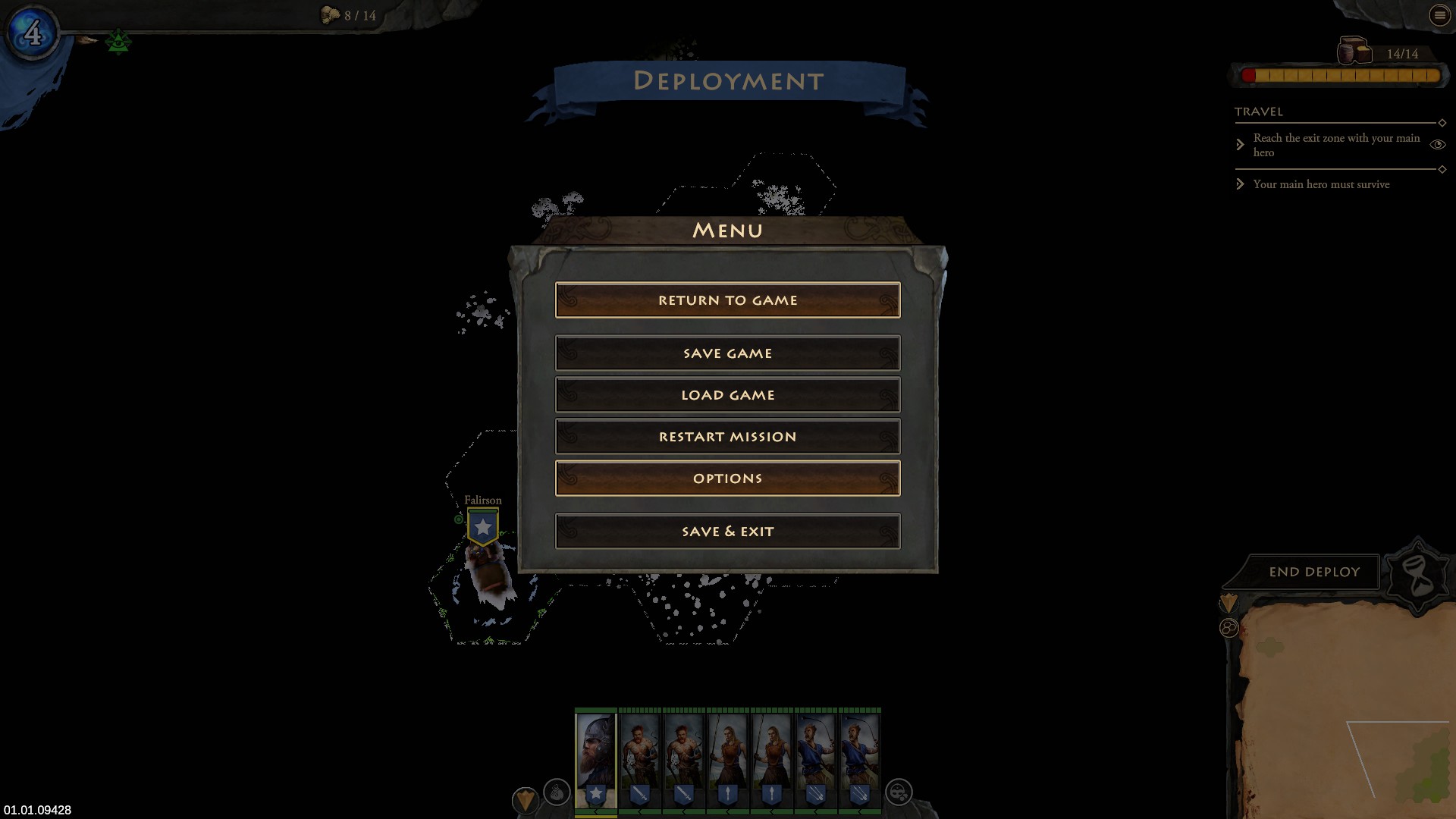
Do I have to delete some remains form beta ?
Re: Can't deplay units/start Onslaught
Posted: Fri Mar 13, 2020 10:57 am
by El_Condoro
I had exactly the same issue.
Re: Can't deplay units/start Onslaught
Posted: Fri Mar 13, 2020 10:58 am
by ObG_Chris
The input problem can be fixed by using Options -> Input -> Restore Defaults.
The graphics problem can be fixed by using the Options -> Reset according to other users with this problem.
Edit:
The problem with the graphics happens if you have the setting set to Shadow Quality: No Shadows during game start. After changing it at least once (even if it is changed back to Shadow Quality: No Shadows) it will be ok until you restart the game.
Re: Can't deplay units/start Onslaught
Posted: Fri Mar 13, 2020 12:23 pm
by El_Condoro
Thanks, the Reset fixed it.
Re: Can't deplay units/start Onslaught
Posted: Fri Mar 13, 2020 1:29 pm
by Arent
ObG_Chris wrote: Fri Mar 13, 2020 10:58 am
The input problem can be fixed by using Options -> Input -> Restore Defaults.
The graphics problem can be fixed by using the Options -> Reset according to other users with this problem.
Edit:
The problem with the graphics happens if you have the setting set to Shadow Quality: No Shadows during game start. After changing it at least once (even if it is changed back to Shadow Quality: No Shadows) it will be ok until you restart the game.
I thankfully found this out myself and mentioned it in my review on gog. I seriously considered deducting a star for such a serious glitch, but since i like your game very much & hope it will be quickly patched, i still gave 5 stars.
Re: Can't deplay units/start Onslaught
Posted: Fri Mar 13, 2020 2:37 pm
by PanzerG
The 2 partial resets didnt work, a full reset did work.
Re: Can't deplay units/start Onslaught
Posted: Fri Mar 13, 2020 3:38 pm
by euramer
Hello,
I have a similar type of problem, but my screen show correctly the map.
I cannot make any unit deployment, either with an old save from Invasion or with the new DLC since I have installed the Onslaught upgrade: A unit which is installed in a deployment hex with the mouse pointer won't stick/stay in its place using the right mouse switch: What did I do wrong?
Thank you for your help.
Re: Can't deplay units/start Onslaught
Posted: Fri Mar 13, 2020 3:51 pm
by ObG_Chris
ObG_Chris wrote: Fri Mar 13, 2020 10:58 am
The input problem can be fixed by using Options -> Input -> Restore Defaults.
Re: Can't deplay units/start Onslaught
Posted: Fri Mar 13, 2020 6:55 pm
by PanzerG
ObG_Chris wrote: Fri Mar 13, 2020 3:51 pm
ObG_Chris wrote: Fri Mar 13, 2020 10:58 am
The input problem can be fixed by using Options -> Input -> Restore Defaults.
but not permanently...
whenever i load the savegame or restart with a new game in onslaught, i have to repeat the "restore" procedure. This needs a hotfix.
Re: Can't deplay units/start Onslaught
Posted: Mon Mar 16, 2020 3:43 pm
by ObG_Chris
PanzerG wrote: Fri Mar 13, 2020 6:55 pm
but not permanently...
whenever i load the savegame or restart with a new game in onslaught, i have to repeat the "restore" procedure. This needs a hotfix.
Just to make sure that there is a bug I need to delve into deeper: You do click on apply afterwards?
And yes we are already finished working on a more permanent fix for this issue, unfortunately the actual bug was not under our control and it took some time to work around our input middleware.
Re: Can't deplay units/start Onslaught
Posted: Mon Mar 16, 2020 4:08 pm
by PanzerG
ObG_Chris wrote: Mon Mar 16, 2020 3:43 pm
PanzerG wrote: Fri Mar 13, 2020 6:55 pm
but not permanently...
whenever i load the savegame or restart with a new game in onslaught, i have to repeat the "restore" procedure. This needs a hotfix.
Just to make sure that there is a bug I need to delve into deeper: You do click on apply afterwards?
And yes we are already finished working on a more permanent fix for this issue, unfortunately the actual bug was not under our control and it took some time to work around our input middleware.
Yes I do "apply", yet, each time i start the game again, I have to reset shadows and apply again...bec the bug is back.
Re: Can't deplay units/start Onslaught
Posted: Mon Mar 16, 2020 6:09 pm
by Arent
PanzerG wrote: Mon Mar 16, 2020 4:08 pm
ObG_Chris wrote: Mon Mar 16, 2020 3:43 pm
PanzerG wrote: Fri Mar 13, 2020 6:55 pm
but not permanently...
whenever i load the savegame or restart with a new game in onslaught, i have to repeat the "restore" procedure. This needs a hotfix.
Just to make sure that there is a bug I need to delve into deeper: You do click on apply afterwards?
And yes we are already finished working on a more permanent fix for this issue, unfortunately the actual bug was not under our control and it took some time to work around our input middleware.
Yes I do "apply", yet, each time i start the game again, I have to reset shadows and apply again...bec the bug is back.
Do you always afterwards set to "no shadows"? In my case I left it at the second lowest shadow level & then it worked.
Re: Can't deplay units/start Onslaught
Posted: Wed Mar 18, 2020 2:06 pm
by ObG_Chris
For everyone with access to the playtest steam channel:
If you are still having the input issue or the graphics issue give it a try.
To accurately test that the input issue is gone you will need some special steps:
* Verify that you are still having input issues in the default branch (Opt out of all Betas)
* Verify that you don't have input issues in the playtest branch (Please tell us if you do)
* Close the game
* Open the file config.xml in your installation directory with any simple texteditor (
NO Wordpad). You can find your installationfolder via Properties -> Local Files -> Browse Local Files...
* Remove the line
Code: Select all
<settings directory="Fantasy General II Beta"/>
from it.
* After restarting the game verify that all your savegames from the live game are displayed ingame.
* Load any
NON IRONMAIDEN savegame
* See if both left and rightclick work correctly.
*
DO NOT save a game (no autosaves either) or start a new one
* Exit the game
* Put the line you deleted from config.xml back or click Properties -> Local Files -> Verify integrity of game files and verify that the line is back.
* Dont forget to switch back to the default branch for playing the game.