Renamed scens are not showing.
Posted: Tue Apr 23, 2019 8:44 am
I've just been tidying up my Docs > MyGames folder by renaming some of my created scens but their new names are not showing (sniffle).
Look, I went into MyGames and gave the four scens in the red square these neat new names-
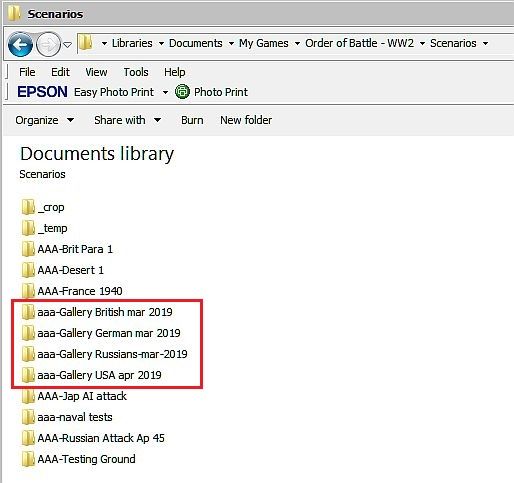
But when I start the game, they're still listed under their old names (I've marked them with red X's), what have I done wrong?
I can still play them by selecting these old names so it's by no means a serious problem, I'd simply like to tidy things up so that the MyGames list and the Scens list look the same.
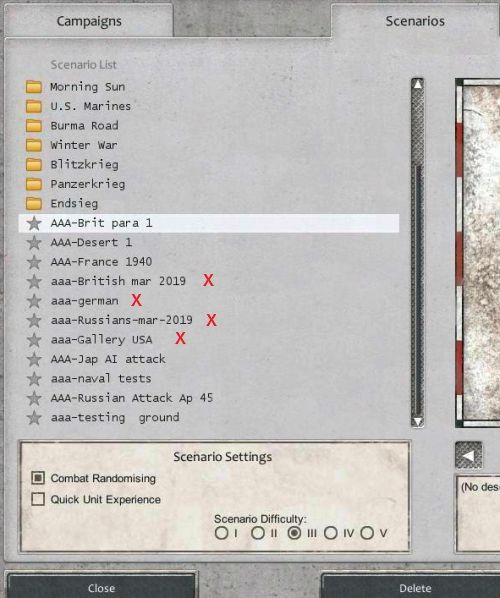
Look, I went into MyGames and gave the four scens in the red square these neat new names-
But when I start the game, they're still listed under their old names (I've marked them with red X's), what have I done wrong?
I can still play them by selecting these old names so it's by no means a serious problem, I'd simply like to tidy things up so that the MyGames list and the Scens list look the same.
