Page 1 of 1
Movement Display Issue
Posted: Fri Aug 17, 2018 12:22 pm
by Morbio
There are two issues in one here;
Firstly, the movement display gives away the location of hidden units. See below
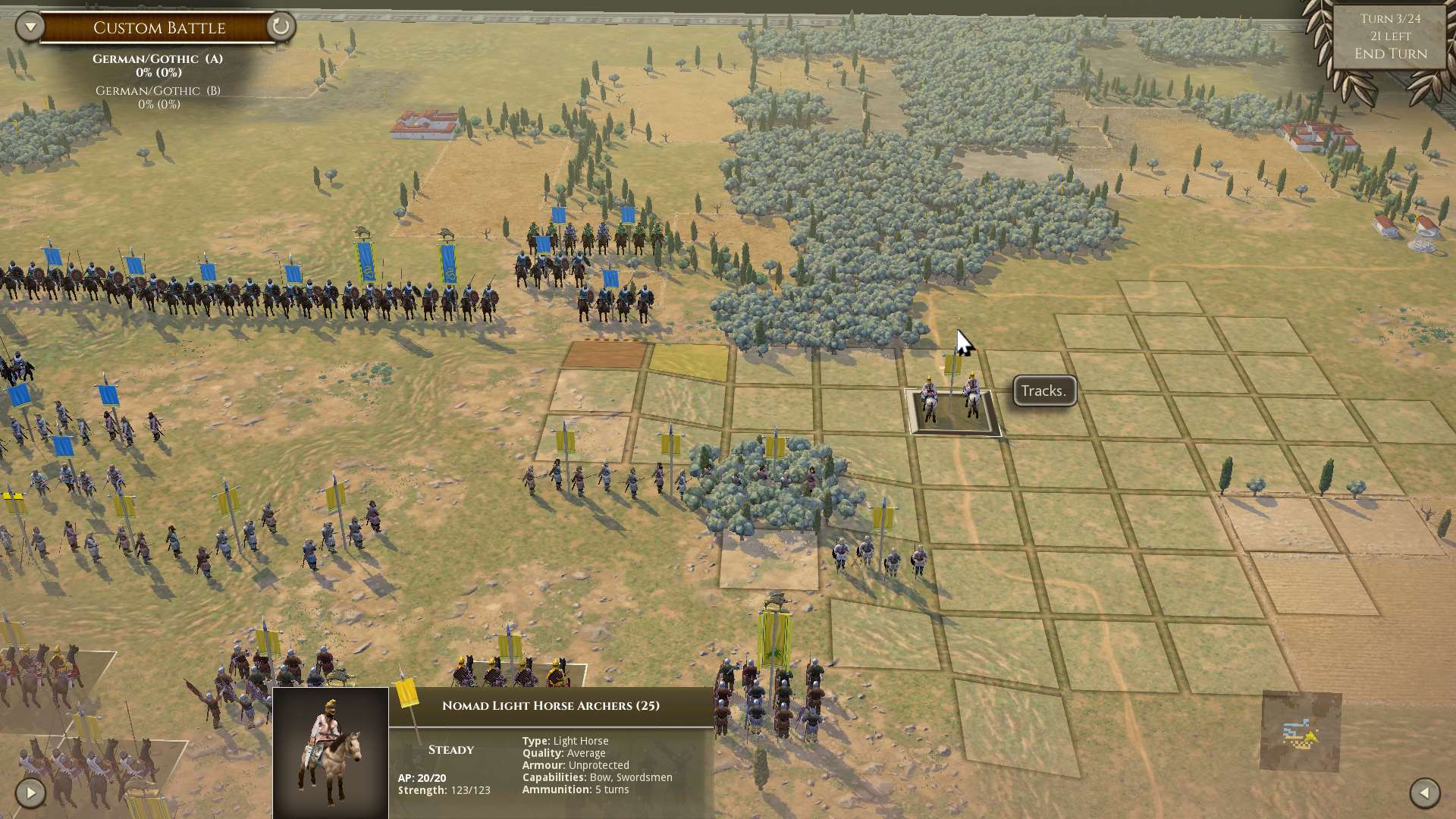
- Screenshot (51).jpg (272.88 KiB) Viewed 1988 times
I wonder why I can't access the tile where the cursor is?
Ta daa!
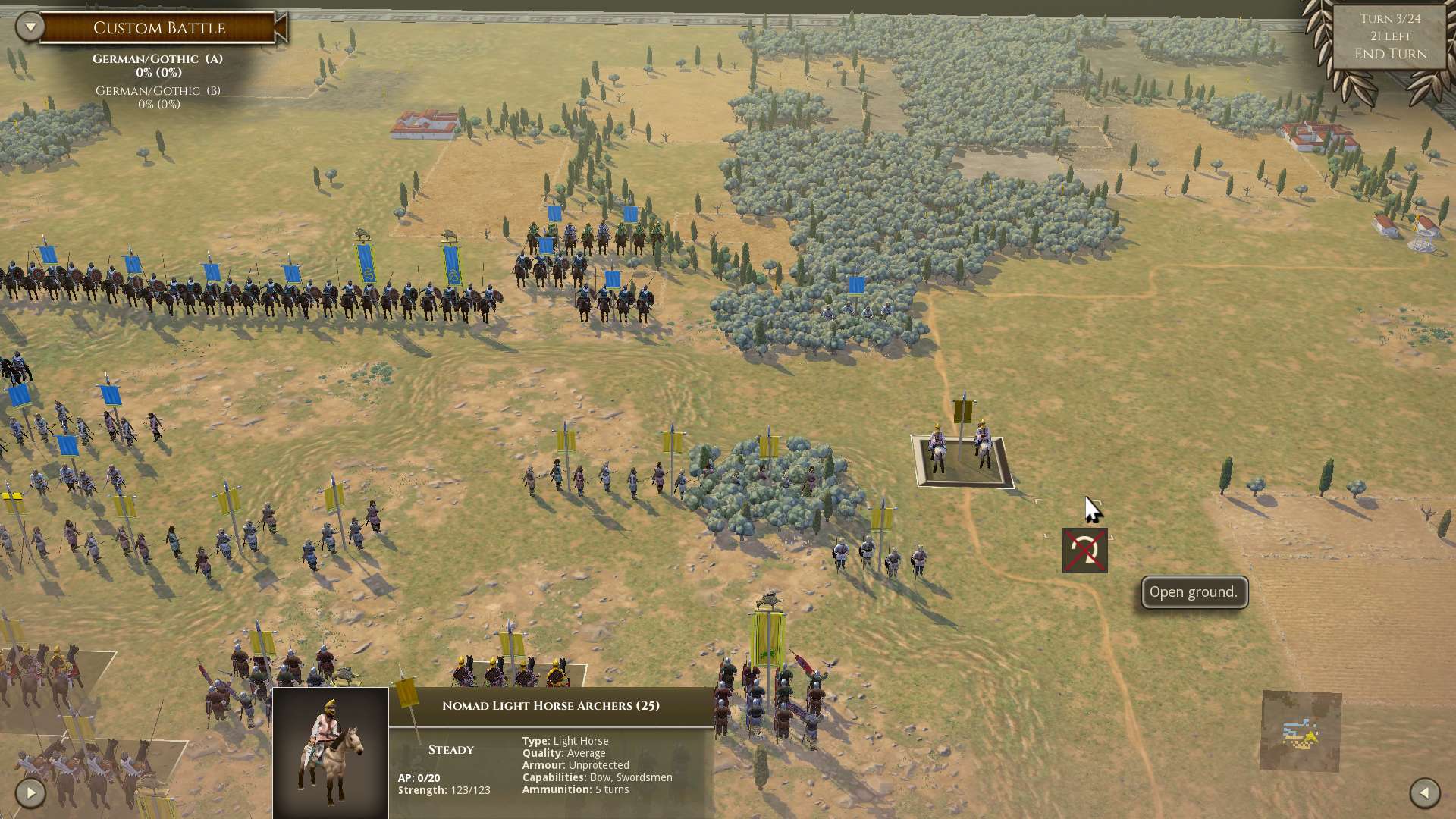
- Screenshot (52).jpg (266.24 KiB) Viewed 1988 times
The second issue is why can't I move to the tile to the right of the cursor?
Re: Movement Display Issue
Posted: Fri Aug 17, 2018 2:17 pm
by rbodleyscott
I take your point, but (to state the obvious) highlighted tiles show the tiles that you can move to, and not the ones you can't. That is how the engine is designed to work.
Maybe we could script round it to make the display show that you "can" move to the square and then abort the move when you get to the previous square, but I am not sure it is worth the trouble.
The answer to your second question is that the route to the tile to the right of the cursor goes through the secondary ZOC of the light foot in the forest.
Re: Movement Display Issue
Posted: Mon Aug 20, 2018 11:39 am
by Morbio
I agree about the solution and it's possible cost-benefit.
Regarding the second question, is it not a valid move to go immediately diagonally right and then straight on? This would avoid the secondary ZOC.
Re: Movement Display Issue
Posted: Mon Aug 20, 2018 2:11 pm
by rbodleyscott
Morbio wrote: Mon Aug 20, 2018 11:39 am
I agree about the solution and it's possible cost-benefit.
Regarding the second question, is it not a valid move to go immediately diagonally right and then straight on? This would avoid the secondary ZOC.
Well the program does not look for multiple possible ways of moving to a square, it picks one route to each square, prioritising straight ahead moves first, and checks whether that route is possible. If not, it does not look for alternative routes.
You might be able to do it by moving square by square, however, but that won't show in the tile display until you have done the first step.
Re: Movement Display Issue
Posted: Tue Aug 21, 2018 11:57 am
by Morbio
Yup, that's what I often do. Just as a comment, I've sometimes fallen foul of the system choice for moves, I've had times where there are two different possible attacks on the enemy, one that will be head-on and one that will be flank and to my dismay the system has attacked the front rather than the flank

I'm a little wiser now so I make that mistake less, but it can be frustrating when it happens!
Re: Movement Display Issue
Posted: Tue Aug 21, 2018 1:47 pm
by rbodleyscott
Morbio wrote: Tue Aug 21, 2018 11:57 am
Yup, that's what I often do. Just as a comment, I've sometimes fallen foul of the system choice for moves, I've had times where there are two different possible attacks on the enemy, one that will be head-on and one that will be flank and to my dismay the system has attacked the front rather than the flank
I'm a little wiser now so I make that mistake less, but it can be frustrating when it happens!
The actual route that will be taken is shown by the dots in the middle of the squares along the default route.
Re: Movement Display Issue
Posted: Wed Aug 22, 2018 11:52 am
by Morbio
I understand and ultimately the mistake in mine, sometimes I've rushed the attack because of a desire to complete the moves quickly. My recommendation is that the default move should be the most favourable move as this is the one the player is most likely to want. However I appreciate that this is probably a low priority enhancement request.
Re: Movement Display Issue
Posted: Wed Aug 22, 2018 12:03 pm
by rbodleyscott
Morbio wrote: Wed Aug 22, 2018 11:52 am
I understand and ultimately the mistake in mine, sometimes I've rushed the attack because of a desire to complete the moves quickly. My recommendation is that the default move should be the most favourable move as this is the one the player is most likely to want. However I appreciate that this is probably a low priority enhancement request.
The scripts use the engine-based route-finding functions, which return one route, and one route only, so this isn't really possible without doing the whole thing in scripts, which would be a lot less efficient.
Re: Movement Display Issue
Posted: Wed Aug 22, 2018 12:16 pm
by Morbio
OK, NP
