Page 1 of 2
Editor issues
Posted: Tue Jun 19, 2018 12:13 pm
by Erik2
The Free French campaign flag is blank in the campaign editor.
Event graphics in editor preview
Posted: Tue Jun 19, 2018 1:28 pm
by Erik2
Event graphics still do not display when the game is run from the editor.
This is an old one, guys.
Re: Editor issues
Posted: Tue Jun 19, 2018 1:52 pm
by Shards
You know why this last one is though? Adherbal has explained before? The game creates a temporary scenario folder for you to playtest the game in. If it had to copy all your images across, it would be a much slower cycle.
Re: Editor issues
Posted: Tue Jun 19, 2018 3:02 pm
by Erik2
Aha, I see.
Too bad you don't get to test the event graphics though.
I would have preferred waiting the seconds it takes to copy the graphics over.
Re: Editor issues
Posted: Tue Jun 19, 2018 6:04 pm
by GabeKnight
Erik2 wrote:Aha, I see.
Too bad you don't get to test the event graphics though.
I would have preferred waiting the seconds it takes to copy the graphics over.
I guess it's the "_temp" folder, right? So if you don't mind manually copying the pic files there (with the Explorer while you're in the OoB editor), Erik, it should work then (?)
Re: Editor issues
Posted: Tue Jun 19, 2018 8:47 pm
by Erik2
Yep, I ‘m planning to do that.
Damage counter
Posted: Wed Jun 20, 2018 3:33 pm
by Erik2
It looks like the unit damage counter doesn't count correctly.
The Swordfishes have surely inflicted 5 damage to the battleship, but the counter displays 4 hits.
Damage counter
Posted: Wed Jun 20, 2018 3:38 pm
by Erik2
And stranger still.
After the AI turn the counter displays 12

And it increases by 2 for each AI turn.
I wonder if I've set up the trigger/event correctly...
Re: Editor issues
Posted: Wed Jun 20, 2018 3:51 pm
by Erik2
So here's the trigger I've set up.
I find this a bit confusing.
There are both Unit definitions fields and a Target definition field.
When I tried the latter the counter didn't work at all.
Re: Editor issues
Posted: Wed Jun 20, 2018 4:02 pm
by Shards
No idea what you've got going on there erik! Do you mind uploading the scenario as an attachment so I can log it for someone to look at?
Re: Editor issues
Posted: Wed Jun 20, 2018 4:04 pm
by terminator
Unit Damage Done works for me :
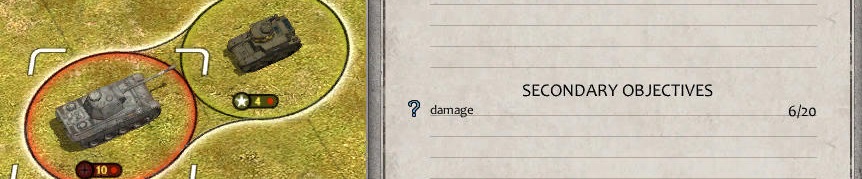
- damage.jpg (68.69 KiB) Viewed 3710 times
Re: Editor issues
Posted: Wed Jun 20, 2018 4:06 pm
by bru888
Erik, I think it's because you have the Killer being defined when you should have that information under Target. The Killer should be GB/Swordfish and the Target should be Italy/battleship.
Re: Editor issues
Posted: Wed Jun 20, 2018 4:08 pm
by terminator
Re: Damage counter
Posted: Wed Jun 20, 2018 4:12 pm
by bebro
edit NM, misunderstood you
Re: Editor issues
Posted: Wed Jun 20, 2018 5:54 pm
by GabeKnight
bru888 wrote:Erik, I think it's because you have the Killer being defined when you should have that information under Target. The Killer should be GB/Swordfish and the Target should be Italy/battleship.
Yep, I think the same. Wrong trigger setup. No unit under "killer" (e.g. just the player's nation/team) and the target definition should be BB
Re: Editor issues
Posted: Thu Jun 21, 2018 8:21 am
by Erik2
Thanks.
So Unit Definitions should be relabeled Killer Definitions.
Edit: But this also means you cannot leave the Killer blank, you must put something there.
At least the trigger didn't work when I had the target entered correctly, but no killer.
Re: Editor issues
Posted: Thu Jun 21, 2018 9:24 am
by Shards
It does say Killer definition at the top?
But yeah, I can see how this could be clearer as a trigger, I don't know the underworkings, but it might be better if Killer and Target were mirrored and had all the same options (nation/type/etc)?
Editor issues
Posted: Thu Jun 28, 2018 8:18 am
by Erik2
Cropping the rigfht side of some (large) maps does not work. Tried smaller crops (10 hexes) without luck.
Cropping bottom (20 hexes) or left side (10 hexes) works OK.
Re: Editor issues
Posted: Thu Jun 28, 2018 12:07 pm
by bebro
Erik2 wrote:Cropping the rigfht side of some (large) maps does not work. Tried smaller crops (10 hexes) without luck.
Cropping bottom (20 hexes) or left side (10 hexes) works OK.
I do sometimes have similar probs, but sooner or later get it to work usually. Can you attach the map here?
(or do you prefer to mail it)
Re: Editor issues
Posted: Thu Jun 28, 2018 12:11 pm
by bebro
Erik2 wrote:Aha, I see.
Too bad you don't get to test the event graphics though.
You could launch in cam mode, and trigger the events manually that are supposed to display those pics. The happy nuking to the next scn...

 Confusion between Killer and Target