Page 1 of 1
Can I disable the mouseover clicking noise?
Posted: Fri Apr 06, 2018 9:32 am
by Quoda
Is there a way to turn off the clicking noise that happens when I run my mouse over buttons in the menus?
It is actually painful for me so I haven't been able to play the game yet.
Re: Can I disable the mouseover clicking noise?
Posted: Fri Apr 06, 2018 9:35 am
by zakblood
welcome to the forum, will look for an answer now and see if it's possible to disable just that noise, but may take input from a developer for it to happen, so can't say it will be either a quick answer or one that's is able to be done either
while your waiting, you can disable the music and also alter the volume of the clicks and noises in game so for now it won't be an issue and you can play
Re: Can I disable the mouseover clicking noise?
Posted: Fri Apr 06, 2018 3:12 pm
by pipfromslitherine
Are you playing Sanctus Reach? There are no focus sfx playing for me on the main menu. Or are you talking about the launcher menu?
Cheers
Pip
Re: Can I disable the mouseover clicking noise?
Posted: Mon May 07, 2018 5:10 pm
by Quoda
It's the Launcher buttons in Sanctus Reach.
Also is there a way to speed up the mouse movement? The sensitivity of my mouse seems to take a hit in the game and it drags a little but when I tab out its fine.
Re: Can I disable the mouseover clicking noise?
Posted: Mon May 07, 2018 7:53 pm
by pipfromslitherine
I don't think it is possible to turn off the sounds on the main menu. However you could use the sound mixer (on W10 right click the volume entry on the system tray and go to Open Volume Mixer, W7 just left click the volume entry and choose Mixer). You can mute the launcher app and it should remember going forward.
It sounds like the game may just be running a little slowly on your system. Try reducing the shadow quality, assuming slowdown is in battle.
Cheers
Pip
Re: Can I disable the mouseover clicking noise?
Posted: Sat May 12, 2018 8:04 am
by Quoda
The workaround for the noises on the launcher is helpful and has worked, thanks!
The mouse sensitivity slowdown happens as soon as I get into the main menu. I haven't got into a battle yet.
Re: Can I disable the mouseover clicking noise?
Posted: Mon May 14, 2018 4:23 pm
by pipfromslitherine
What are your system specs? Though slowdown in the main menu is very uncommon.
Cheers
Pip
Re: Can I disable the mouseover clicking noise?
Posted: Mon May 14, 2018 4:54 pm
by zakblood
How to get a DirectX Diagnostic file:
1. click on "START"
2. click "run"
3. type in "dxdiag" and click "OK"
4. check through the tabs and perform all tests
5. click "Save all Information..." and save the text file to a location of your choice
We prefer that DxDiag files be posted as message attachments rather than pasted into the body of the post.
once the report has been made, just attach it to your post with first adding the file to a zip, which is then permitted to attach to the forum
Re: Can I disable the mouseover clicking noise?
Posted: Thu May 17, 2018 10:11 am
by Quoda
I think I've managed to attach it as you asked.
Re: Can I disable the mouseover clicking noise?
Posted: Thu May 17, 2018 10:11 am
by zakblood
thanks looking now
Windows 10 Home 64-bit (10.0, Build 15063) (15063.rs2_release.170317-1834)
Processor: Intel(R) Core(TM) i5-7600K CPU @ 3.80GHz (4 CPUs), ~3.8GHz
Memory: 16384MB RAM
System DPI Setting: 96 DPI (100 percent)
Card name: NVIDIA GeForce GTX 1080
Display Memory: 16250 MB
Dedicated Memory: 8086 MB
Shared Memory: 8164 MB
Current Mode: 1920 x 1080 (32 bit) (60Hz)
Native Mode: 1920 x 1080(p) (60.000Hz)
Driver Date/Size: 27/10/2017
old
Realtek High Definition Audio
Date and Size: 16/08/2016
old
Drive: C:
Free Space: 136.4 GB
Total Space: 237.9 GB
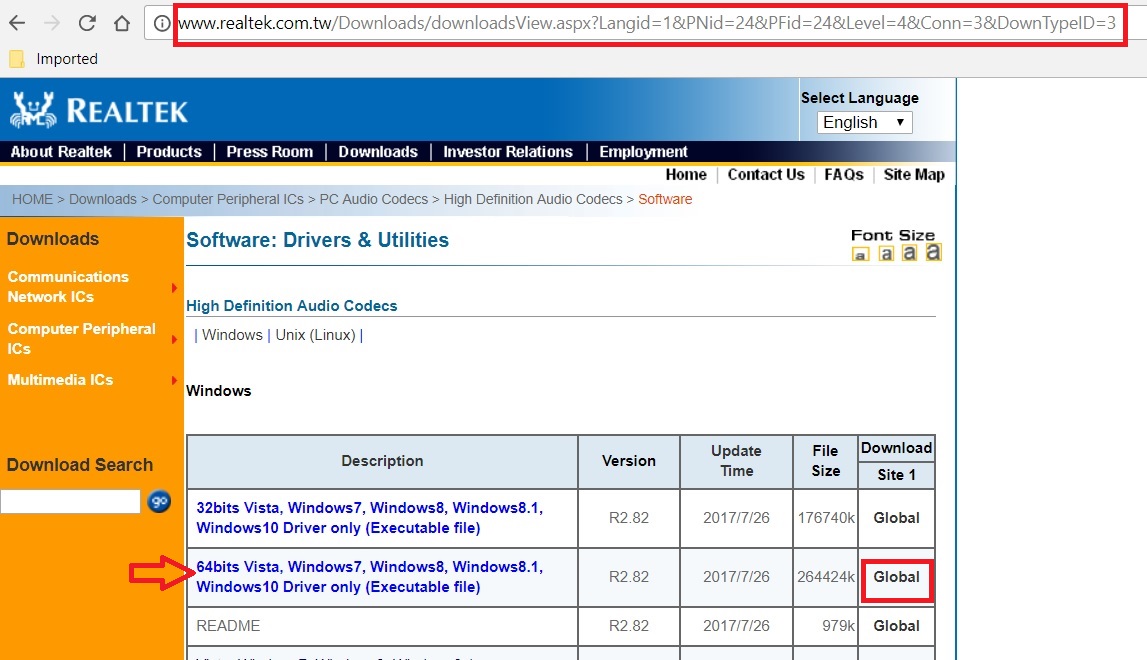
- realtec.jpg (171.62 KiB) Viewed 5064 times
latest drivers
http://www.nvidia.co.uk/download/driver ... 4118/en-uk

- Untitled.jpg (29.9 KiB) Viewed 5064 times
Re: Can I disable the mouseover clicking noise?
Posted: Thu May 17, 2018 3:33 pm
by pipfromslitherine
SHIFT+Q will give you a framerate counter on the top left of the screen. What values are you seeing in the main menu?
Cheers
Pip