Page 1 of 1
Popup Dialog
Posted: Thu Jan 18, 2018 5:26 am
by terminator
2 problems :
- 1.There is a
scroll bar wich seems inactive

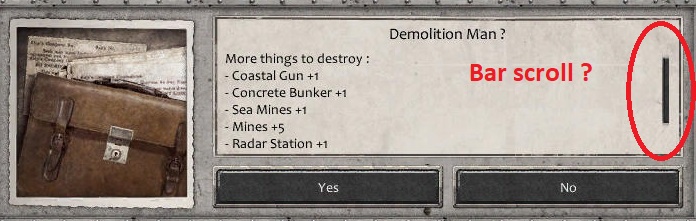
- PopupDialog.jpg (68.62 KiB) Viewed 1294 times
- 2. The option
< None > for the trigger disappears if we want to choose a trigger :
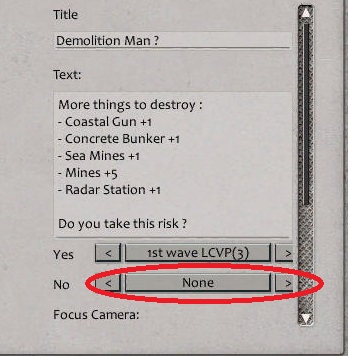
- PopupDialog(2).jpg (44.79 KiB) Viewed 1294 times
Re: Popup Dialog
Posted: Tue Apr 17, 2018 12:19 pm
by terminator
Is it possible to resolve this bug in the next patch ?
thanks
Re: Popup Dialog
Posted: Tue Apr 17, 2018 2:47 pm
by Shards
Hi,
I'm not sure i understand the second issue? I'm using that second option to select items okay in my scenarios?
I've asked for the guys to take a look at the scroll bar issue
Re: Popup Dialog
Posted: Tue Apr 17, 2018 4:04 pm
by terminator
Okay, it's a detail but maybe easy to fix.
For example, you have chosen "Trigger 1" for the response "No". Later you want to resume the option "None" for the response "No", it is not possible anymore. The only solution is to begin again everything. We cannot re-choose any more the option " None " (for the response "Yes" or "No") when we made a change.
Re: Popup Dialog
Posted: Sun Jun 10, 2018 8:30 am
by terminator
Focus Camera not working in the
Dialog Popup Effect.
The solution is to use
Focus Camera Effect before. It works perfectly.
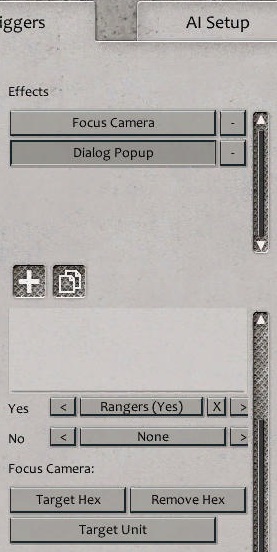
- Dialog&Focus.jpg (49.52 KiB) Viewed 981 times
So which is the utility to have a function Focus Camera (which does not work) in the Dialog Popup Effect