Page 1 of 1
Please correct max zoom typo in variables.txt
Posted: Wed Jan 10, 2018 11:28 pm
by bru888
The guys reported, and I confirmed, that there is a typo in the variables.txt file that prevents zooming the display out to a maximum that can be very useful and enjoyable. It is a hidden error that many players, myself included, may not even be aware is a problem, believing it to be just a normal constraint.
The file contains this typo:
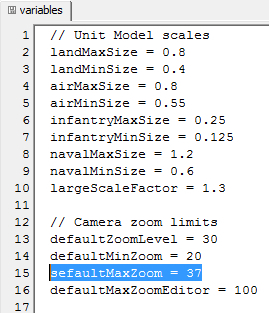
- Capture467.jpg (104.61 KiB) Viewed 3984 times
Which should be corrected to this:
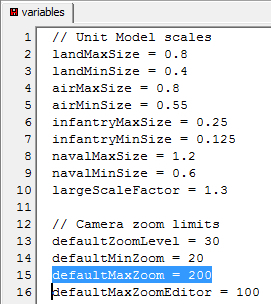
- Capture468.jpg (104.07 KiB) Viewed 3984 times
The difference is huge. Before, this was the maximum zoom on
Oahu Invasion:
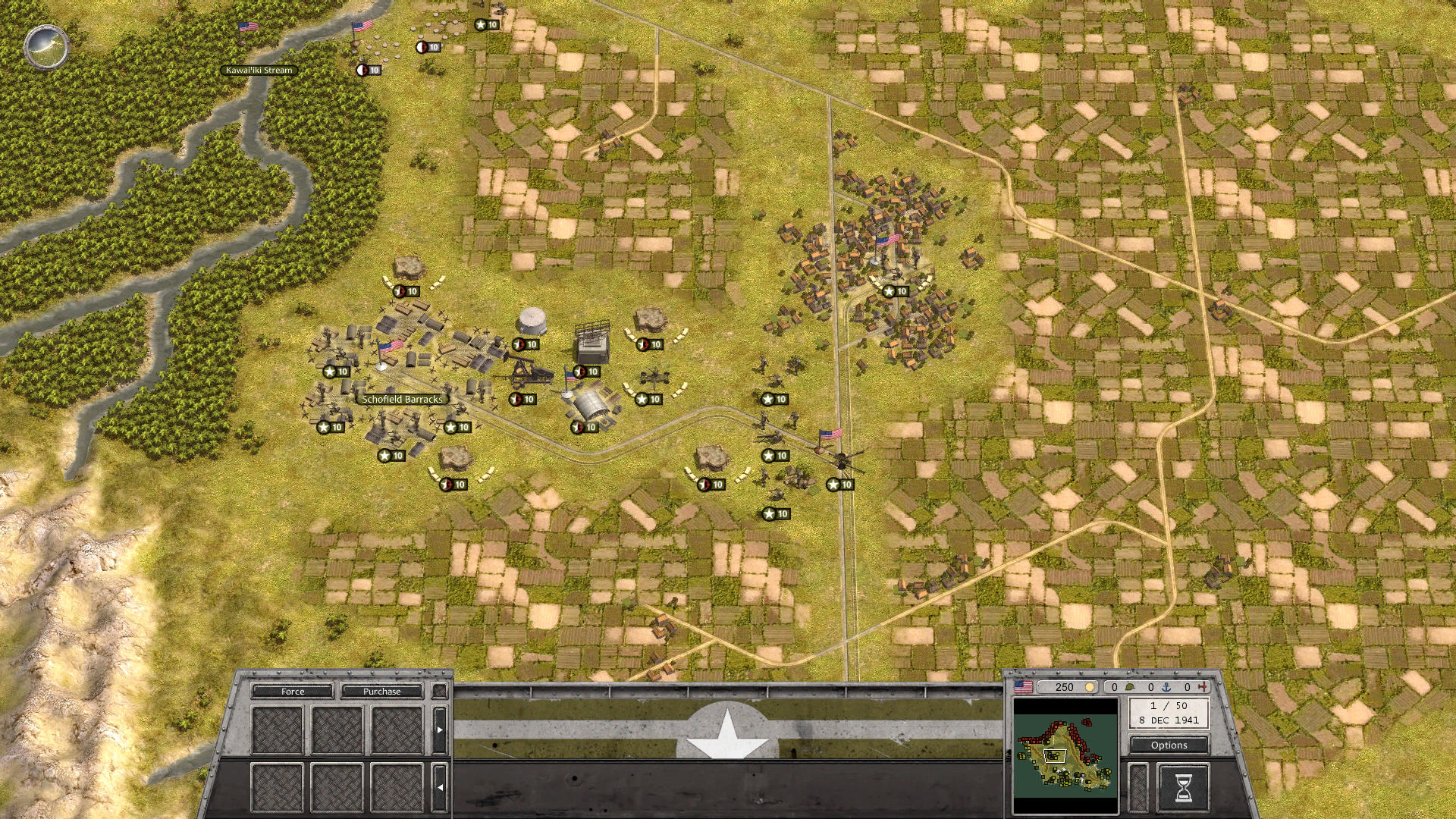
- Screenshot 1.jpg (679.51 KiB) Viewed 3985 times
Now, with the file corrected, the maximum zoom is this, which is beautiful:
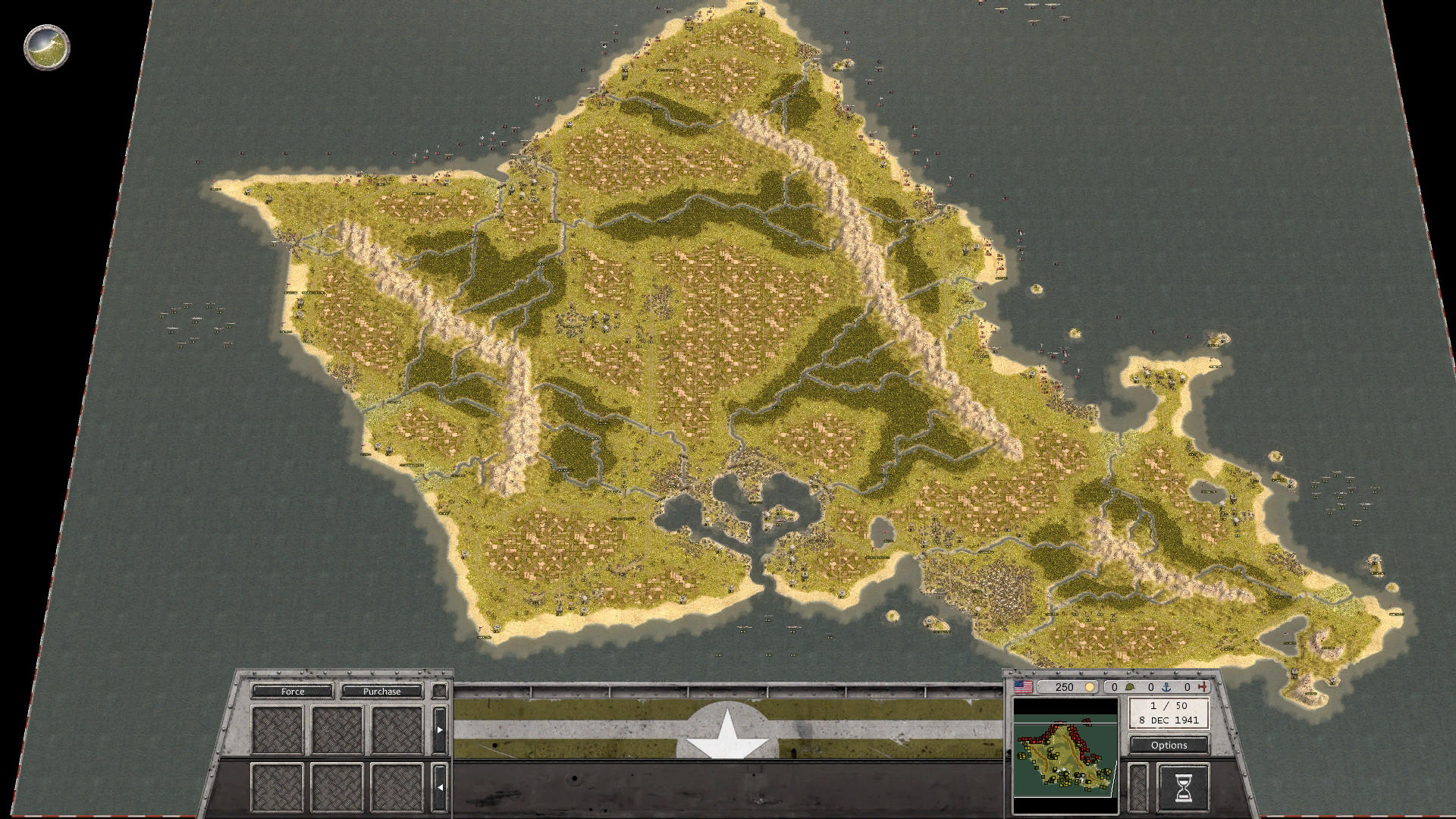
- Screenshot 2.jpg (462.38 KiB) Viewed 3985 times
Please correct this simple typographic error so that more players may enjoy this game to its fullest capacity.
Re: Please correct max zoom typo in variables.txt
Posted: Wed Jan 10, 2018 11:48 pm
by bru888
Somebody said that the "37" may have been intentional and that the value is still operational despite the misspelling of "sefault."
I repeat my comments here: ". . . but don't you think 37 is still a bit low, regardless? Maybe 200 is too huge for some computers but some additional maximum zoom surely is not a terrible burden for most computers. And '37' just seems like an odd number, you know? Like 'sefault' seems like an odd word? Like perhaps both were just sloppily typed and left as is for years.
"You take a look at those two screens above and tell me that it isn't a desirable feature to be able to see more of a map that beautiful. As well as practical. The only thing that I can think of is that the developers are afraid of crashing computers with too much zoom. I don't have cutting edge equipment myself but I had no problem zooming all the way out like that."
Please consider this request and comment as necessary.
Re: Please correct max zoom typo in variables.txt
Posted: Thu Jan 11, 2018 12:29 pm
by Erik2
+1
I set max = 200 for the editor as well. Quite handy for large-map scenarios.
Re: Please correct max zoom typo in variables.txt
Posted: Thu Jan 11, 2018 9:31 pm
by steevodeevo
A min of 10 and max 100 works a treat for me and a few others who mentioned it. My computer isn't all that impressive these days and it seems fine with the changes, runs sweet.
By the way, I personally think the enhanced zooms do enhance game-play somewhat, enabling you to select a better and optimised field of view, as well as adding cosmetic candy, (zoomed in for unit details I have never seen and out for breathtaking terrain shots), which really shows off the engine.
I guess its possible way-back-when that the max and min were hard coded / set to modest values to ensure performance on all machines was adequate, but with the 64 bit upgrade and multiple passes over the years at code optimisation, the defaults seem a bit conservative and don't do the game justice IMO.
Re: Please correct max zoom typo in variables.txt
Posted: Fri Jan 12, 2018 2:01 am
by bru888
Either by bug or by design, it's a lost opportunity to enhance the enjoyment this game. Most people are not going to know about modding a settings text file buried in the program folders. That being the case, the opportunity to zoom out is artificially and unknowingly constrained. In short, people don't know what they are missing.
Re: Please correct max zoom typo in variables.txt
Posted: Fri Jan 12, 2018 2:49 am
by Navman2854
bru888 wrote:Either by bug or by design, it's a lost opportunity to enhance the enjoyment this game. Most people are not going to know about modding a settings text file buried in the program folders. That being the case, the opportunity to zoom out is artificially and unknowingly constrained. In short, people don't know what they are missing.
bru, amen brother! Would love a better zoom (out especially)

Re: Please correct max zoom typo in variables.txt
Posted: Thu Jun 14, 2018 3:35 pm
by jchastain
New player here who was wondering why the zoom was SO restrictive to the point of being completely pointless. After searching through all the configs, I did a search here and voila! Huge help! There have been several patches and a new DLC since this post. For the sake of new players, please consider making an adjustment to the max zoom in an upcoming patch. Thanks for posting this here guys. Very helpful.
Re: Please correct max zoom typo in variables.txt
Posted: Thu Jun 14, 2018 4:39 pm
by bru888
jchastain wrote:New player here who was wondering why the zoom was SO restrictive to the point of being completely pointless. After searching through all the configs, I did a search here and voila! Huge help! There have been several patches and a new DLC since this post. For the sake of new players, please consider making an adjustment to the max zoom in an upcoming patch. Thanks for posting this here guys. Very helpful.
Our pleasure, we're sure.

[I was going to delete the rest of this post in which I originally wondered why editing the variables.txt file was no longer working but I figured I would insert this reminder instead,
TO ME, the dummy

, as well as to others who hopefully are much smarter but have never encountered this before. It's this: At least on my laptop, with Windows 8.1, I cannot edit files directly in C:\Program Files\Slitherine\Order of Battle - WWII\ or any other folder in C:\Program Files\ for that matter. My stupid text editor tells me that it accepts the change and seems to save it but it does not take; it must be a built-in protection of some sort to prevent hacking. What must be done, dummy me and as advice to others, is to copy the file to the desktop, edit and save it there, then copy it back to C:\Program Files\Slitherine\Order of Battle - WWII\Order of Battle - WW2_64_Data. Would I please remember this in the future?

]
With each OOB update, this editing must be repeated because such revisions are overwritten by the original game program files. So while the developers have corrected the label "sefaultMaxZoom" to "defaultMaxZoom," they left the value itself at 37 which is only 17 higher than minimum and 7 more than default. As we saw above, changing the value to "defaultMaxZoom = 200" does the trick nicely, for me at least (full screen, 1920x1080 resolution). I am not sure of this but I would use caution not to put in too high a value on the chance that doing so may cause the program to crash.
Re: Please correct max zoom typo in variables.txt
Posted: Thu Jun 14, 2018 6:56 pm
by Erik2
The devs should simply move this to Options, with a suitable (larger) max zoom.
Re: Please correct max zoom typo in variables.txt
Posted: Fri Jun 15, 2018 12:51 am
by GabeKnight
Erik2 wrote:The devs should simply move this to Options, with a suitable (larger) max zoom.
Agreed. But don't forget the
bottom-border-shift (BBS) that comes with changing the zoom max values. It's especially apparent and annoying during the Sandstorm DLC, that has many maps with positions on the southern edges. Just try to play the very first mission that way:
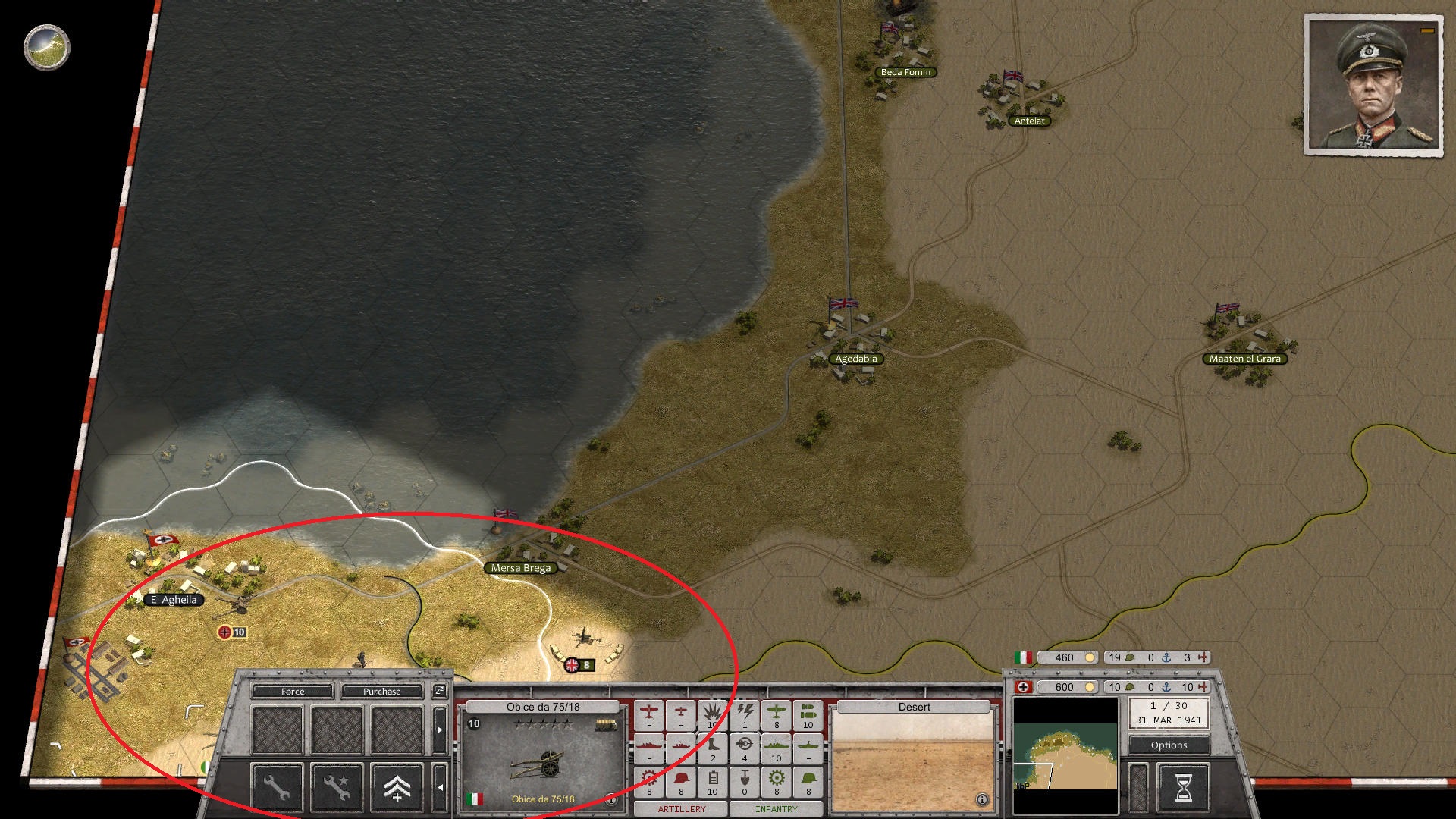
- Screenshot 493.jpg (631.9 KiB) Viewed 3583 times
Re: Please correct max zoom typo in variables.txt
Posted: Fri Jun 15, 2018 7:37 am
by Erik2
We also need a 'maximize window' option that will fit the window to the current screen.
Re: Please correct max zoom typo in variables.txt
Posted: Fri Jun 15, 2018 10:48 am
by Shards
Erik2 wrote:We also need a 'maximize window' option that will fit the window to the current screen.
aka Borderless Window?
Re: Please correct max zoom typo in variables.txt
Posted: Sun Jun 17, 2018 3:29 pm
by Erik2
Something like Borderless, but a built-in better Windows handling than the current solutio.
Borderless has a few quirks if I remember correctly.