Page 1 of 1
Guide to producing AAR's?
Posted: Sun Dec 03, 2017 6:26 pm
by stockwellpete
Is there anybody willing to provide an "idiots guide" to doing an AAR? I would like to reproduce the guide for use with the FOG2 Digital League. Thanks.

Re: Guide to producing AAR's?
Posted: Mon Dec 04, 2017 7:37 am
by vakarr
F2 – Takes a screenshot and dumps it to
Documents\My Games\FIELDOFGLORY2\SCREENS. There is also a Windows program on your computer called Snipit which allows you to select a part of the screen and take a snapshot of it (and draw lines and arrows on it). It's easier just to press F2, though.
So, get the screen how you want it and press F2, and keep doing that at each point in the battle where you want a screenshot. After the battle, go to
My Documents\My Games\FIELDOFGLORY2\SCREENS and you will see a bunch of numbered files. You can then view the files and perhaps rename them so you know what they show. If you want to add arrows and text to the pictures, you can use Paint or another picture editing program to do that. Now go back to the forum. When you reply to a message or create a new thread, at the bottom of the screen you will see this:

- Upload attachment screen
- Capture.PNG (15.41 KiB) Viewed 3012 times
Click on the Upload attachment tab and you will see this:
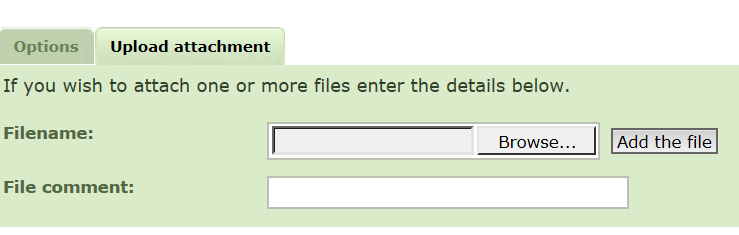
- Upload attachment tab
- Capture2.PNG (18.16 KiB) Viewed 3012 times
Click on the Browse button, browse to your screen shot, then click Add the file. You can also type something in the File Comment box to say what it is. You can do this many times, until you see something like this:
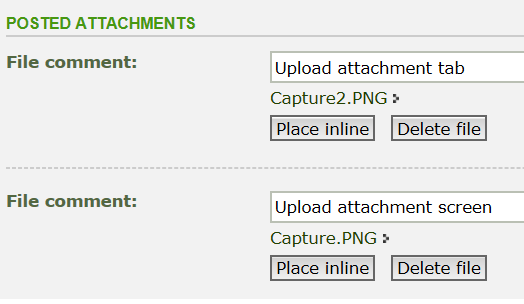
- Place inline screen
- Capture3.PNG (13.01 KiB) Viewed 3012 times
Now click where you want a picture to go, and click "Place inline" to put that picture there, add more text, then do it again.
Re: Guide to producing AAR's?
Posted: Mon Dec 04, 2017 8:53 am
by stockwellpete
Vakarr, thank you very much, that is fabulous. I will add it to the FOG2DL forum today.

Re: Guide to producing AAR's?
Posted: Mon Dec 04, 2017 9:33 am
by vakarr
Just remember, it's not enough to click on the Browse button and find to your screen shot, you must then also click on Add the file and wait for the file to be uploaded.
Re: Guide to producing AAR's?
Posted: Mon Dec 04, 2017 5:01 pm
by rbodleyscott
You may need to run your screenshots through Paint.net or similar to save them in a less memory-intensive quality - otherwise they may exceed the file size limit for attachments.