Page 1 of 1
Amount of units currently assigned to this team
Posted: Sun Oct 15, 2017 9:26 am
by terminator
When you place a
plane in a hangar and you removed the hangar, the deleted unit is always assigned to this team.
Example :
I have place one plane in a hangar and then I removed the hangar. The result is that the deleted unit still count for the AI team :
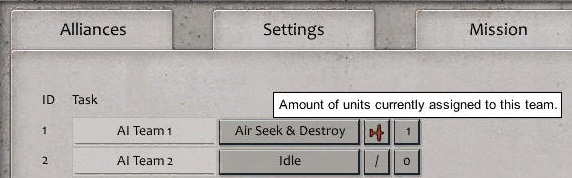
- AIteam.jpg (38.66 KiB) Viewed 1682 times
It seems to me that it was already specified, but this bug is always present and it made me lose at least 2 hours

Re: Amount of units currently assigned to this team
Posted: Sun Oct 15, 2017 9:49 am
by Erik2
If you delete a hangar that contains a plane unit, are you sure the plane is deleted as well?
If I remember correctly, the plane unit is still available.
Re: Amount of units currently assigned to this team
Posted: Sun Oct 15, 2017 10:14 am
by terminator
No, the plane is deleted from the game but not from the AI team.
There is the same Bug with
Airstrip.
Ex: In my scenario, there is only one plane.
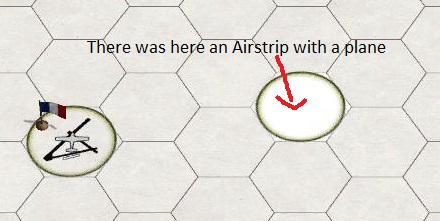
- Airstrip(1).jpg (35.85 KiB) Viewed 1674 times
The deleted plane is still count :
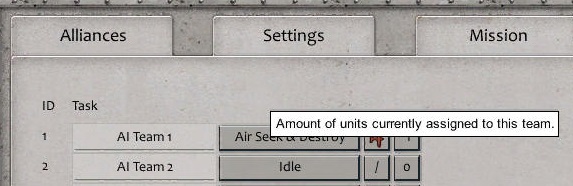
- Airstrip(2).jpg (40.25 KiB) Viewed 1674 times
The problem is that now in my scenario it is impossible to have the exact count for the planes AI.
I have to control for each plane

Bug easy to reproduce

Re: Amount of units currently assigned to this team
Posted: Mon Oct 16, 2017 5:54 pm
by terminator
First picture : there is no units in this Team :
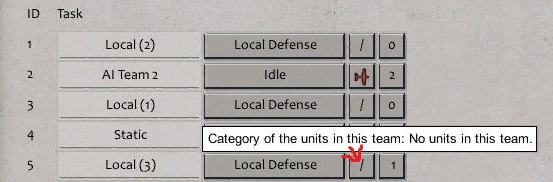
- Bug(1).jpg (34.9 KiB) Viewed 1660 times
Second picture : there is one unit assigned to this Team

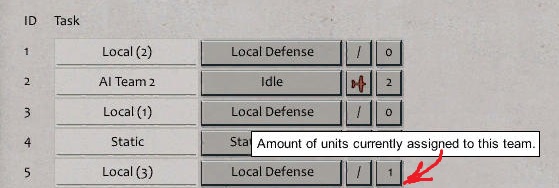
- Bug(2).jpg (35.23 KiB) Viewed 1660 times
The conclusion is : do not put air units in hangar or air strip at the beginning of the scenario
Re: Amount of units currently assigned to this team
Posted: Thu Oct 19, 2017 7:23 pm
by uran21
Plane is in reserve. You should be able to delete it from the unit list accessed from the editor. Lowe right row of bottons.
Re: Amount of units currently assigned to this team
Posted: Thu Oct 19, 2017 9:12 pm
by terminator
Understood, thank you.
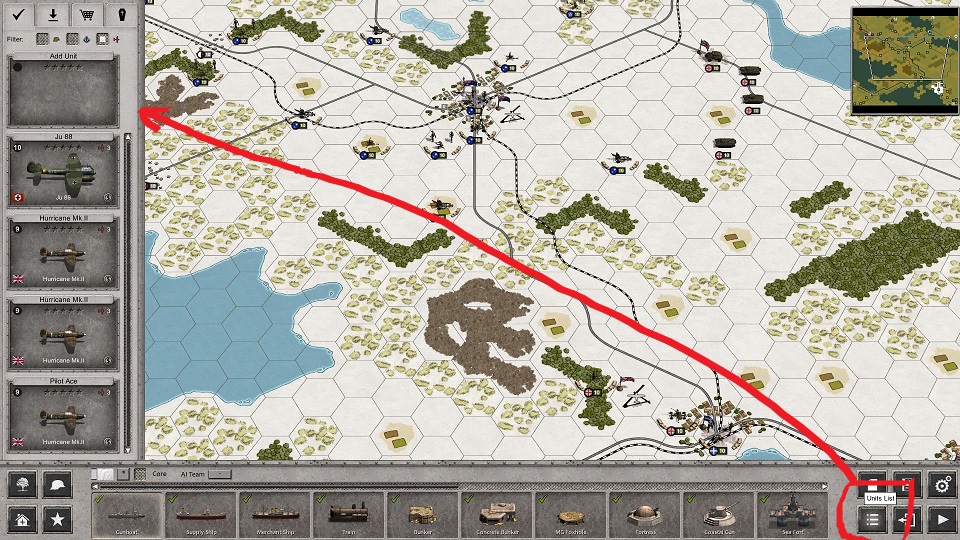
- Units_List.jpg (309.62 KiB) Viewed 1629 times
Re: Amount of units currently assigned to this team
Posted: Fri Oct 20, 2017 7:11 am
by uran21
Furthermore besides using usual air filter you can toggle between Display deployed units and Display reserve units in the Unit List to be able to find it faster. If you are scrolling through Display all alive units, deployed units have their required command points number displayed in white while undeployed units have their CP number displayed in green. If you want to place undeployed unit on the map, select unit from the list and Shift + Click on the map.
Also you can Add Units to reserve list (undeployed on the map) directly from list of Units at the bottom screen. Or you can select units on the map and Undeploy them with one click. Later those undeployed units could be placed on the map with deploy trigger effect.
Re: Amount of units currently assigned to this team
Posted: Sat Oct 21, 2017 5:06 am
by terminator
Thank you for this good advice. Useful to know

For example, it is impossible to unlock a commander to a Spawn Unit but it is possible to unlock a commander to an Undeployed Unit and deploy this unit in a second time.