Page 1 of 1

I can't issue a challenge

Posted: Fri Oct 13, 2017 7:45 pm
by Spitfyr
I already host a game and it's still going. But now i can't make a new challenge. The game freezes and it says this:
Unhandled Exeception!
Exp Address: 0x004909093D
Exp Code: 0x0000094 Exp Flags: 0

Re: I can't issue a challenge

Posted: Fri Oct 13, 2017 8:13 pm
by pipfromslitherine
Please post the contents of the error.log file found in My Documents/My Games/FieldOfGlory2. Note that this is generated immediately after the crash, so if you have run the game since, there should be a timestamped error file from the time of the crash.

Cheers

Pip

Re: I can't issue a challenge

Posted: Fri Oct 13, 2017 8:25 pm
by Spitfyr
20171013_214053
VER:10000 BUILD:10009
PLATFORM: WINDOWS
WinVer:6.1.7601.23915
0: NVIDIA GeForce GT 120
CPU String: GenuineIntel
Stepping ID = 7
Model = 7
Family = 6
Extended model = 1
CLFLUSH cache line size = 64
APIC Physical ID = 1
CPU Brand String: Intel(R) Core(TM)2 Quad CPU Q8200 @ 2.33GHz
Cache Size = 2048K
Found DirectX Version Number: 4.09.00.0904
Creating Device.....
MonkeyInitStart
MIS: Found DD
MIS: IsHW
MIS: SetCoop
MIS: Setting Disp Mode
MIS: Done Init 3D Device
MIS: Tex Enum
MIS: SDRS
MIS: Init Decal Render
TS: Start
TS: IAPSent
TS: UILoaded
INITIAL LOAD 9020
TS: BattleObj
TS: Managers
TS: BFBB
TS: LT
TS: InitDLUI
TS: Messages
TS: Ended
The following was returned by the server:
0

[{"ErrorCode":"0","clientVersion":"00010000","login":"Spitfyr"}]

Rebuilding the Device....
SUCCESS!!!! Rebuilding the Device....
Rebuilding the Device....
SUCCESS!!!! Rebuilding the Device....
Rebuilding the Device....
SUCCESS!!!! Rebuilding the Device....
######## EXCEPTION: 0xC0000094 at address: 0x0049093D
SEARCHING: C:\Program Files (x86)\Steam\steamapps\common\Field of Glory II;C:\Program Files (x86)\Steam\steamapps\common\Field of Glory II;C:\Windows
C:\Program Files (x86)\Steam\steamapps\common\Field of Glory II;C:\Program Files (x86)\Steam\steamapps\common\Field of Glory II;C:\Windows
FAILED
LOAD: Eine Datei kann nicht erstellt werden, wenn sie bereits vorhanden ist.


0: SYMFROM: GetLastError = 487
0: SymGetSymFromAddr64(): GetLastError = 487
0: SYMFROM: GetLastError = 487
0: SymGetSymFromAddr64(): GetLastError = 487
0: SYMFROM: GetLastError = 487
0: SymGetSymFromAddr64(): GetLastError = 487
0: SYMFROM: GetLastError = 487
0: SymGetSymFromAddr64(): GetLastError = 487
0: SYMFROM: GetLastError = 487
0: SymGetSymFromAddr64(): GetLastError = 487
0: SYMFROM: GetLastError = 487
0: SymGetSymFromAddr64(): GetLastError = 487
0: SYMFROM: GetLastError = 487
0: SymGetSymFromAddr64(): GetLastError = 487
0: SYMFROM: GetLastError = 487
0: SymGetSymFromAddr64(): GetLastError = 487
0: SYMFROM: GetLastError = 487
0: SymGetSymFromAddr64(): GetLastError = 487
0: SYMFROM: GetLastError = 487
0: SymGetSymFromAddr64(): GetLastError = 487
0: SYMFROM: GetLastError = 487
0: SymGetSymFromAddr64(): GetLastError = 487
0: SYMFROM: GetLastError = 487
0: SymGetSymFromAddr64(): GetLastError = 487
0: SYMFROM: GetLastError = 487
0: SymGetSymFromAddr64(): GetLastError = 487
0: SYMFROM: GetLastError = 487
0: SymGetSymFromAddr64(): GetLastError = 487
SGA: BaseThreadInitThunk
BaseThreadInitThunk
SGA: RtlInitializeExceptionChain
RtlInitializeExceptionChain
SGA: RtlInitializeExceptionChain
RtlInitializeExceptionChain

Re: I can't issue a challenge

Posted: Mon Oct 30, 2017 2:47 pm
by Ouistiti
Same problem here when clicking New Challenge
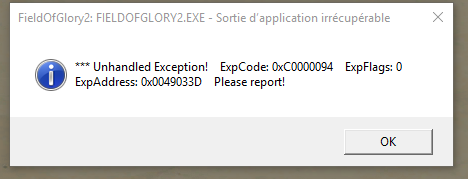
FOG multi.PNG
FOG multi.PNG (21.05 KiB) Viewed 2492 times
20171030_152546
VER:10000 BUILD:10009
PLATFORM: WINDOWS
WinVer:10.0.15063.296
0: Intel(R) HD Graphics Family
CPU String: GenuineIntel
Stepping ID = 1
Model = 5
Family = 6
Extended model = 4
CLFLUSH cache line size = 64
CPU Brand String: Intel(R) Core(TM) i3-4005U CPU @ 1.70GHz
Cache Size = 256K
Found DirectX Version Number: 4.09.00.0904
Creating Device.....
MonkeyInitStart
MonkeyInitStart Is Windowed
MIS: Found DD
MIS: IsHW
MIS: SetCoop
MIS: Done Init 3D Device
MIS: Tex Enum
MIS: SDRS
MIS: Init Decal Render
TS: Start
TS: IAPSent
TS: UILoaded
INITIAL LOAD 13673
TS: BattleObj
TS: Managers
TS: BFBB
TS: LT
TS: InitDLUI
TS: Messages
TS: Ended
The following was returned by the server:
0

[{"ErrorCode":"0","clientVersion":"00010001","login":"Ouistiti"}]

######## EXCEPTION: 0xC0000094 at address: 0x0049033D
SEARCHING: C:\Program Files (x86)\Slitherine\Field of Glory II;C:\Program Files (x86)\Slitherine\Field of Glory II;C:\WINDOWS
C:\Program Files (x86)\Slitherine\Field of Glory II;C:\Program Files (x86)\Slitherine\Field of Glory II;C:\WINDOWS
FAILED
LOAD: Impossible de créer un fichier déjà existant.


SGA: CUIManager::Draw9Slice
CUIManager::Draw9Slice
c:\dev\archon\ui\uimanager.cpp(4618) : +4 bytes (CUIManager::Draw9Slice) 0
SGA: CUIImage::Render
CUIImage::Render
c:\dev\archon\ui\uicomponents.cpp(1862) : +0 bytes (CUIImage::Render) 0
SGA: CUIObject::DoRender
CUIObject::DoRender
c:\dev\archon\ui\uicomponents.cpp(1487) : +0 bytes (CUIObject::DoRender) 0
SGA: CUIManager::RenderObjects
CUIManager::RenderObjects
c:\dev\archon\ui\uimanager.cpp(1482) : +0 bytes (CUIManager::RenderObjects) 0
SGA: CUIManager::RenderObjects
CUIManager::RenderObjects
c:\dev\archon\ui\uimanager.cpp(1572) : +0 bytes (CUIManager::RenderObjects) 0
SGA: CUIManager::RenderObjects
CUIManager::RenderObjects
c:\dev\archon\ui\uimanager.cpp(1572) : +0 bytes (CUIManager::RenderObjects) 0
SGA: CUIManager::RenderObjects
CUIManager::RenderObjects
c:\dev\archon\ui\uimanager.cpp(2006) : +0 bytes (CUIManager::RenderObjects) 0
SGA: UIManagerRenderFunction
UIManagerRenderFunction
c:\dev\archon\ui\uimanager.cpp(1913) : +0 bytes (UIManagerRenderFunction) 0
SGA: CMViewport::Render
CMViewport::Render
c:\dev\monkey11\viewportmonkey.cpp(190) : +16 bytes (CMViewport::Render) 0
SGA: CUIManager::Render
CUIManager::Render
c:\dev\archon\ui\uimanager.cpp(2338) : +0 bytes (CUIManager::Render) 0
SGA: CGame::Update
CGame::Update
c:\dev\ba2_tile_shader\game\game.cpp(1001) : +0 bytes (CGame::Update) 0
SGA: CPlatform::MainLoop
CPlatform::MainLoop
c:\dev\archon\platform_windows.cpp(920) : +11 bytes (CPlatform::MainLoop) 0
SGA: WinMain
WinMain
c:\dev\archon\platform_windows.cpp(530) : +11 bytes (WinMain) 0
SGA: __tmainCRTStartup
__tmainCRTStartup
f:\dd\vctools\crt_bld\self_x86\crt\src\crtexe.c(578) : +29 bytes (__tmainCRTStartup) 0
SGA: BaseThreadInitThunk
BaseThreadInitThunk
SGA: RtlGetAppContainerNamedObjectPath
RtlGetAppContainerNamedObjectPath
SGA: RtlGetAppContainerNamedObjectPath
RtlGetAppContainerNamedObjectPath

Re: I can't issue a challenge

Posted: Mon Nov 13, 2017 10:56 pm
by Ouistiti
Hey!

The problem remains, it's OK since I can just accept challenges from others but I still can't send any new challenge.
Is it going to be fixed? Or do I need to do something?

Re: I can't issue a challenge

Posted: Tue Nov 14, 2017 5:45 pm
by pipfromslitherine
That is very odd. Does the new patch not fix it? It looks like you are running in French, so perhaps that could be the defining issue.

Cheers

Pip

Re: I can't issue a challenge

Posted: Thu Nov 16, 2017 4:33 pm
by Ouistiti
Indeed my OS is running in French but i run the game in english. I tried to run it in french too just in case but it doesnt make any difference.

The patch did not fix it nope.

Re: I can't issue a challenge

Posted: Thu Nov 16, 2017 4:41 pm
by pipfromslitherine
Have you tried a full reinstall? It could be a missing UI screen or something like that - it isn't an issue that has been reported by anyone else.

What screen rez are you running in?

Cheers

Pip

Re: I can't issue a challenge

Posted: Tue Feb 13, 2018 10:02 pm
by Spitfyr
I made a full reinstallation. And now it works.

Re: I can't issue a challenge

Posted: Tue Feb 13, 2018 11:20 pm
by rbodleyscott
Spitfyr wrote:I made a full reinstallation. And now it works.
Glad to hear it.