Page 1 of 1
New computer - where previous game files?
Posted: Sat Jul 29, 2017 5:26 pm
by conboy
I just got a new computer and the new (reinstalled) OoB doesn't have the records of the previous scenarios I have played (through Steam). Any idea how I can move my OoB history from one computer to another? I'd also like to get the replay files moved over, etc.
any help would be appreciated!
conboy
Re: New computer - where previous game files?
Posted: Sat Jul 29, 2017 5:41 pm
by bru888
I don't have the Steam version, and all bets are off if you are on a Mac, but don't you have this folder on the old computer, in My Documents? Then you would just copy the contents of the highlighted folders from the old computer to the same location on the new one.
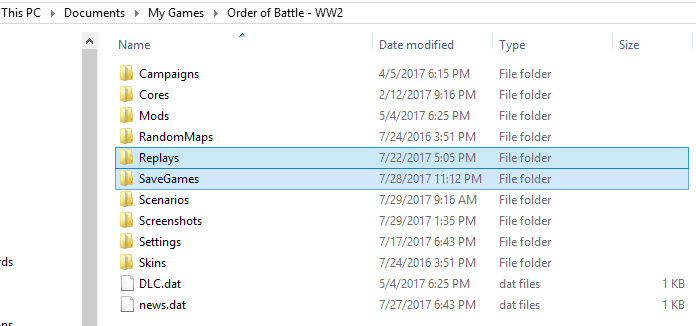
- 2017-07-29_01.jpg (133.12 KiB) Viewed 960 times
You may also be interested in copying over the following, if any:
* Campaigns and Scenarios (mods) that you have downloaded and stored in those folders
* Mods that you have downloaded and stored in this folder (the game automatically stores Battle of Britain in here if you install it)
* Settings, so you don't have to set them again in the new game installation. Make sure the game versions are the same (currently 3.4.2)
EDIT: Actually, I think you do want Settings to copy over because it contains the unlocked.dat file which is a record of which campaign scenarios you have played and won.
Re: New computer - where previous game files?
Posted: Sat Jul 29, 2017 7:30 pm
by conboy
Hoot mon! It worked. saved me a few hours trying to figure that one out. Thanks, hombre - see you on the other side!