Page 1 of 1
Simple Question.
Posted: Sun Jul 02, 2017 3:50 am
by kayeldee02
can someone please explain how these work?
Re: Simple Question.
Posted: Sun Jul 02, 2017 4:08 am
by GiveWarAchance
Hard to tell is that an objective ingame? On objectives the number means the supply you get from it. The supply number on captured places starts very low and then gradually increases over time.
Re: Simple Question.
Posted: Sun Jul 02, 2017 5:01 am
by bru888
Re: Simple Question.
Posted: Tue Jul 04, 2017 12:31 am
by kayeldee02
GiveWarAchance wrote:Hard to tell is that an objective ingame? On objectives the number means the supply you get from it. The supply number on captured places starts very low and then gradually increases over time.
they always pop up when I'm trying to place a new unit, I've tried to place units on/adjacent to one with no joy but on a couple occasions I was allowed to place my new unit.
Basically, I'm just looking for a clear explanation of what the numbers mean and whatever the digit in the pointed corner means.
But now, apparently I need to read the manual again.
Re: Simple Question.
Posted: Tue Jul 04, 2017 1:55 am
by bru888
Here's what it is telling you. Click on each image.
I have two infantry units in reserve. I have not placed any units on the map yet. The green +170 number is the total amount of supply that I have available given the amount of towns that I own at the start of the scenario and how much supply they all put out (the white numbers):
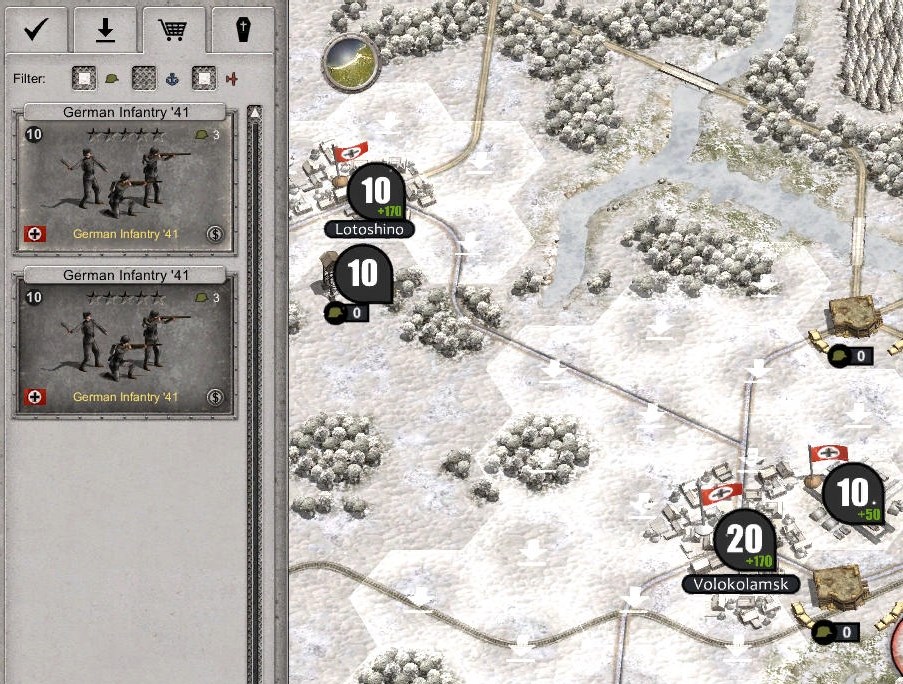
- Screenshot 2.jpg (222.5 KiB) Viewed 2810 times
Notice how, after I place one infantry unit that requires 3 supply, the number has now decreased to +167.
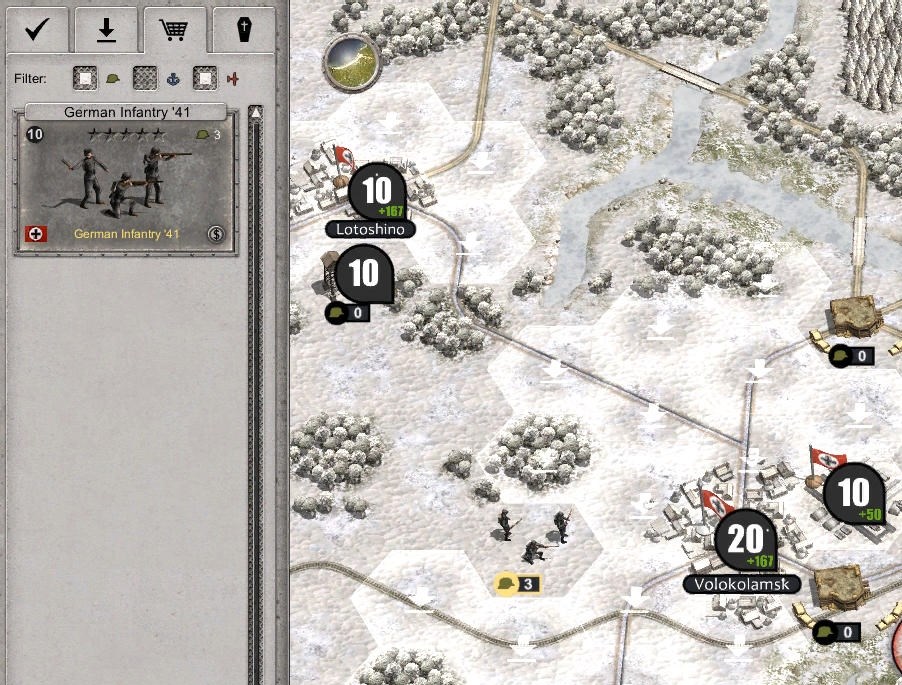
- Screenshot 3.jpg (206.26 KiB) Viewed 2810 times
Given enough resources, I can continue to purchase and place units on the map until this green number approaches zero.
Sorry for merely posting manual pages but you were not very specific with your original question. You did not say, for example, that you were looking to place units on the map.
By the way, the airfield shown in my example is also reporting on supply (+50) but this is air supply, not ground supply.
Re: Simple Question.
Posted: Tue Jul 04, 2017 10:40 am
by GiveWarAchance
That was a good reply with pictures and clear explanation. Bru sounds like a professional tutorial maker.
Re: Simple Question.
Posted: Tue Jul 04, 2017 10:11 pm
by kayeldee02
excellent reply, should prove quite insightful...next question.. how do I increase command points??
Re: Simple Question.
Posted: Tue Jul 04, 2017 10:49 pm
by bru888
kayeldee02 wrote:excellent reply, should prove quite insightful...next question.. how do I increase command points??
I am still assuming you are setting up to play someone else's scenario and not designing your own. If so, there are cheat codes for this purpose.
Perhaps during the deployment stage, but certainly right after you start the scenario, you can increase command points by typing Shift + C (that is, hold down the shift key and type the letter "c") to open the Command Console. In the dialog box, type one of the following commands according to the type of command points that you wish to increase:
#landcp <value>
Gives <value> more Land Command Points.
#navalcp <value>
Gives <value> more Naval Command Points.
#aircp <value>
Gives <value> more Air Command Points.
For example, if you wanted to add 10 more Land Command Points, you would press Shift + C and then type this: #landcp 10
Re: Simple Question.
Posted: Wed Jul 05, 2017 6:16 am
by kayeldee02
I'm curious how to increase then number without using cheat codes, that's something I generally don't do...except for armada 2526
Re: Simple Question.
Posted: Wed Jul 05, 2017 7:20 am
by kayeldee02
and on a related question: I needed to buy a supply shipbut there were no navl purchases to choose from, as illustrated: question? huh?444
Re: Simple Question.
Posted: Wed Jul 05, 2017 12:39 pm
by bru888
kayeldee02 wrote:I'm curious how to increase then number without using cheat codes, that's something I generally don't do...except for armada 2526
kayeldee02 wrote:and on a related question: I needed to buy a supply shipbut there were no navl purchases to choose from, as illustrated: question? huh?444
The answer to both of these questions is the same. It was designed that way.
The scenario designer determines how many command points are assigned to you at the beginning of the scenario. Occasionally, the designer will include an increase of command points later in the scenario, either as part of a script he had in mind or as an incentive for achieving a secondary objective.
Same thing for the availability of unit types for purchase. The scenario designer apparently left them out because he thought they were not necessary if the scenario you are playing is land-based or he intended that you would not be allowed to add any more ships.
So you will not be able to add command points unless the designer intended for you to do so or you use those cheat codes during gameplay. You will not be able to add naval units to a scenario if the designer did not intend for you to do so unless you decide to add them yourself using the scenario editor.
Re: Simple Question.
Posted: Thu Jul 06, 2017 8:59 pm
by kayeldee02
so command points can only come down from high command??