Page 1 of 1
Check unit strength
Posted: Sun Mar 27, 2016 4:23 am
by earlecook
Hello,
With the "Check Unit(s) Strength" trigger, what are the values related to?
Amount =<> (number value) - How do the values work?
Thank you,
Earle
Re: Check unit strength
Posted: Sun Mar 27, 2016 5:13 pm
by bru888
earlecook wrote:Hello,
With the "Check Unit(s) Strength" trigger, what are the values related to?
Amount =<> (number value) - How do the values work?
Thank you,
Earle
I got it to work in the attached test scenario. Basically, the trigger asks whether the unit's strength number is at, above, or below a certain number such as the default 10. In this test scenario, I made the Japanese unit retreat (using an AI Team and a Setup AI Team effect) once it had taken any damage from the two U.S. units.
My questions would still be about how this Check Unit(s) Strength trigger works for AI Teams (do you set the amount for the cumulative total strength, e.g., 10 units x 10 strength = set it for < 100 if you want the team to retreat when
any team member takes damage or do you leave it at <10 referring to any and all?), how the Difficulty Bonus Compensation option figures in, and what the Unit Definition setting would be used for in this context. See boxed area:
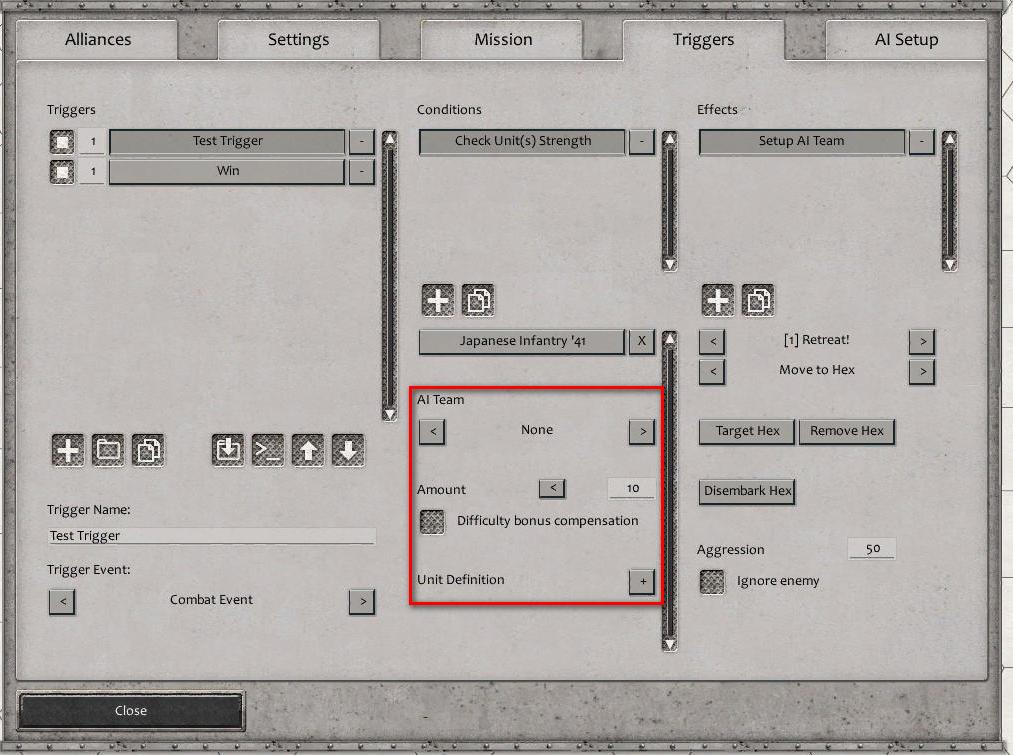
- CheckStrengthTrigger.jpg (102.9 KiB) Viewed 1816 times
EDIT: Upon further thought, my theory about the Difficulty Bonus Compensation is that it adjusts the strength amount for the scenario difficulty setting. 10 is the default unit strength in the Scenario Editor. If you play the scenario on the middle difficulty setting, enemy unit strength remains at 10. However, lower difficulties reduce this amount to 6 and 8 and higher difficulties set enemy strengths at 12 and 14, I believe. This Difficulty Bonus Compensation checkbox, if clicked, will adjust the strength amount set in this trigger by an amount proportional to the difficulty setting when this trigger is used in the scenario.
Re: Check unit strength
Posted: Sun Mar 27, 2016 7:50 pm
by earlecook
Thank you.
I was thinking of the AI setting and whether it was cumulative, glad you thought of it, since I was not clear.
Thanks,
Earle
Re: Check unit strength
Posted: Mon Mar 28, 2016 1:10 am
by bru888
Yes, hopefully we will get an answer to those remaining questions.
Re: Check unit strength
Posted: Sat Aug 26, 2017 7:31 pm
by bru888
bru888 wrote:My questions would still be about how this Check Unit(s) Strength trigger works for AI Teams (do you set the amount for the cumulative total strength, e.g., 10 units x 10 strength = set it for < 100 if you want the team to retreat when any team member takes damage or do you leave it at <10 referring to any and all?), how the Difficulty Bonus Compensation option figures in, and what the Unit Definition setting would be used for in this context.
I believe I have answers for two of those three questions. If ANY unit in the AI Team falls below the indicated strength level, the trigger activates. As an example, attack and damage just one Japanese unit in this revised test scenario, and both of them (AI Team 1) will begin exiting the map.
The Unit Definition setting is for when it's not an individual unit or an AI Team are being evaluated, but a Unit Type, Class, or Category.
This is the question that I am still stumped on:
bru888 wrote:EDIT: Upon further thought, my theory about the Difficulty Bonus Compensation is that it adjusts the strength amount for the scenario difficulty setting. 10 is the default unit strength in the Scenario Editor. If you play the scenario on the middle difficulty setting, enemy unit strength remains at 10. However, lower difficulties reduce this amount to 6 and 8 and higher difficulties set enemy strengths at 12 and 14, I believe. This Difficulty Bonus Compensation checkbox, if clicked, will adjust the strength amount set in this trigger by an amount proportional to the difficulty setting when this trigger is used in the scenario.
Is that correct?
