Page 1 of 1
Creating a nation flag
Posted: Fri Jan 22, 2016 9:56 pm
by FOARP
Uggh . . . . every time I start modding a game I haven't modded before I feel incredibly dumb. This time is no different. I want to create a custom nation - I've worked out how to add the nation to the nations.pzdat file, and add a corresponding flag to the panzer corps\ui\purchase folder (they're rectangular so this isn't a problem), but I'm having a really hard time creating the circular flag icon for use in the panzer corps\ui folder. I know they should be 20x20 pixels and basically circular but I have no idea how to make a flag this size. I can shrink a flag to 20x20 pixels no problem, but cropping a circular part of that flag is a total pain in the arse and I have no idea how to do it. GIMP has what seems like a useful rounded-edge selection feature but I can't seem to crop using it. Any ideas?
Re: Creating a nation flag
Posted: Fri Jan 22, 2016 10:05 pm
by BiteNibbleChomp
I use paint.net, but what I do is quite likely possibly on Gimp.
1/ load up a square image of your flag. 21x21 or whatever the roundel is.
2/ load up an existing roundel (the German one is good because its only one colour on the outside)
3/ set the existing roundel to be a layer ABOVE the one you want to edit. You should see a strange coloured border surrounding the Germany thing.
4/ select the bottom layer for editing. erase any colour until all you can see is the German roundel (and do your best not to go over the roundel border. 1px over isn't too bad.)
5/ hide the German layer.
6/ if happy with result, delete German layer and save.
Sure, it won't come out perfect, but it works


- BNC
Re: Creating a nation flag
Posted: Fri Jan 22, 2016 11:04 pm
by FOARP
BiteNibbleChomp wrote:I use paint.net, but what I do is quite likely possibly on Gimp.
1/ load up a square image of your flag. 21x21 or whatever the roundel is.
2/ load up an existing roundel (the German one is good because its only one colour on the outside)
3/ set the existing roundel to be a layer ABOVE the one you want to edit. You should see a strange coloured border surrounding the Germany thing.
4/ select the bottom layer for editing. erase any colour until all you can see is the German roundel (and do your best not to go over the roundel border. 1px over isn't too bad.)
5/ hide the German layer.
6/ if happy with result, delete German layer and save.
Sure, it won't come out perfect, but it works
- BNC
Thanks BNC. So, I've managed to make a custom nation by adding it to the nations file, but it doesn't show up as an option in the nations in the scenario parameters in the scenario editor, though its units and its flag are in the units/flags there. Saving a scenario with the custom nation's troops in doesn't result in a scenario that is visible in the custom scenarios folder when I load up the game - back to the drawing board I guess.
Re: Creating a nation flag
Posted: Fri Jan 22, 2016 11:19 pm
by BiteNibbleChomp
Add the nation to:
nations.pzdat
strings.pzdat
editor_condmap.html
editor_scnparams.html
editor_unitfilter.html
editor_unitparams.html
Make sure it has a valid flag, purchase flag and roundel.
- BNC
Re: Creating a nation flag
Posted: Sat Jan 23, 2016 8:44 am
by FOARP
Thanks a lot - I had searched for data files mentioning nations etc. but didn't know about the strings and editor files.
Re: Creating a nation flag
Posted: Sat Jan 23, 2016 8:58 am
by BiteNibbleChomp
I should add, the html files are in UI folder, the other 2 are in Data.
- BNC
Re: Creating a nation flag
Posted: Sat Jan 23, 2016 10:29 am
by FOARP
Yay! It works!
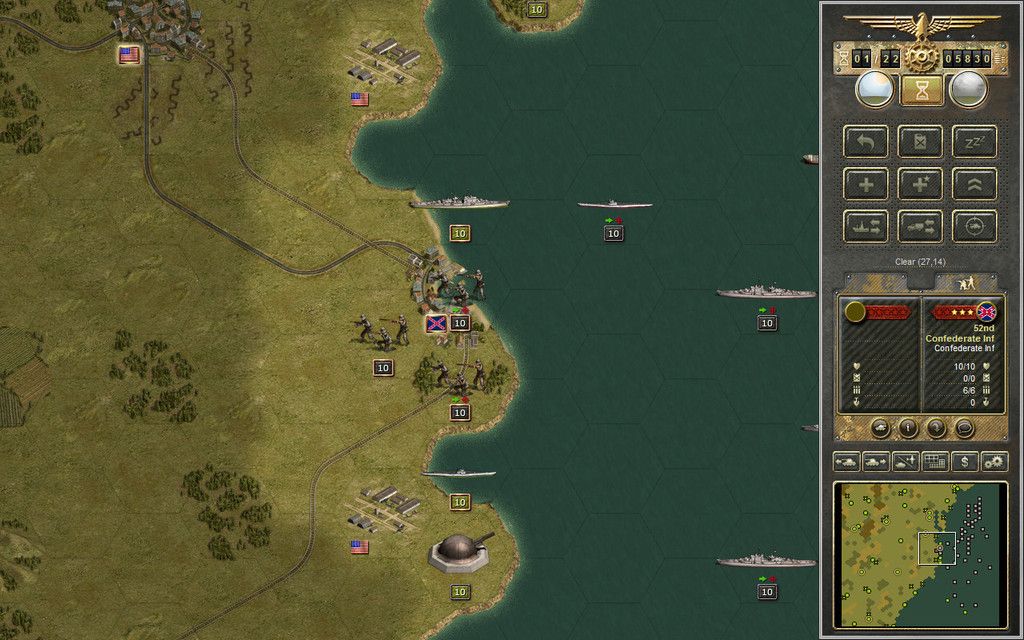
EDIT: I guess I should say that for a while now I've been planning to do a Southern Victory (
https://en.wikipedia.org/wiki/Southern_Victory) mod for HOI4, but HOI4's release still seems a long way off so in the meantime I'm playing around with the idea of making one for PzC.
Re: Creating a nation flag
Posted: Sun Jan 24, 2016 7:33 am
by BiteNibbleChomp
Isn't the CSA flag meant to be inverted? (ie Red background with blue X). Other than that, great work. I look forward to seeing more.
- BNC
