Page 1 of 1
Black Screen
Posted: Wed Nov 26, 2014 4:29 pm
by Abhean
Tutorial (2nd part) display goes all black. According to task manager the program is still running, and I can hear the background music.
This going to be a directX issue also? I am running 11.0 Windows 8.1.
Have attempted to install 9.0c but will not allow me to as I have a later version.
Re: Black Screen
Posted: Wed Nov 26, 2014 4:45 pm
by zakblood
i also have 8.1, and it does allow you to, and is needed for the game to work, run as administrator, and you will be fine, good luck, not that you wont need it and it works 100% with windows 8.1...
Code: Select all
http://www.reddit.com/r/windows8/comments/29dvex/windows_81_minimizing_videogames_at_random/
Code: Select all
http://steamcommunity.com/app/236430/discussions/0/558754260147963856/
common tbh if things happen in the background also, windows will change what your doing, that's maybe why game is still running, just click on the item in the taskbar and that will again make it run full screen
Code: Select all
https://support.microsoft.com/kb/179113/
Re: Black Screen
Posted: Wed Nov 26, 2014 8:13 pm
by Abhean
Humm. These black screen problems are happening at completely random times. Seems to me that if it was a problem within Direct X problem it should be repeatable which it is not. Trying to replicate the quasi crash I found that when I rebooted my system after trying to run the game with me working on some PHP/SQL stuff on the side the game ran for the better part of an hour with no problems. It appears that the game is a pretty big clock cycle hog. Wondering if there are some memory leaks going on that is bogging down my laptop causing these graphics problems.
Still looking though. Any of the testers have these problems during their testing?
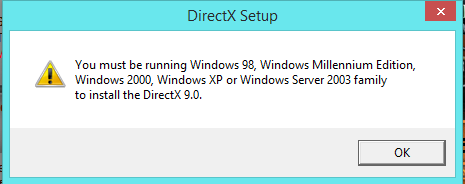
- DX.PNG (9.25 KiB) Viewed 3078 times
Re: Black Screen
Posted: Wed Nov 26, 2014 10:53 pm
by zakblood
you must have other errors on your pc then with 8.1, as it works fine on mine, same o/s with all patches installed, the last link i gave you is the one from MS and explains how to install on 9.0c on windows 8.1, any errors you get will either be hardware related to pc in use or errors in the install of windows, try repair or check the status of your anti virus program while you install or try to install the dx9.0c files from the link...
if it still then gives same error, uninstall the game and make sure the folder is empty and deleted, and reinstall and follow it all the way and say yes again at the end to install all thats needed...
How to get a DirectX Diagnostic file:
1. click on "START"
2. click "run"
3. type in "dxdiag" and click "OK"
4. check through the tabs and perform all tests
5. click "Save all Information..." and save the text file to a location of your choice
We prefer that DxDiag files be posted as message attachments rather than pasted into the body of the post.
sorry also as you may have to make at least 10 posts here before you can link the zip or rar file, its a forum rule i'm afraid
Re: Black Screen
Posted: Thu Nov 27, 2014 9:56 am
by IainMcNeil
The game requires Direct X 9.0c to run. DX9 is completely different to DX 11, don't let the version number fool you. They are unrelated and you can have both installed and different apps needs different versions.
You need to find out what is stopping DX 9.0c installing or you are going to have a variety of issues with the game. I'm surprised it runs at all to be honest.