Page 1 of 1
Adding/Changing Nations?
Posted: Fri Oct 31, 2014 12:23 am
by maguro
Hi everyone,
I'm trying to make an ETO campaign but I can't seem to properly add new countries. I read a previous post about trying to change a minor nation to the country you want rather than adding a new one and I tried changing the nations.pzdat and strings.pzdat, so an existing nation would then become Finland. Although the name changes in the Scenario Parameters: Nations of the Editor, It doesn't let me select neutral/axis/allied, and In a test scenario the nation doesn't show up in the purchase screen. Clearly I'm missing something. Anyone got any ideas?
And a second question, Is there a way to add national borders for countries that are not neutral?
Re: Adding/Changing Nations?
Posted: Fri Oct 31, 2014 10:26 am
by Soldberg
If you would like to change or expand the nation / Flags pool, then you need after an appropriate pattern, rewrite or expand the following files:
- Data\equipment.pzeqp
- Data\nations.pzdat
- Data\strings.pzdat
- Graphics\Overlays\flags.png
- Localizations\... (optional)
- UI\flags\...
- UI\purchase\flags\...
- UI\editor_actunit.htm
- UI\editor_condmap.htm
- UI\editor_scnparams.htm
- UI\editor_unitfilter.htm
- UI\editor_unitparams.htm
Alternatively, you can also (directly) download my
flag mod ... Infos for the mod at
streitmacht.de or
designmodproject.de (both in German)...
Your second question ...
Directly and easily, you can not set border ... The same problem we had to solve in "Legacy of Versailles". We have to expand the file: Graphics \ Tiles \ LayerMarkers.png
so for example ...
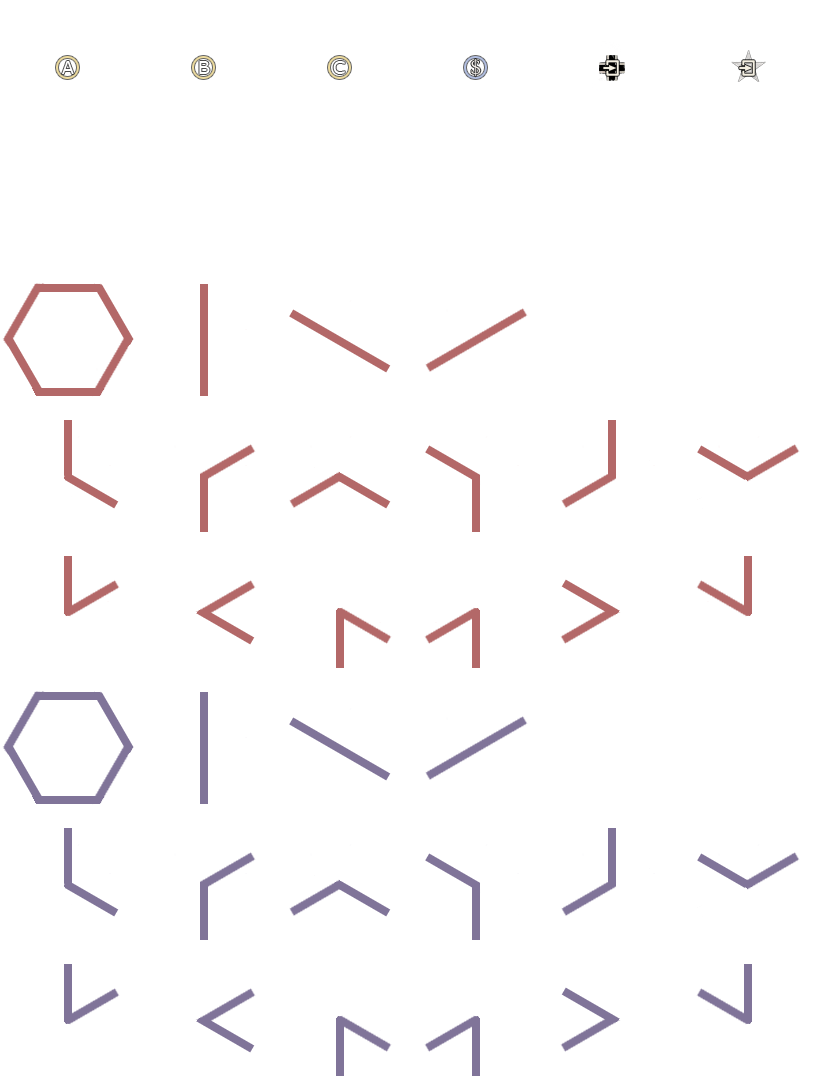
- LayerMarkers.png (45.22 KiB) Viewed 3437 times
For LoV we have expanded a "little" more our marker layer ... As a result, it looks like this ...
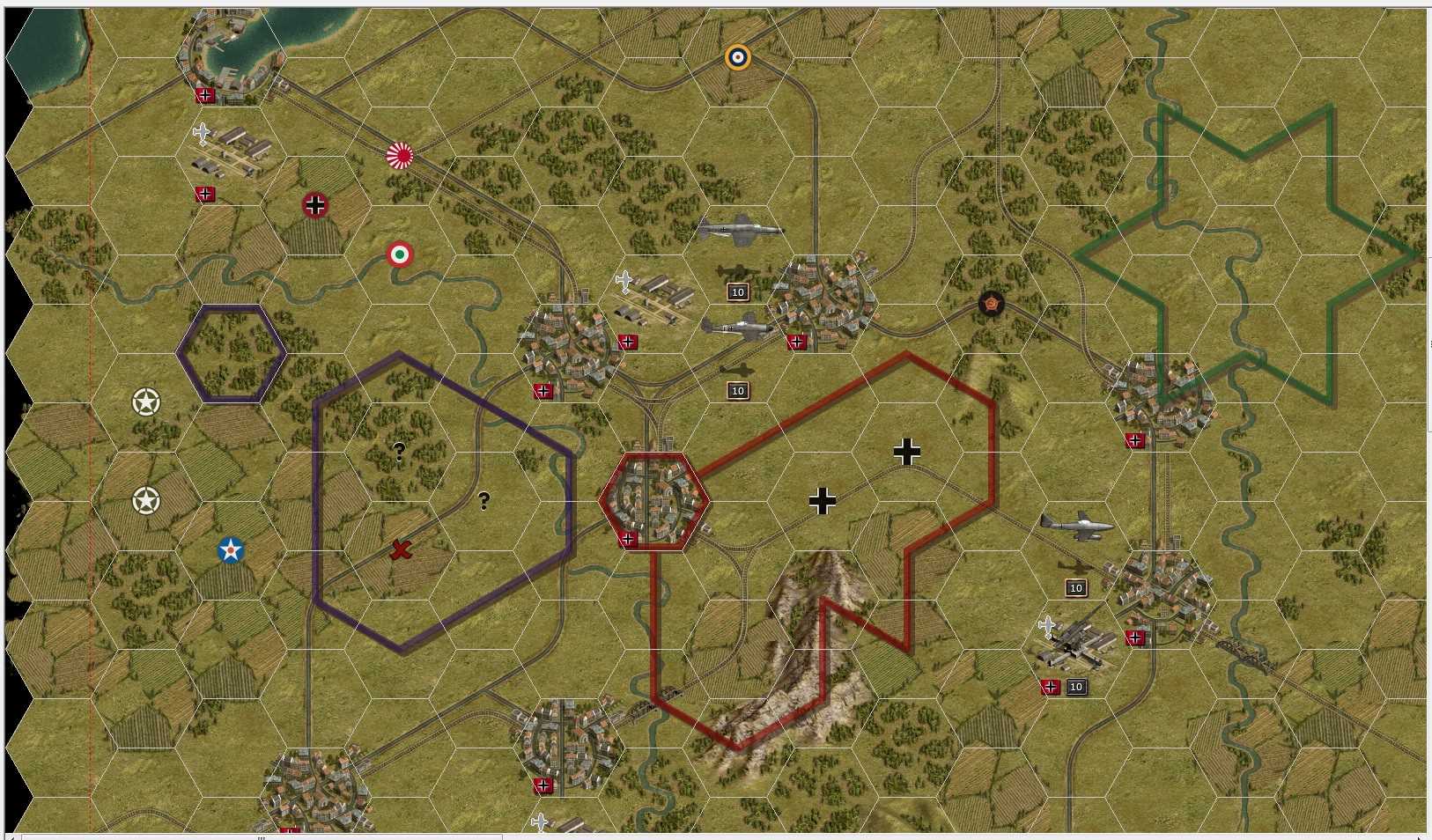
- TEST_layermarkers.jpg (249.9 KiB) Viewed 3437 times
Re: Adding/Changing Nations?
Posted: Sat Nov 01, 2014 8:00 am
by maguro
Thanks for the info! Looks a bit more complex than I imagined. It's not as straight forward as what I'm used to, like adding new units etc. but your mod looks like what I had in mind for the flags. I'll give it a try.
Re: Adding/Changing Nations?
Posted: Mon Nov 03, 2014 8:44 am
by peterw
Checking LoV is a good idea.
If you still find it to complicate adding a new nation, you can first change an existing nation.
In this way you don't need to add/change a lot at once, but you can change one sing part and it's still running...
If you want a campaign with the new country, you need to change the following file too:
Data\campaign.pzdat
Re: Adding/Changing Nations?
Posted: Wed Nov 05, 2014 9:16 pm
by maguro
Thanks! LoV looks like the way to go. The list of scenarios look like fun too. I'll give it a try.
Re: Adding/Changing Nations?
Posted: Fri Nov 28, 2014 10:01 am
by BiteNibbleChomp
maguro wrote:Hi everyone,
I'm trying to make an ETO campaign but I can't seem to properly add new countries. I read a previous post about trying to change a minor nation to the country you want rather than adding a new one and I tried changing the nations.pzdat and strings.pzdat, so an existing nation would then become Finland. Although the name changes in the Scenario Parameters: Nations of the Editor, It doesn't let me select neutral/axis/allied, and In a test scenario the nation doesn't show up in the purchase screen. Clearly I'm missing something. Anyone got any ideas?
And a second question, Is there a way to add national borders for countries that are not neutral?
A quicker way than editing all the system files AND the graphics is to just edit the graphics. Replace an unused flag (Republican Spain, Blue Germany are good ones) with the new country. In the editor it will still call it "Republican Spain", but no-one sees this apart from those who look in the editor (players won't notice), so why would ti be an issue? I did this in the earlier versions of WWI and am using it in the Mongol mod, and it seems to work well.
- BNC
Re: Adding/Changing Nations?
Posted: Sun Dec 14, 2014 5:59 am
by maguro
That would've been easier and probably given me the result I was looking for. I'll have to try that next time when I add Japan & China. Thanks for the idea!