Page 1 of 2
How to modify the deployment area?
Posted: Fri Sep 07, 2012 8:06 am
by GottaLove88s
Pip, In MP deployment games, only one side can deploy, right? It would be great if you could fix that so both sides can deploy (for 2.0.7

).
But, my actual question is... How do we modify/define the area of the map into which that side's units can deploy? Thanks...
Re: How to modify the deployment area?
Posted: Fri Sep 07, 2012 3:17 pm
by pipfromslitherine
They can deploy to anywhere they can see initially. If you want to increase the area, you can get the SetTileLOS command in the script to open up some areas of the map.
Cheers
Pip
Re: How to modify the deployment area?
Posted: Fri Sep 07, 2012 3:55 pm
by GottaLove88s
So if I push units forward in the Editor, they can deploy anywhere they can see...
Just to be sure I understood, I can use SetTileLOS to increase the LOS for the 1st deployment turn, and reduce it back to normal for the 2nd, move turn? That's perfect...
Re: How to modify the deployment area?
Posted: Fri Sep 07, 2012 4:04 pm
by pipfromslitherine
All correct

.
Cheers
Pip
Re: How to modify the deployment area?
Posted: Fri Sep 07, 2012 4:13 pm
by GottaLove88s
Nice, thanks much Pip
Re: How to modify the deployment area?
Posted: Fri Sep 07, 2012 4:49 pm
by GottaLove88s
Okay...
I just took a look in the forum for SetTileLOS and the only hits are our conversations (plus Granfali) so I did a search in the BA folder...
I find SetTileLOS in Functions.BSF and Tools.BSF...
Which do I need to change to permit a one-off LOS change for the Allies in their deployment phase, cancelled for their move phase...
Sorry to be a techno-dweeb
From Functions.BSF
// Clear the LOS in the area
// Mostly used to clear up area to inform player about event + recon pilot popup explaining event
FUNCTION ClearLOS(x, y, side, radius)
{
int i ;
int j ;
int x2 ;
int y2 ;
for(i=0; i<=radius*2; i++)
{
for(j=0; j<=radius*2; j++)
{
x2 = x + i - radius ;
y2 = y + j - radius ;
if( GetDistanceBetweenTiles(x, y, x2, y2) <= radius )
{
SetTileLOS(x2, y2, side, 1) ;
}
}
}
}
From Tools.BSF
FUNCTION HideUnit (unit)
{
int minX;
int maxX;
int minY;
int maxY;
int i;
int j;
int side ;
minX = GetUnitX(unit) - 1;
maxX = minX + 2 ;
minY = GetUnitY(unit) - 1;
maxY = minY + 2 ;
side = GetUnitSide(unit) ;
// get enemy side
side *= -1 ;
side += 1 ;
for (i=minX; i<maxX; i++)
{
for (j=minY; j<maxY; j++)
{
SetTileLOS(i, j, side, 0) ;
}
}
SetForceVisible(unit, 0) ;
//AddVizUnitText(unit, "IDS_UNIT_DISAPPEARED", "ffffff", 1) ;
}
Re: How to modify the deployment area?
Posted: Fri Sep 07, 2012 6:15 pm
by pipfromslitherine
If memory serves, the skirmish campaigns (the allied special operations ones where you basically are in survival mode, Slith_Allied_Missions I think) do something to open up the deployment area on turn 0, so perhaps check them out?
Cheers
Pip
Re: How to modify the deployment area?
Posted: Fri Sep 07, 2012 7:03 pm
by rf900
Yep, basically goes through every tile setting it to visible.
if( GetTurn() == 0 && GetTileLOS(21, 21, 0)!=1)
{
for(y=22;y<=41;y++)
{
for(x=22;x<=33;x++)
{
SetTileLOS(x,y,0,1) ;
}
}
}
Re: How to modify the deployment area?
Posted: Fri Sep 07, 2012 7:14 pm
by GottaLove88s
Thanks rf,
Two questions please...
1. Which .bsf does this go into? And where?
2. How do I adapt it to make 30x40 of a 40x40 map visible, keeping the far 10x40 invisible?
Really appreciate your (ever excellent) help!
Re: How to modify the deployment area?
Posted: Fri Sep 07, 2012 7:49 pm
by pipfromslitherine
It would go into the scenario BSF file. You would set the loop to cover whichever tiles you wished to make deployable. You can see the X,Y coordinates of tiles in the editor.
Cheers
Pip
Re: How to modify the deployment area?
Posted: Fri Sep 07, 2012 9:16 pm
by GottaLove88s
Thanks guys!
So let's say my map runs from tile 16,16 (bottom left) to tile 55,55 (top right)...
If I create a Scenario.bsf and drop the code below into it...
Will this make 30x40 squares visible for the deployment phase only...?
GL88 making a wild stab at learning code wrote:
if( GetTurn() == 0 && GetTileLOS(16, 16, 0)!=1)
{
for(y=17;y<=56;y++)
{
for(x=17;x<=46;x++)
{
SetTileLOS(x,y,0,1) ;
}
}
}
Re: How to modify the deployment area?
Posted: Sat Sep 08, 2012 8:50 am
by GottaLove88s
PS. What computer language is this code based on? I think I need to bite the bullet and buy a Duffer's Guide to teach me the basics...
Re: How to modify the deployment area?
Posted: Sun Sep 09, 2012 7:14 am
by rf900
Changed the code a bit, I don't think you need the second condition check, not sure why it is used in the mission. For the coordinates I am assuming a map that goes from 16,16 to 45,55, if not change the values.
The code is similar to C, and many others as it just have the basic instruction set.
Code: Select all
if( GetTurn() == 0)
{
for(y=16;y<=55;y++)
{
for(x=16;x<=45;x++)
{
SetTileLOS(x,y,0,1) ;
}
}
}
Re: How to modify the deployment area?
Posted: Sun Sep 09, 2012 9:24 am
by GottaLove88s
Thanks again RF,
I pasted your code straight into a new text file which I called MyScenarioName.BSF.
There's nothing else in that BSF
Code: Select all
if( GetTurn() == 0)
	{

		for(y=16;y<=55;y++)
		{

			for(x=16;x<=45;x++)
			{

				SetTileLOS(x,y,0,1) ;
			}
		}
	}
But I get this error when I run that scenario...
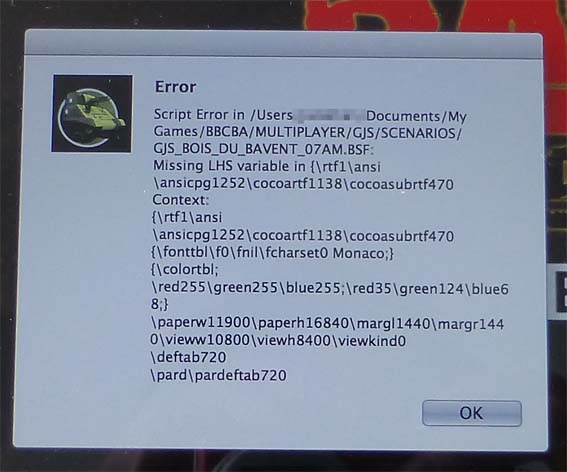
- ScriptError.jpg (55.06 KiB) Viewed 3521 times
I wondered if this error might be happening because I should include your code within a StartTurn(side) function, so I've also tried it this way...
Code: Select all
FUNCTION StartTurn(side)
{

if( GetTurn() == 0)
	{

		for(y=16;y<=55;y++)
		{

			for(x=16;x<=45;x++)
			{

				SetTileLOS(x,y,0,1) ;
			}
		}
	}

}
But still no luck...
Sorry to be so dense. Any ideas what I'm doing wrong?
I suspect it's probably obvious...

Re: How to modify the deployment area?
Posted: Mon Sep 10, 2012 6:54 am
by rf900
Strangely the code is in the tick function, not sure why... If your bsf file already has this function insert only the code needed including the declaration of int x and int y variables at the top.
Code: Select all
// called every game tick.
// You would tend to use this for reactive logic and
// win situations etc
FUNCTION Tick(side)
{
	int counter ;
	int i ;
	int id ;
	int x ;
	int y ;

	if( GetTurn() == 0)
	{
		for(y=16;y<=55;y++)
		{
			for(x=16;x<=45;x++)
			{
			SetTileLOS(x,y,0,1) ;
			}
		}
	}
}
Re: How to modify the deployment area?
Posted: Mon Sep 10, 2012 7:13 am
by GottaLove88s
rf900 wrote:Strangely the code is in the tick function, not sure why... If your bsf file already has this function insert only the code needed including the declaration of int x and int y variables at the top.
Merci RF! Knew you'd solve this easily...
Unfortunately my Scenario.BSF is empty other than this code. I'm only creating it for this purpose... Also I didn't need a Functions.BSF for this scenario, so that doesn't exist either.
So when you write, "if your bsf file already has this function", sadly it doesn't have this function (yet). Can I work around this by copying something from somewhere else? Do I need to create a Functions.BSF?
Re: How to modify the deployment area?
Posted: Mon Sep 10, 2012 8:09 am
by rf900
If you don't have a bsf file then create one with the same name as the scenario and with the code I put above in it. You will need at the top an include to funcions.bsf (it will pick it from the game files)
Code: Select all
include "Functions.BSF"

FUNCTION Tick(side)
{
   int counter ;
   int i ;
   int id ;
   int x ;
   int y ;

   if( GetTurn() == 0)
   {
      for(y=16;y<=55;y++)
      {
         for(x=16;x<=45;x++)
         {
         SetTileLOS(x,y,0,1) ;
         }
      }
   }
}
Re: How to modify the deployment area?
Posted: Mon Sep 10, 2012 8:32 am
by GottaLove88s
Hey RF,
I've copied your code below and pasted it into MyScenarioName.BSF in the same Scenario folder as MyScenarioName.BAM
But I still get the error... I seem to be missing something else?
Do I need to include Tools? Is Tick(side) one of BA's own functions? Do I need a $Default.BSF?
Really sorry that this isn't working... My bad...
rf900 wrote:If you don't have a bsf file then create one with the same name as the scenario and with the code I put above in it. You will need at the top an include to funcions.bsf (it will pick it from the game files)
Code: Select all
include "Functions.BSF"

FUNCTION Tick(side)
{
   int counter ;
   int i ;
   int id ;
   int x ;
   int y ;

   if( GetTurn() == 0)
   {
      for(y=16;y<=55;y++)
      {
         for(x=16;x<=45;x++)
         {
         SetTileLOS(x,y,0,1) ;
         }
      }
   }
}
Re: How to modify the deployment area?
Posted: Mon Sep 10, 2012 8:48 am
by GottaLove88s
PS. RF, thanks for your help. i suspect, it's easier if i show you exactly what i'm doing...
Here's a direct link to the Campaign ->
http://dl.dropbox.com/u/31228617/For%20RF900/GJS.zip
Drop this into your \Multiplayer folder. I'm working on the Bois_du_Bavent scenario.
If you setup a BdB challenge and try to run it, you'll see the error that I see.
Re: How to modify the deployment area?
Posted: Mon Sep 10, 2012 10:18 am
by rf900
In your bsf file I see this, not sure what text editor you used. Use notepad or notepad++ (free).
I attach the corrected file.
Code: Select all
{\rtf1\ansi\ansicpg1252\cocoartf1138\cocoasubrtf470
{\fonttbl\f0\fnil\fcharset0 Monaco;}
{\colortbl;\red255\green255\blue255;\red35\green124\blue68;}
\paperw11900\paperh16840\margl1440\margr1440\vieww14140\viewh10620\viewkind0
\deftab720
\pard\pardeftab720

\f0\fs26 \cf2 include "Functions.BSF"\
\
FUNCTION Tick(side)\
\
\{\
\'a0 \'a0int counter ;\
\'a0 \'a0int i ;\
\'a0 \'a0int id ;\
\'a0 \'a0int x ;\
\'a0 \'a0int y ;\
\'a0 \'a0\
\'a0 \'a0if( GetTurn() == 0)\
\'a0 \'a0\{\
\'a0 \'a0 \'a0 for(y=16;y<=55;y++)\
\'a0 \'a0 \'a0 \{\
\'a0 \'a0 \'a0 \'a0 \'a0for(x=16;x<=45;x++)\
\'a0 \'a0 \'a0 \'a0 \'a0\{\
\'a0 \'a0 \'a0 \'a0 \'a0SetTileLOS(x,y,0,1) ;\
\'a0 \'a0 \'a0 \'a0 \'a0\}\
\'a0 \'a0 \'a0 \}\
\'a0 \'a0\}\
\}}