Page 1 of 1
Understanding "hard attack" rating
Posted: Wed Dec 28, 2011 12:46 pm
by alex0809
At first glance I would have thought that the hard attack rating simply means how much armor it can penetrate, but it seems that the rating is also influenced by the, how to call it, "effectiveness" of the vehicle - for example an Archer with 17pdr has less hard attack rating than a Sherman Firefly with the same gun, same with the 88mm FlaK and the Tiger. On the other hand the Stug IV has the same hard attack than a Panzer IV G even though it also has the same gun - following the Firefly/Archer logic shouldn't it have less hard attack? Well, I guess such inconsistencies are for gameplay reasons and I don't care much about that anyway.
My main question is how the pentration system works (I didn't find anything about that in the manual). Is there a documentation for that somewhere? Without armor/penetration values how am I supposed to know when I can destroy a tank a nd when not?
Posted: Wed Dec 28, 2011 6:26 pm
by Merr
Alex,
I don't know how they came up with that "AP Rating" that you see in the UI, other than simply comparing the differences. It's not a direct armor penetration value but could mean the average. Also, I know the differences in the values are used for the AI when it comes to target selection. If one value is higher than the other, then it might consider the unit with a higher value as more of a threat.
Now, they could display (for the human), the actual penetration values for a given range on the UI ... Maybe something they can look at later.
The penetration works like this (something you don't see, but can read the values in the squadCSV data file) ;
APAttack[0] and APAttack[1] values are the base penetration values. The game
will randomly select a number within those two values to generate a base
penetration value.
Example ... Sherman ;
APAttack[0] = 76
APAttack[1] = 169
APEffective[0]-[4] values are the percentage multiplier at the given range.
The [0]-[4] is the range(tiles), as follows ;
Range 1 = APEffective[0]
Range 2 = APEffective[1]
Range 3 and 4 = APEffective[2]
Range 5 and 6 = APEffective[3]
Range 7+ = APEffective[4]
Example ... Sherman APEffective[0]-[4] ;
APEffective[0] = 83 ... 83% of APAttack at range 1.
APEffective[1] = 83 ... 83% of APAttack at range 2.
APEffective[2] = 67 ... 67% of APAttack at ranges 3 and 4.
APEffective[3] = 53 ... 53% of APAttack at ranges 5 and 6.
APEffective[4] = 42 ... 42% of APAttack at ranges 7 and greater.
Summary Example ... Sherman penetration at ranges below ;
Range 1 and 2 ... (76-169) * 83% = 63-140
Range 3 and 4 ... (76-169) * 67% = 50-113
Range 5 and 6 ... (76-169) * 53% = 40-89
Range 7+ .......... (76-169) * 42% = 31-70
Now, compare that value above with the Armour[0]-[3] vales for the Panther ;
Front ... Armour[0] = 140
Side .... Armour[1] = 60
Rear ... Armour[2] = 60
Top .... Armour[3] = 30
Note that the Sherman cannot penetrate the Panther front armour, however, it
can penetrate the Panthers side armour 100% of the time, at ranges 1 or 2.
At longer ranges, you can see that it can penetrate the side armor, but not 100% of the time.
I hope that helps !!!!
-Merr
Posted: Wed Dec 28, 2011 6:53 pm
by alex0809
Yeah that helps a lot! This should be made sticky imho, not only for players but also for modders.
I wish the devs would have included rough data for this in the UI, though, especially with the new unit info during the game. It could just be two lines like
Armor: 140/60/30
Gun: 63-140/50-113/40-89/31-70
Posted: Wed Dec 28, 2011 7:18 pm
by junk2drive
I added this to the Manual Additions sticky.
Posted: Wed Dec 28, 2011 8:48 pm
by Merr
alex0809 wrote:Yeah that helps a lot! This should be made sticky imho, not only for players but also for modders.
I wish the devs would have included rough data for this in the UI, though, especially with the new unit info during the game. It could just be two lines like
Armor: 140/60/30
Gun: 63-140/50-113/40-89/31-70
To make it "fit" in the UI .... I quickly made an example and added some code and rearrange the icons ...
In this screenshot of the UI, I only used the APAttack[1] value (higher of the two) ...
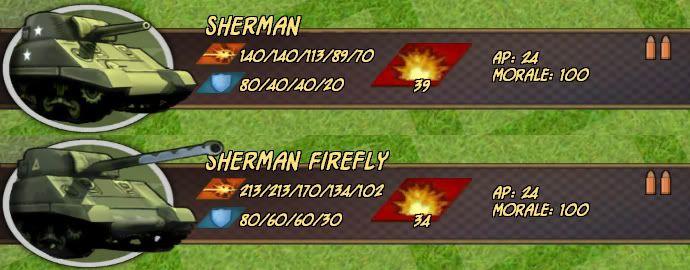
Eh, not too bad ... a little tight squeeze.
To explain what it all means (tooltip) ... Hovering the mouse over the icon will show the range for AP ... 1 / 2 / 3-4 / 5-6 / 7+ .
And for Armor ... it can read ... front/side/rear/top.
-Merr
Posted: Wed Dec 28, 2011 8:54 pm
by alex0809
I meant that tooltip when you CTRL+Click on a unit actually - it would more than fit in that page - but this looks fitting as well.
Posted: Wed Dec 28, 2011 9:28 pm
by Merr
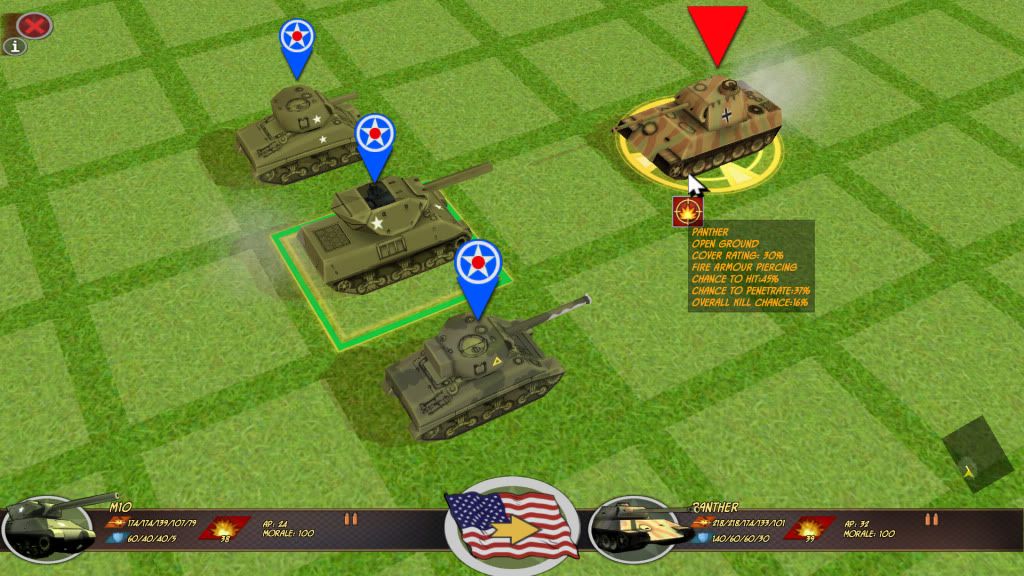
In this screenshot ... (a little blurry from compression).
You can see the M10 gun ratings as ... 174/174/139/107/79
And the Panther Armor ratings ... 140/60/60/30
A quick glance and you can see that the M10 has a "chance" to penetrate the Panthers front at ranges 1 and 2 (showing max pen of 174).
No chance beyond range 2 ... (139/107/79).
The tooltip over the Panther tank shows at range 2, there's a 37% chance to penetrate because it's running a formula using the Panthers armor with the APAttack envelope.
The actual APAttack "envelope" for range 2 = (84-174).
Anyway ... The UI change does help give the player an idea if it can do anything at all !!!!
Posted: Wed Dec 28, 2011 9:30 pm
by Merr
alex0809 wrote:I meant that tooltip when you CTRL+Click on a unit actually - it would more than fit in that page - but this looks fitting as well.
Yes, that can be done too ... I think Pip (Slitherine) was going to look into the matter.
I would think having it on the actual UI would help deduce the situation faster, but hey, it's a tight squeeze for the data placement.
Posted: Thu Dec 29, 2011 7:18 am
by Obsolete
I don't like the squeeze/clutter. Prefer to have it on the CTRL hotkey.... so we finally have something USEFUL there. Also other data like spotting-range etc isn't anywhere in the GUI. These types of info windows have been around since the beginning of Panzer General.... it seems BA is quite over-due in GUI elements that are coming.
Posted: Sun Jan 22, 2012 1:31 am
by robc04_1
Merr wrote:alex0809 wrote:Yeah that helps a lot! This should be made sticky imho, not only for players but also for modders.
I wish the devs would have included rough data for this in the UI, though, especially with the new unit info during the game. It could just be two lines like
Armor: 140/60/30
Gun: 63-140/50-113/40-89/31-70
To make it "fit" in the UI .... I quickly made an example and added some code and rearrange the icons ...
In this screenshot of the UI, I only used the APAttack[1] value (higher of the two) ...
Eh, not too bad ... a little tight squeeze.
To explain what it all means (tooltip) ... Hovering the mouse over the icon will show the range for AP ... 1 / 2 / 3-4 / 5-6 / 7+ .
And for Armor ... it can read ... front/side/rear/top.
-Merr
Is this a mod that you wrote to display this data in the UI? If so, where can we get it and does it work with the demo?
Thanks
Edit: Never mind, I figured out how to do it.
Posted: Mon Jan 23, 2012 11:23 am
by IainMcNeil
The AP rating takes account of more than that. It also accounts for accuracy, range and I cant remember what else. The issuie is there is so much going on to show all the variables would have been completely overwhelming. We've also got completely different types of weapons like flame thowers that need to be covered, artillery indirect fire, infantry assaults attacks. If you look at the squads file you'll see how many stats there are and why we didn't try and show the player everything.
Posted: Mon Jan 23, 2012 1:35 pm
by robc04_1
iainmcneil wrote:The AP rating takes account of more than that. It also accounts for accuracy, range and I cant remember what else. The issuie is there is so much going on to show all the variables would have been completely overwhelming. We've also got completely different types of weapons like flame thowers that need to be covered, artillery indirect fire, infantry assaults attacks. If you look at the squads file you'll see how many stats there are and why we didn't try and show the player everything.
I
really hope that your team can put some effort into making the game more transparent. Lack of transparency is the biggest hurdle for me towards purchasing the game. I think the biggest improvement would be the addition of a detailed log where the player could see all of the combat rolls and other checks. For example, I saw another thread about the perception that random numbers were not being generated properly reguarding ambushes or opportunity fire. If there was a log where the player could see such checks those perceptions would happen much less frequently. Players who are uninterested in this detail could ignore the log, while players like me could use it to understand how the game works. I just don't like playing games that are black boxes. It would also be easier to keep the log code up to date then if it were separate documentation.
I really don't want to be protected from the complexity of the system, I want to embrace it. While I have been playing strategy games for a long time, I am not a hard core wargamer. The documentation in Unity of Command is excellent and explains the entire system along with combat resolution examples. Granted its system doesn't seem to have as many variables, but their documentation really elevates the quality of their game. Please seriously consider this request.
Thank you