Page 1 of 1
Strange event with para unit
Posted: Tue Dec 06, 2011 9:35 pm
by gchristie
Posted this in tech support but don't know how active that section of the forum is when it comes to GS 2.0 questions.
Playing a test game of GS 2.0 as Axis against the AI, and when it was time for me to create SS units I selected my best armor corps and noticed it had two similar but unfamiliar icons next to the picture of the unit (where the experience iron crosses should be). When I tried to upgrade it to SS status (renaming it to add "SS") a pop up box said that it is already a para unit.
I'd attach the save game but attaching files isn't possible. Any help with this based on what I've described?
I did not create a para unit so far in this game and para corps is not a selected game option.
Didn't know we could parachute in tanks in 2.0

Thanks
Posted: Wed Dec 07, 2011 1:45 am
by JyriErik
How about a screen shot of the unit then?
Jyri
Posted: Wed Dec 07, 2011 1:53 pm
by gchristie
JyriErik wrote:How about a screen shot of the unit then?
Jyri
Happy to, but how do I do that?
The forum FAQ says, "Images can indeed be shown in your posts. However, there is no facility at present for uploading images directly to this board. Therefore you must link to an image stored on a publicly accessible web server, e.g.
http://www.some-unknown-place.net/my-picture.gif. You cannot link to pictures stored on your own PC (unless it is a publicly accessible server) nor to images stored behind authentication mechanisms such as Hotmail or Yahoo mailboxes, password-protected sites, etc. To display the image use either the BBCode [img] tag or appropriate HTML (if allowed)."
Can someone recommend a free publicly accessible web server that is intuitive and easy to navigate and I will post a screen shot.
Thanks.
Posted: Thu Dec 08, 2011 4:33 am
by JyriErik
I use imageshack for storing imbedded screenshots, but there are several places that also allow you to do it.
Here's a sample thumbnail. Just "quote" my message and you'll see how it's done.

Jyri
Hi George!
Posted: Thu Dec 08, 2011 12:45 pm
by KingHunter3059
I use '
http://photobucket.com/' - It is free and easy to set up.
Here are the instructions I sent Morris:
==
Morris -
Here are the steps to post an image
I did this for my AAR, and it works, you will need to get an account with a PHOTO Image share website [PISW] (I use PHOTO BUCKET {
http://photobucket.com/})
1) Get a screen shot (ALT-Print Scrn Button) of the game screen.
2) Open Paint (Or any Photo Editor) and Paste the Image
3) Save the file as a .JPG file in the editor, and store it in a folder.
4) Post the image to your PISW account.
5) find the URL of that image.
6) Paste the Url in an IMG Tag, as noted below - then submit the AAR entry.
EXAMPLE POSTING:
=======
Posted: Thu Dec 08, 2011 2:52 pm
by gchristie
Thanks Jay.
I remembered this post, just couldn't find it.
Regards,
George
Posted: Thu Dec 08, 2011 2:57 pm
by KingHunter3059
gchristie wrote:Thanks Jay.
I remembered this post, just couldn't find it.
Regards,
George

Screen shot
Posted: Thu Dec 08, 2011 7:37 pm
by gchristie
OK, giving this a try for the first time, hope it works.
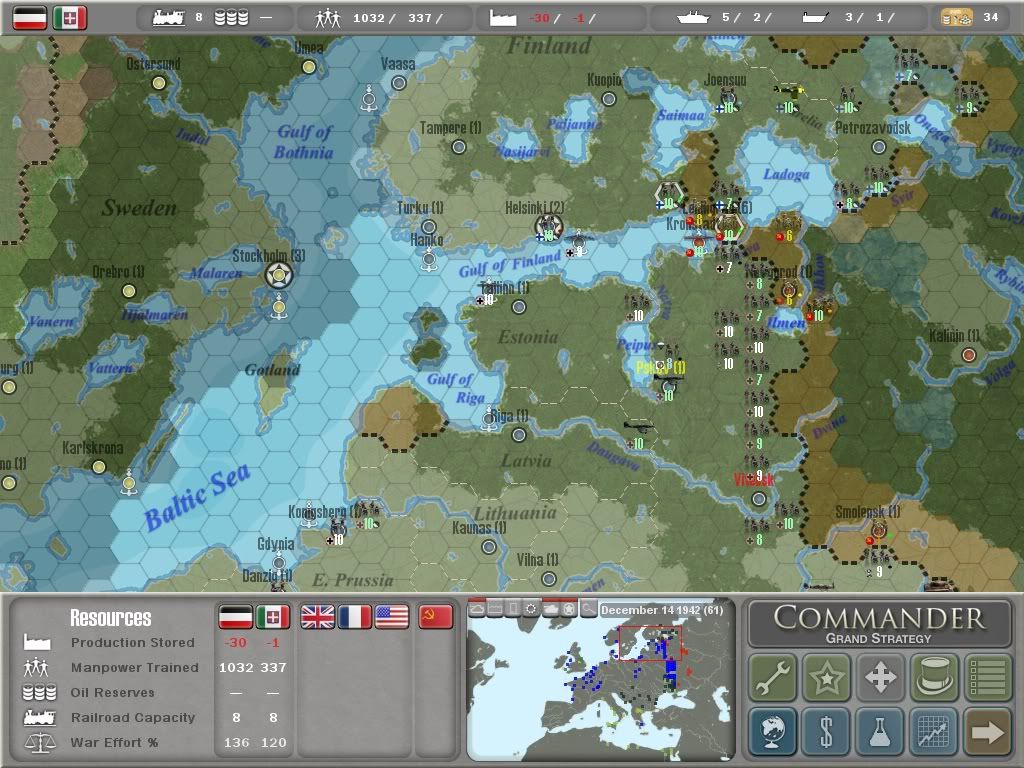
Below should be a picture of what I see in the game...

Well that didn't work, but you can click on the link and see the picture of the message I get as well as the strange icons that show for experience of the armor corps.
How do I embed the image in my post?
Edit: I removed the first three letter from the name of the armor corps then added SS at the end of the name and it upgraded to an SS armor corps. So how did it get the designation as a para corps in the first place?
moderate rkr - fixed the picture link for you.
Re: Screen shot
Posted: Thu Dec 08, 2011 8:54 pm
by KingHunter3059
gchristie wrote:OK, giving this a try for the first time, hope it works.
Below should be a picture of what I see in the game...
http://s1108.photobucket.com/albums/h42 ... ratank.jpg
Well that didn't work, but you can click on the link and see the picture of the message I get as well as the strange icons that show for experience of the armor corps.
How do I embed the image in my post?
Edit: I removed the first three letter from the name of the armor corps then added SS at the end of the name and it upgraded to an SS armor corps. So how did it get the designation as a para corps in the first place?
Like this:
You have to put an '

Posted: Thu Dec 08, 2011 8:58 pm
by gchristie
Just tried bookending the link with the Img bit but still doesn't show the image.
Posted: Thu Dec 08, 2011 10:56 pm
by rkr1958
gchristie wrote:Just tried bookending the link with the Img bit but still doesn't show the image.
I took care of it for you.
Posted: Thu Dec 08, 2011 11:25 pm
by gchristie
Thank you. What did you do in case I need to do this again?
and, is it possible to make any unit a para drop unit if you add FJR in front of the name.
"Look Fritz, it's raining Shermans!"
Posted: Fri Dec 09, 2011 12:12 am
by rkr1958
gchristie wrote:Thank you. What did you do in case I need to do this again?
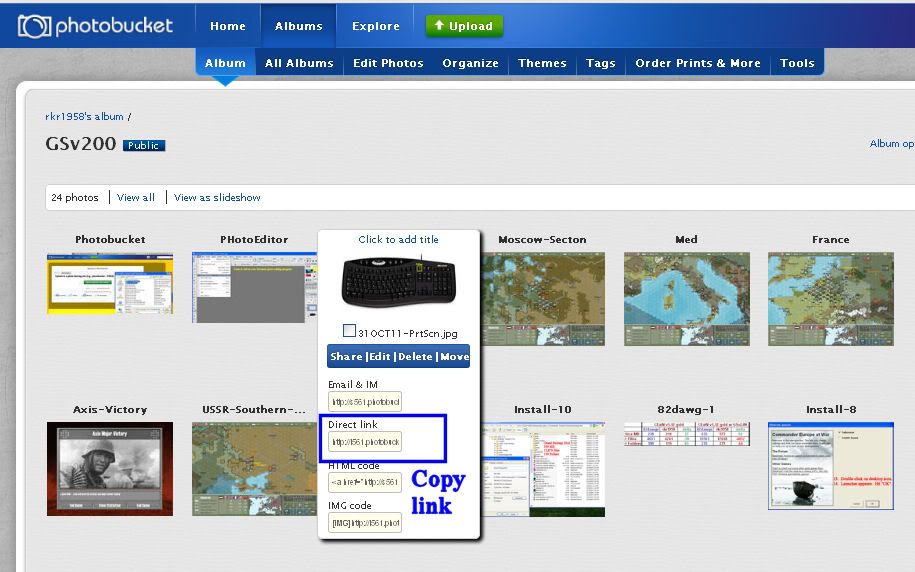
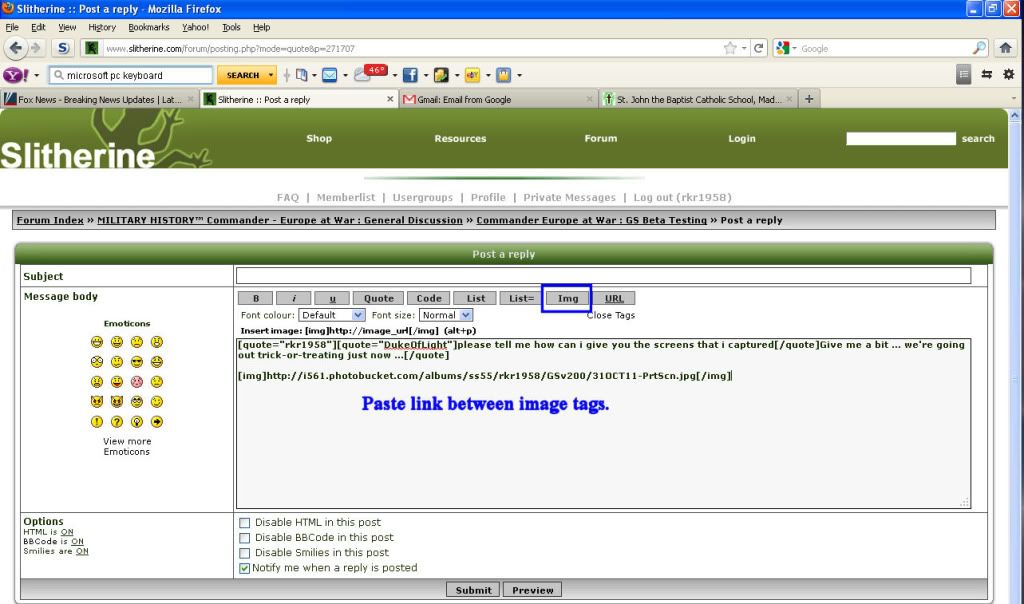
Posted: Fri Dec 09, 2011 12:15 am
by rkr1958
gchristie wrote:and, is it possible to make any unit a para drop unit if you add FJR in front of the name.
"Look Fritz, it's raining Shermans!"
No. This should not be possible. If you don't have para corps option selected then only garrisons should be convertible to airborne. If you do, then both garrisons and infantry corps should be. But mechs and tanks should NOT be.
By the way, I think the bug is an erroneous message. The tank corps CANNOT be dropped by air. If it could, you'd see the parachute symbols of where it could drop in addition the hexes that it move overland to. All I see in your screen cap are the hexes it can move overland to.
EDIT: Well after looking at the date it's February so if the weather is NOT fair it wouldn't be able to drop. If you select the unit in fair weather do you see the parachute symbols?
Posted: Fri Dec 09, 2011 12:43 am
by Peter Stauffenberg
What happens after you click on the checkbox in the dialog box? Then the unit should get back to the original one. The message simply says that it can't be both para and SS. I guess you added text for both para and SS at the same time?
Posted: Fri Dec 09, 2011 1:14 am
by gchristie
Stauffenberg wrote:What happens after you click on the checkbox in the dialog box? Then the unit should get back to the original one. The message simply says that it can't be both para and SS. I guess you added text for both para and SS at the same time?
No, I did not add the para text, it wouldn't have occurred to me to do so. As the King of Siam would say, "it is a puzzlement."

