Page 1 of 1
Half-size Monitor
Posted: Mon Oct 24, 2011 2:42 pm
by Stormtrooper
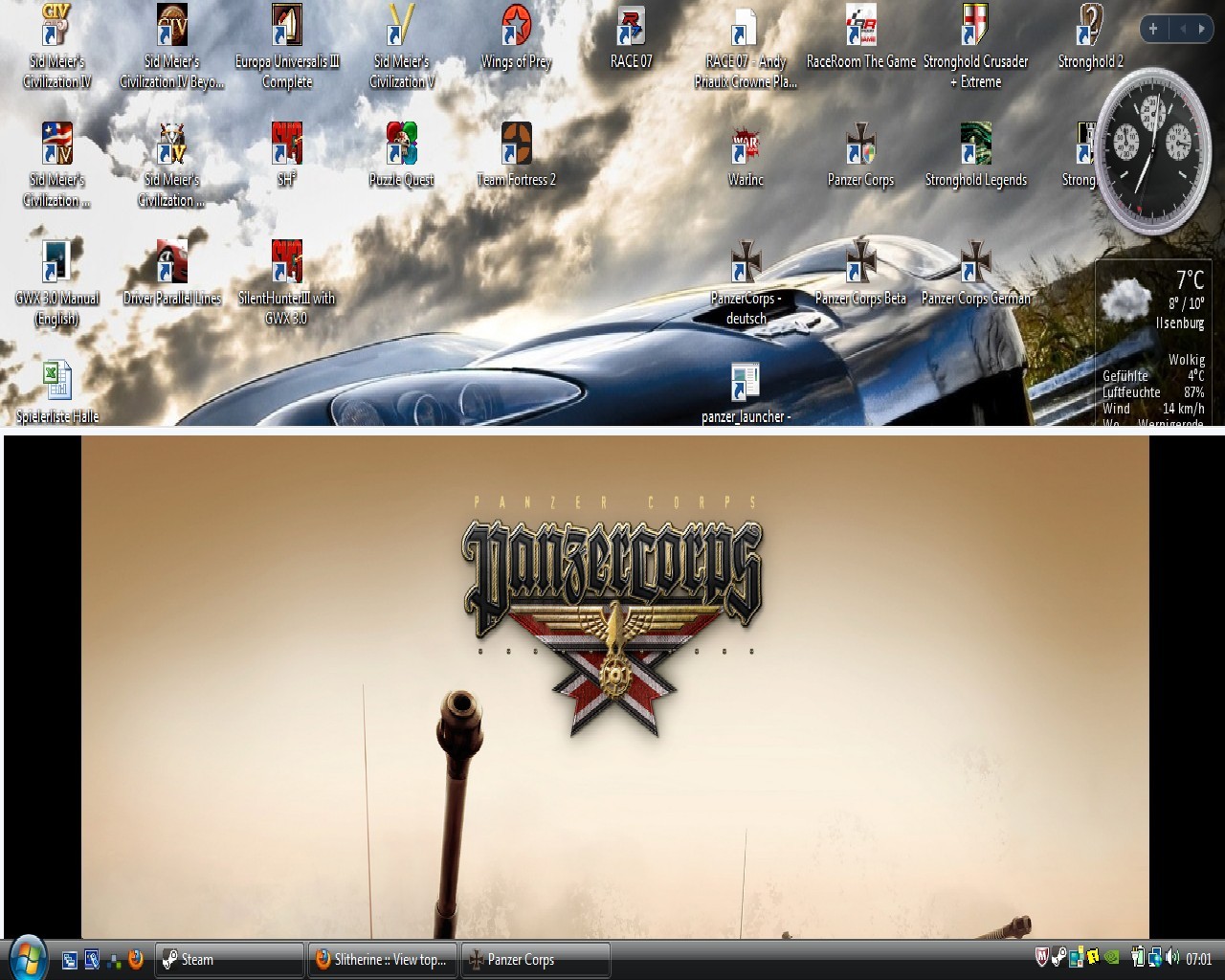
Mein Spiel lässt sich nicht mehr auf den Vollbildmodus zurückschalten. Während des Spiels muss ich eine Stelle am oberen Rand erwischt haben und durch eine schnelle Mausbewegung habe ich den Spielmonitor auf die Hälfte des Monitors begrenzt. Leider lässt sich ddas Spiel auch nicht hochscrollen, so dass ich an die Schaltflächen im Hauptmenü nicht mehr rankomme. Habt ihr vielleicht ne Idee wie ich das Spiel jetzt zurück in den Vollbildmodus bekomme? Ne Config-Datei hab ich auch noch nicht gefunden.
I can't get my game back in fullsize mode. Ingame i took a place upside an scroll the whole game down to the half of my screen. Now i can't scroll it back. Even i can't see the Headmenue. Had you any idea, how ich get the game back to fullsizemode? I didn't found any config-file
Posted: Mon Oct 24, 2011 4:20 pm
by VPaulus
Take a look at this thread:
viewtopic.php?t=28377
Posted: Tue Oct 25, 2011 5:09 am
by Stormtrooper
Ich kann garnichts mehr einstellen, weil ich nichtmal auf die Schaltfläche komme. Ich bekomm das Spiel einfach nicht mehr ausgebreitet. Und mein Betriebssystem ist Vista. Unten hab ich nochmal nen Screen zum bessereren Verständnis eingestellt.
-
There is no way to find the "select". I can't scroll it higher. My os is vista. Here is a screen for a better understanding.
Posted: Tue Oct 25, 2011 9:12 am
by Fimconte
I think this program can solve your problem:
http://grismar.net/shiftwindow/
Posted: Tue Oct 25, 2011 9:41 am
by VPaulus
Do you know how to edit windows registry?
Posted: Tue Oct 25, 2011 4:34 pm
by Stormtrooper
I didn't have wrote the registry before. Can you wrote the standard-path for vista?
Posted: Tue Oct 25, 2011 10:19 pm
by VPaulus
If you're not experienced I can't advise you to mess with the registry. After all if you mess with Windows registry you'll end up messing with your Windows settings.
So I've created a registry fix, that hopefully will solve your issue.
Download this file and double click after it. A Windows message, asking if you want to add the information to the registry, will appear on the screen.
Answer yes. Run the game and report back, please.
I've tested this successfully in several machines, however there's always the risk that something can go wrong. It's only a minimum risk.
Posted: Wed Oct 26, 2011 5:40 am
by Stormtrooper
Thanks VPaulus. It works.
Re: Half-size Monitor
Posted: Mon Apr 03, 2017 1:44 pm
by Rag116
I had the same type of problem, i fixed it by placing my toolbar to the top of the screen and there it game screen came up, once that was done i replaced the toolbar back on bottom. The game window is now back to normal.