PSP Photo Script to quickly make game images from WWII photo
Posted: Fri Jan 07, 2011 11:27 am
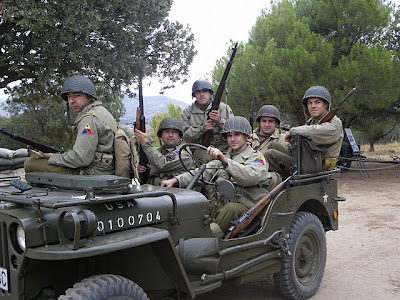
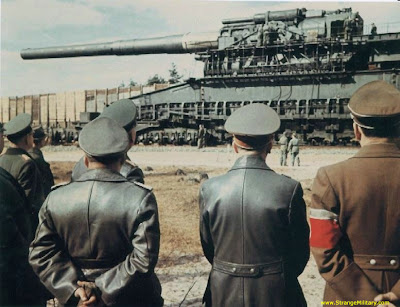
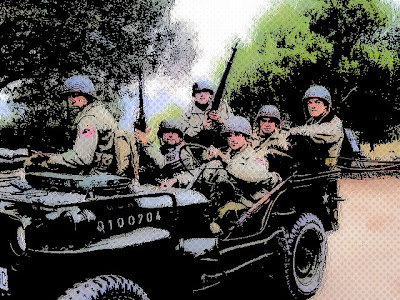
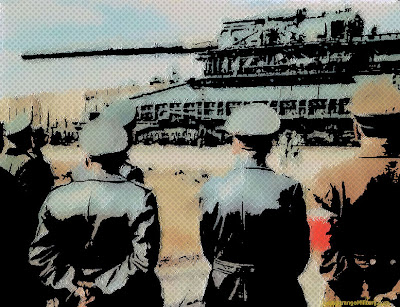
I've created an extremely simple one step script to create a comic-ized image from a WWII (or reenactment) color photo. It works pretty well, is far from the quality of ingame images (really love the artwork) but final results are great with a very little time expenditure... :p
BEFORE...
AFTER a single click!
To import it to PSP photo x2 you can write the file (with notepad) in your scripts directory with any name and ".PspScript" extension.
Anyway, if you want to try on your own, the script applies the following effects:
1. Duplicate the image in another layer.
2. The topmost layer is set to "multiply"
3. The topmost layer is applied a Threshold with 99 strenght.
4. The bottom layer is applied a brush stroke artistic effect (thin strokes and lightly smoothed).
5. The bottom layer is clarified with a triple "one step photo fix" effect.
6. Layers are merged and... voilá!
Hope you find it usefull.
The first image is taken from the SpearHead Spanish Reenactment Group (https://sites.google.com/site/spearhead3ad/), in fact, driver is my brother!
The second photo was googled from www.strangemilitary.com
BEFORE...
AFTER a single click!
To import it to PSP photo x2 you can write the file (with notepad) in your scripts directory with any name and ".PspScript" extension.
Anyway, if you want to try on your own, the script applies the following effects:
1. Duplicate the image in another layer.
2. The topmost layer is set to "multiply"
3. The topmost layer is applied a Threshold with 99 strenght.
4. The bottom layer is applied a brush stroke artistic effect (thin strokes and lightly smoothed).
5. The bottom layer is clarified with a triple "one step photo fix" effect.
6. Layers are merged and... voilá!
Hope you find it usefull.
The first image is taken from the SpearHead Spanish Reenactment Group (https://sites.google.com/site/spearhead3ad/), in fact, driver is my brother!
The second photo was googled from www.strangemilitary.com
Code: Select all
from PSPApp import *

def ScriptProperties():
    return {
        'Author': u'',
        'Copyright': u'',
        'Description': u'',
        'Host': u'Paint Shop Pro Photo',
        'Host Version': u'12.00'
        }


def Do(Environment):
    # EnableOptimizedScriptUndo
    App.Do( Environment, 'EnableOptimizedScriptUndo', {
            'GeneralSettings': {
                'ExecutionMode': App.Constants.ExecutionMode.Silent,
                'AutoActionMode': App.Constants.AutoActionMode.Match,
                'Version': ((12,0,0),1)
                }
            })

    # LayerDuplicate
    App.Do( Environment, 'LayerDuplicate', {
            'GeneralSettings': {
                'ExecutionMode': App.Constants.ExecutionMode.Silent,
                'AutoActionMode': App.Constants.AutoActionMode.Match,
                'Version': ((12,0,0),1)
                }
            })

    # Color Adjust Threshold
    App.Do( Environment, 'ColorAdjustThreshold', {
            'Threshold': {
                'Threshold': 99
                },
            'GeneralSettings': {
                'ExecutionMode': App.Constants.ExecutionMode.Silent,
                'AutoActionMode': App.Constants.AutoActionMode.Match,
                'Version': ((12,0,0),1)
                }
            })

    # Layer Properties
    App.Do( Environment, 'LayerProperties', {
            'General': {
                'Opacity': None,
                'Name': None,
                'IsVisible': None,
                'IsTransparencyLocked': None,
                'LinkSet': None,
                'UseHighlight': None,
                'PaletteHighlightColor': None,
                'GroupLink': None,
                'BlendMode': App.Constants.BlendMode.Multiply
                },
            'BlendRanges': None,
            'Path': (0,0,[],False),
            'ArtMediaTexture': None,
            'Effects': None,
            'BrightnessContrast': None,
            'ChannelMixer': None,
            'ColorBalance': None,
            'CurveParams': None,
            'HSL': None,
            'Threshold': None,
            'Levels': None,
            'Posterize': None,
            'Overlay': None,
            'GeneralSettings': {
                'ExecutionMode': App.Constants.ExecutionMode.Silent,
                'AutoActionMode': App.Constants.AutoActionMode.AllAlways,
                'Version': ((12,0,0),1)
                }
            })

    # SelectLayer
    App.Do( Environment, 'SelectLayer', {
            'Path': (0,-1,[],False),
            'GeneralSettings': {
                'ExecutionMode': App.Constants.ExecutionMode.Silent,
                'AutoActionMode': App.Constants.AutoActionMode.Default,
                'Version': ((12,0,0),1)
                }
            })

    # Brush Strokes
    App.Do( Environment, 'BrushStrokes', {
            'Angle': 102,
            'Bristles': 50,
            'Color': (80,80,80),
            'Density': 25,
            'Length': 10,
            'Opacity': 50,
            'Softness': 20,
            'Width': 5,
            'GeneralSettings': {
                'ExecutionMode': App.Constants.ExecutionMode.Silent,
                'RandomSeed': 43402523,
                'AutoActionMode': App.Constants.AutoActionMode.Match,
                'Version': ((12,0,0),1)
                }
            })

    # Halftone
    App.Do( Environment, 'Halftone', {
            'BackgroundColor': (255,255,255),
            'ColorScheme': App.Constants.ColorScheme.RGB,
            'HalftonePattern': App.Constants.HalftonePattern.Square,
            'Overlay': True,
            'OverlayBlendMode': App.Constants.BlendMode.Multiply,
            'OverlayOpacity': 20,
            'PatternColor': (0,0,0),
            'ScreenAngles': (45,45,45),
            'Size': 4,
            'TransparentBackground': False,
            'GeneralSettings': {
                'ExecutionMode': App.Constants.ExecutionMode.Silent,
                'AutoActionMode': App.Constants.AutoActionMode.Match,
                'Version': ((12,0,0),1)
                }
            })

    # LayerMergeAll
    App.Do( Environment, 'LayerMergeAll', {
            'GeneralSettings': {
                'ExecutionMode': App.Constants.ExecutionMode.Silent,
                'AutoActionMode': App.Constants.AutoActionMode.Match,
                'Version': ((12,0,0),1)
                }
            })

    # OneStepPhotoFix
    App.Do( Environment, 'OneStepPhotoFix', {
            'GeneralSettings': {
                'ExecutionMode': App.Constants.ExecutionMode.Silent,
                'AutoActionMode': App.Constants.AutoActionMode.Match,
                'Version': ((12,0,0),1)
                }
            })

    # OneStepPhotoFix
    App.Do( Environment, 'OneStepPhotoFix', {
            'GeneralSettings': {
                'ExecutionMode': App.Constants.ExecutionMode.Silent,
                'AutoActionMode': App.Constants.AutoActionMode.Match,
                'Version': ((12,0,0),1)
                }
            })

    # OneStepPhotoFix
    App.Do( Environment, 'OneStepPhotoFix', {
            'GeneralSettings': {
                'ExecutionMode': App.Constants.ExecutionMode.Silent,
                'AutoActionMode': App.Constants.AutoActionMode.Match,
                'Version': ((12,0,0),1)
                }
            })
