Page 1 of 1
Lighting Functionality ... Dawn/Dusk/Night ?
Posted: Mon Aug 16, 2010 2:40 pm
by Merr
Pip or adherbal,
I see that each scenario has a "lighting" file and I fear that the lighting can't be changed during a scenario ... or can it?
What I would like to do is add lines of code to the "FUNCTION Tick(side)" so when the LOS is reduced it will also dim the lights down a notch or two and perhaps lower the light source for dawn/dusk transitions.
Also, I have a question about reducing LOS, and I will use the Desert2.bsf as an example. There are two FUNCTIONS calls that reduce the LOS .... StartTurnPost and Tick. In the StartTurn Post it reduces the LOS by 20 and in the Tick it lowers it by 2. Does this mean that ever turn it's lowered by 20 and when the conditons are met in the Tick that it reduces it another 2/10's ? ... or is this a typo ... because lowering it by 2/10's isn't much of a sandstorm unless this small change is enough to reduce LOS by an additonal tile. I've deduced that each 15 LOS is required to see 1 tile diagonaly, whilst each 10 is needed to see 1 tile that's adjacent.
I'm not a programmer and I'm slowly understanding C, however, can you please provide a definition to each line of the lighting file for reference?
Thanks a lot!
Rob
Posted: Mon Aug 16, 2010 3:16 pm
by pipfromslitherine
Most of the lighting entires should be fairly self-explanatory. You have different lights for the units and the world (sometimes it is useful). And for each light you have its direction (as a 3D vector), it's colour, and the ambient colour.
You can ignore the BLOOM* entries and the FILLCOLOUR as they are not used.
There is currently no way to alter the lighting from the scripts, but it's a great idea!
Cheers
Pip
Posted: Mon Aug 16, 2010 4:16 pm
by adherbal
I will use the Desert2.bsf as an example. There are two FUNCTIONS calls that reduce the LOS .... StartTurnPost and Tick.
The code is the Tick function doesn't do anything I think. It was an early attempt to reduce LOS which doesn't work. The StartTurnPost function was specifically added to allow adjusting things such as LOS. This function is executed after ("post") every other "start of turn" function. There are some core scripts that deal with resetting LOS in the data folder so this new function was required to adjust LOS after those scripts had done their thing.
So in short: ignore the stuff in the Tick function and use the StartTurnPost function to adjust LOS at the start of each turn.
Posted: Mon Aug 16, 2010 4:25 pm
by Merr
Pip,
Thanks for the fast reply!
I suppose we'll have to see how popular such a function would be considering that there are other clues to the vis being lower ... lower LOS of unit, pop-up UI box telling the player.
I think adding some spooky light effects might add something to scenario!
Thanks again,
Rob
Posted: Mon Aug 16, 2010 4:27 pm
by Merr
adherbal wrote:I will use the Desert2.bsf as an example. There are two FUNCTIONS calls that reduce the LOS .... StartTurnPost and Tick.
The code is the Tick function doesn't do anything I think. It was an early attempt to reduce LOS which doesn't work. The StartTurnPost function was specifically added to allow adjusting things such as LOS. This function is executed after ("post") every other "start of turn" function. There are some core scripts that deal with resetting LOS in the data folder so this new function was required to adjust LOS after those scripts had done their thing.
So in short: ignore the stuff in the Tick function and use the StartTurnPost function to adjust LOS at the start of each turn.
adherbal,
Thanks for another fast reply!
Ok, StartTurnPost is the one ... thanks!
Rob
Posted: Wed Jan 19, 2011 9:43 pm
by TopoSolitario
SHADOW BUGS?
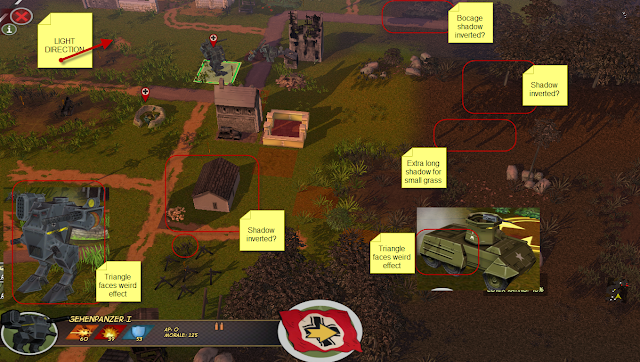
I'm working the first scenario and want to be it at dawn... I enlongated shadows somehow, with a nice -2 -1 -2 vector. But I found some bugs in shadows... there are many objects that cast shadows the wrong direction, or even in both directions (Bocage, el Alemein house, some trees...) other have a shadow extremely long for their height (small grass, maybe caused by going into the ground?).
Another problem is face triangulation in 3D objects (custom and standar) they made a weird effect. Sherman for example renders well, I've to have a look at mesh smoothing, maybe that will solve the problem, it's the only difference I can see.
Posted: Wed Jan 19, 2011 10:30 pm
by TopoSolitario
Sorry for the doubleposting... I've noticed that direction for unit light is ignored, the lights are the same no matter what vector coordinates you use :S
In fact with a Wordlight -2 -1 -2, the light comes from the opposite direction for the units even if they cast the right shadow :S
Posted: Wed Jan 19, 2011 10:55 pm
by pipfromslitherine
That is odd. Some of it can be explained, as you say, by having objects which are slightly below ground level. That's an artifact of the approach, and can really only be fixed in the meshes. If they are our objects, I imagine we just never spotted it as none of the lighting is quite as extreme.
I'll check through and make sure there aren't any caveats that aren't in the docs. As if anything could
possibly be missing from the docs...!

Cheers
Pip
Posted: Wed Jan 19, 2011 11:56 pm
by pipfromslitherine
It does look like there is some oddness going on on some meshes with the unit lighting - I'm assuming we didn't spot it as we don't tend to have lighting as harsh as yours. I will investigate where in the morass of MAX/smoothing groups/exporters/loaders the problem lies...

Cheers
Pip
Posted: Thu Jan 20, 2011 12:21 am
by Amaz_Ed
The errors on both the walker and the greyhound definitley look like smoothing group errors.
Posted: Sat Jan 22, 2011 12:48 pm
by TopoSolitario
Amaz_Ed wrote:The errors on both the walker and the greyhound definitley look like smoothing group errors.
Thats it (I finally got time to test it, this was a busy week)
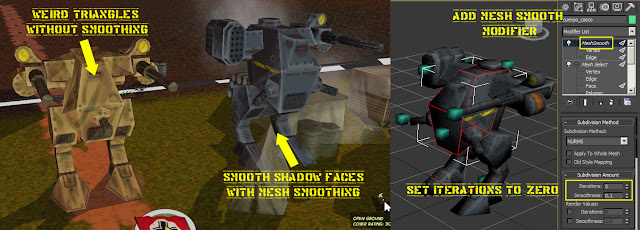
Maybe I look to much into details, but a revision of game units smoothing will be nice

I'll smooth up mine.
Posted: Sat Jan 22, 2011 10:37 pm
by Amaz_Ed
No need to use mesh smooth. Simply go into the modify panel, select polygon mode, select all polygons and clear smoothing groups and then autosmooth. Unless you have a more complex model that requires some areas to be smother than others this should be fine.
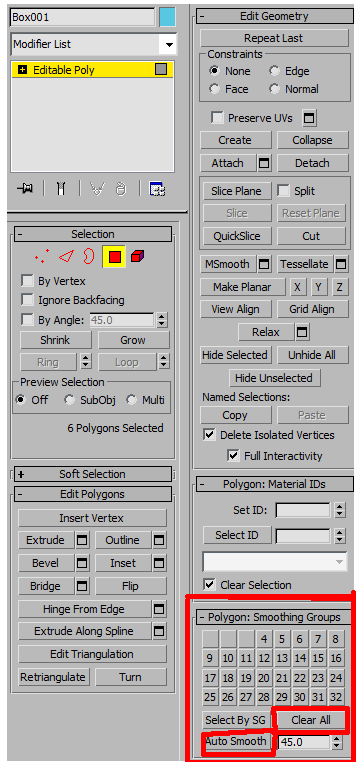
Errors like the ones in the original image can also occur when there is a loose vertex, that's caught me out in the past.
Posted: Wed Sep 28, 2011 8:43 pm
by Merr
Pip,
Old ground, but ... for random maps I think it would be nice to have the functionality to "set" the lighting.
Currently, you have the function SetWeather(mode) ...
How about a new function ... SetLighting(mode) ...
The parameter "mode" calls the specific "lighting.txt" file ...
So, if you add two more lighting files, with all files like this ;
- Lighting_0.TXT ... default daylight.
- Lighting_1.TXT ... new dawn/dusk light.
- Lighting_2.TXT ... new night light.
Just an idea since I don't know how you can/currently do it.
Again, something to consider for random battles (later on).
Thanks,
Rob
Posted: Wed Sep 28, 2011 10:08 pm
by pipfromslitherine
I will add it to my todo list. I have to confess, I kinda reset it during our enforced hiatus

.
Thanks for the reminder
Cheers
Pip