Page 1 of 1
font size
Posted: Sun Oct 24, 2021 2:12 am
by KEV1NJ
Hi!
I'm an old guy who doesn't see that well anymore. Is there any setting anywhere to get a larger font in the text boxes?
Re: font size
Posted: Sun Oct 24, 2021 1:52 pm
by Erik2
There's no way to adjust font size that I know of.
But if you run the game in full-screen you might try windowed mode and a lower resolution (check Options).
There's an app named Borderless Gaming that allow you to remove the borders when you run OOB in windowed mode, thus gaining a bit of screen real estate.
If you have a 4k monitor, turn off the HD UI checkbox.
Hope this helps (I'm no IT-expert...)
Erik
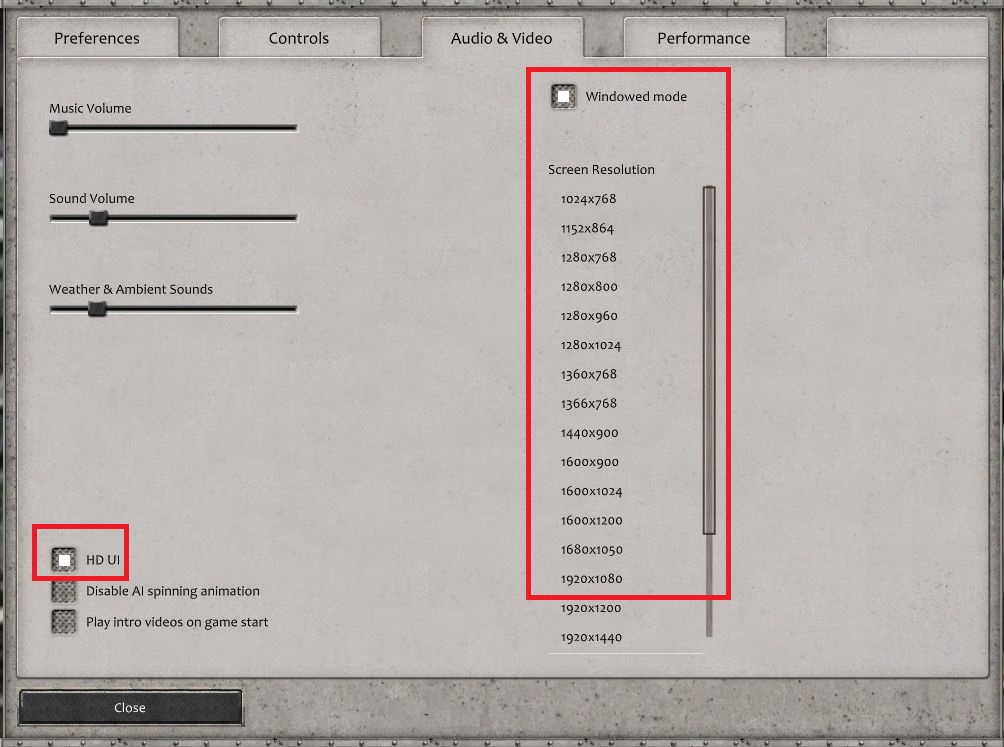
- resolutiom.jpg (157.44 KiB) Viewed 1451 times
Re: font size
Posted: Mon Oct 25, 2021 1:24 am
by GabeKnight
Yep, to my knowledge that's all you can do to try to increase the font size in-game.
But I'm with you. I would also appreciate more scaling options for text.
Personally I've "solved" the issue by having a big-ass TV instead of a monitor...


Re: font size
Posted: Mon Oct 25, 2021 8:19 pm
by KEV1NJ
Ok, Thanks! I'll give it a try.