Page 1 of 1
weather
Posted: Wed Mar 10, 2021 3:10 pm
by Grondel
is there any way to have certain weather on a certain turn to prevent spawning air-waves from crashing at spawn?
Re: weather
Posted: Mon Mar 29, 2021 10:26 pm
by cicciopastic
Did u have any reply? i am tryng this,but is not working. i am sure about the condition (it was on lua manual examples), so it must be wrong the following function.
-- condition
function estate()
return world.round >= 1 and world.round <= 5
end
-- function
function bel_tempo()
world.weather = Clear
end
Re: weather
Posted: Tue Mar 30, 2021 10:43 am
by Grondel
cicciopastic wrote: Mon Mar 29, 2021 10:26 pm
Did u have any reply? i am tryng this,but is not working. i am sure about the condition (it was on lua manual examples), so it must be wrong the following function.
function bel_tempo()
world.weather = Clear
end
function bel_tempo()
world.weather.key = Clear
end
try this
Re: weather
Posted: Tue Mar 30, 2021 12:44 pm
by cicciopastic
Grondel wrote: Tue Mar 30, 2021 10:43 am
function bel_tempo()
world.weather.key = Clear
end
try this
not working neither! ... i touhgt i had to use quotes on Clear, but NO ..... still need help.
did u solve the problem for yourself? i want summer turns to be clear, but i cant set them as i want
Re: weather
Posted: Wed Mar 31, 2021 9:02 am
by asuser
Hello Grondel and cicciopastic and the other hard working friends of LUA testing!

I found a way for that theme and it works really for my needs. With that you can have rainy weather with round 2,
although "dry" is set in the scenario parameters.
In theory, it could also be used for other applications:
function W1() -- Editor: Trigger Round
return world.round == 2
end
function Z1() -- Weather definition
world.weather.key = Rain
end
The trigger definition for the editor looks like this:
Name: Z1
Count:1
Function: W1
StartTurnAction
Don't forget your umbrellas...
After some playtesting you need also built in a separate command for the "Humidity".
Otherwise the ground keeps dry...
Re: weather
Posted: Wed Mar 31, 2021 10:59 am
by cicciopastic
asuser wrote: Wed Mar 31, 2021 9:02 am
Hello Grondel and cicciopastic and the other hard working friends of LUA testing!
hi mate!
thanks for your answer .... i've tryed something like u suggesting, but is not working

, i will try it tonight again, maybe i missspelled something (?)
in return i got some very strange effects as (i had to have clear weather on a 100% rain scenario): i got clear on the top screen bar, but rain on the screen ....

i dont' know how that was possible!

: if i will get that again i will ask for a bug "investigation"
ciao Pietro
Re: weather
Posted: Wed Mar 31, 2021 11:06 am
by cicciopastic
cicciopastic wrote: Wed Mar 31, 2021 10:59 am
in return i got some very strange effects as (i had to have clear weather on a 100% rain scenario): i got clear on the top screen bar, but rain on the screen ....
reading a bit furthermore yuor post it come to my mind that i could have missinterpreted mud as rain??? i will check tonight and i will follow your suggestion changhing humidity to 0
let see .... tks again!
Re: weather
Posted: Wed Mar 31, 2021 12:47 pm
by asuser
Strange to hear that ... thats why here come a more comfortable script for you.
Scenario parameter is "Summer", "No Clouds", and ground "dry".
With that, rain comes after round 2 and goes after round 5 (nearly), after that the weather keeps clear.
I had also add the humidity command, because the standard value for that keeps otherwise dry.
Rain -> Muddy ground!
Finally you get with that a nice weather report to your attention:
function W1() -- Editor: Trigger Round
return world.round >= 2 and world.round <= 5
end
function Z1() -- Weather definition
world.weather.key = Rain
world.humidity = 50
MessageBox("Weather Report!", "Rain is coming!")
end
function W2() -- Editor: Trigger Round
return world.round == 7
end
function Z2() -- Weather definition
world.weather.key = Clear
world.humidity = 0
MessageBox("Weather Report!", "Nice weather is coming!")
end
Name: Z1
Count:1
Function: W1
StartTurnAction
Name: Z2
Count:1
Function: W2
StartTurnAction
Hopefully it works for you... in my scenario it works perfect.
Re: weather
Posted: Wed Mar 31, 2021 1:47 pm
by Grondel
triggerin rain works fine, but triggering sun to prevent planes from crashing does not sadly.
current work around is make planes fly despite of rain, but looks weird
Re: weather
Posted: Wed Mar 31, 2021 3:26 pm
by asuser
Thanks for the feedback Grondel!
This could mean that all aircraft need an additional "landing command" with the first rain function to simulate the correct behavior in rain. The reason for this,... I would think..., is, that the scenario parameters basically say "no rain" and we presumably only overwrite the weather but not the game mechanics of the aircraft. Now you have to find a meaningful LUA combination for:
-All planes!
-Aggressiveness goes to 0?
-Armament goes to 0?
-Move back to airfield?
-...?
... something like that.
Maybe, the secret is connected with the weather.csv:
With rain, the air_operations value is false (not possible) and other values have also other effects.
Re: weather
Posted: Wed Mar 31, 2021 4:53 pm
by Grondel
u can set air_operations to true and planes will fly, u can set weather.key to Clear and the symbol in the ui will change BUT it will still be raining. the grafic is not influenced by the lua.
Re: weather
Posted: Wed Mar 31, 2021 5:56 pm
by asuser
Yes, I tested again and sadly the own and the oppostite air force can fly and attacks despite bad weather. Now we have looking for the right additional commands...
Re: weather
Posted: Wed Mar 31, 2021 6:36 pm
by cicciopastic
Re: weather
Posted: Wed Mar 31, 2021 6:44 pm
by Grondel
i´m not sure yet if this is a bug or i´m incompetent
need more research
Re: weather
Posted: Wed Mar 31, 2021 8:30 pm
by cicciopastic
Grondel wrote: Wed Mar 31, 2021 6:44 pm
i´m not sure yet if this is a bug or i´m incompetent
need more research

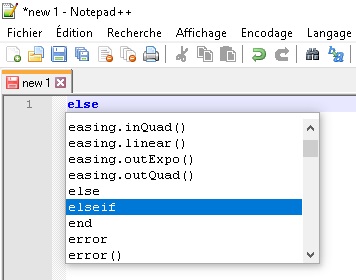
don't worry yesterday i lost 30-40 minutes because i insisted to write
else if instead of
elseif ... and some days before i lost half an hour beacause i was missing and
end !
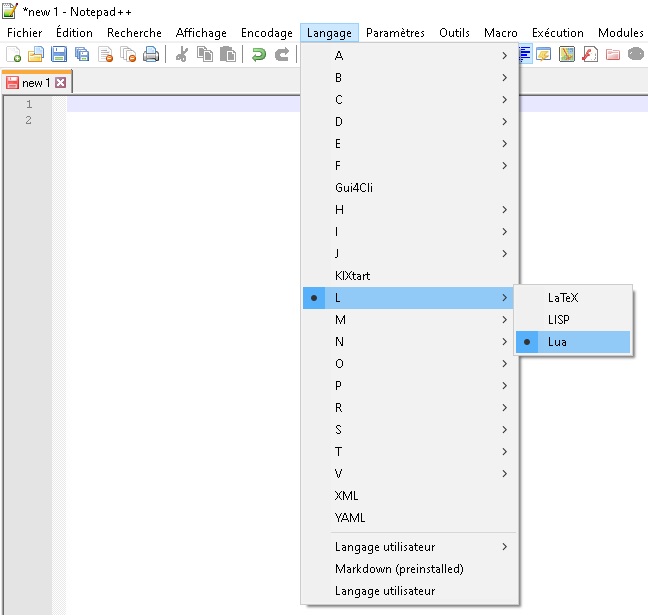
i think they should do a much more complete lua manual for pzc2 with plenty of examples .... anyhow since i downloaded notepad++ everything is much easier
Re: weather
Posted: Wed Mar 31, 2021 9:42 pm
by cicciopastic
Re: weather
Posted: Thu Apr 01, 2021 7:42 am
by asuser
Fine, I made an add on to the "air force still flying" problem.
Re: weather
Posted: Thu Apr 01, 2021 11:57 am
by jeannot le lapin
cicciopastic wrote: Wed Mar 31, 2021 8:30 pm
Grondel wrote: Wed Mar 31, 2021 6:44 pm
i´m not sure yet if this is a bug or i´m incompetent
need more research
don't worry yesterday i lost 30-40 minutes because i insisted to write
else if instead of
elseif ... and some days before i lost half an hour beacause i was missing and
end !
i think they should do a much more complete lua manual for pzc2 with plenty of examples .... anyhow since i downloaded notepad++ everything is much easier
You should use
Notepad++(Freeware):
- Capture d’écran (740).jpg (52.41 KiB) Viewed 4885 times
- Capture d’écran (739).jpg (33.84 KiB) Viewed 4885 times
Re: weather
Posted: Thu Apr 01, 2021 12:30 pm
by cicciopastic
yes m8, as i wrote i just started to use it! tks anyway for your suggestion .... as i told its not easy to start from zero and indeed notepad++ hepls a lot!
tks again,