Page 1 of 1
Set Trigger State
Posted: Wed Nov 18, 2020 5:35 pm
by Erik2
I've set up several triggers with a couple of conditions to spawn units when an airfield is captured (and the location is free of land units).
When the conditions are fulfilled on one airfield the other triggers are disabled.
My problem is that the other triggers also fire when they are supposed to be disabled.
Am I missing anything here?
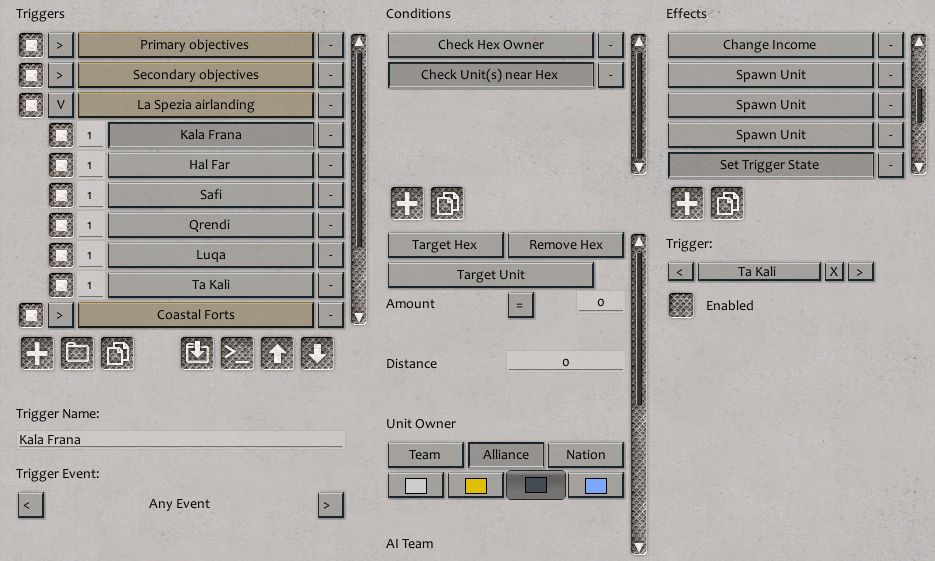
- trigger.jpg (84.6 KiB) Viewed 1457 times
Re: Set Trigger State
Posted: Wed Nov 18, 2020 6:21 pm
by conboy
It only disables Ta Kali the way it's set up now, unless all the triggers are listed as set trigger states underneath the Ta Kali trigger. I think you'd have to list all the triggers that are disabled by each trigger for them to be disabled.
You want to send me a link, I'll be happy to look at it, hombre.
conboy
Re: Set Trigger State
Posted: Wed Nov 18, 2020 8:15 pm
by Erik2
I do have triggers for all the other airfields.
I've added the bare-bones scenario here. An easy way to test it from the editor is to set the British as AI and play 3-4 turns.
Thanks for taking a peek at this. It is the last hurdle before publishing a scenario update.
Re: Set Trigger State
Posted: Wed Nov 18, 2020 9:04 pm
by conboy
I think it has something to do with the Any Event setting because I changed Hal Far and Kala Frana to Capture VP Event and captured them in that order, it didn't fire. But when I took Safi, still set on Any Event, it fired. Try it that way on a couple.
I think somehow the Any Event thing, with two criteria, won't turn it off on the first check since the field isn't unoccupied, and it is set to check only once.
Another way to go about this, is set it for Capture Hal Far by Turn 3 or you lose. Then use that to turn off the other triggers, but that defeats the intent of letting the commander pick which one he wants to capture first.
Or you could set them all for Turn Start, then it'll check for both criteria at once and turn off the triggers. I think the deal is, it only checks each trigger once and if the criteria aren't met, it doesn't work.
So maybe change the setting to Capture VP Event or even better Turn Start and that might fix it.
conboy
Re: Set Trigger State
Posted: Thu Nov 19, 2020 2:09 am
by conboy
You can go down that list and cross them off. I cant figure it out!
I tried them all and still the trigger keeps on firing. Worse than the Energizer bunny!
Sorry man...
conboy
Re: Set Trigger State
Posted: Thu Nov 19, 2020 4:12 am
by terminator
Spawn Unit may create problems. Either try to put Spawn Unit at the end of the list of the Effects or make a separate trigger with Spawn Unit ?
Re: Set Trigger State
Posted: Thu Nov 19, 2020 8:36 am
by Erik2
terminator wrote: Thu Nov 19, 2020 4:12 am
Spawn Unit may create problems. Either try to put
Spawn Unit at the end of the list of the Effects or make a separate trigger with
Spawn Unit ?
Yes, maybe the unit spawns before the triggers fire. That would explain the behaviour.
Back to editor.
Re: Set Trigger State
Posted: Thu Nov 19, 2020 11:06 am
by conboy
Please let us know if that works!
conboy
Re: Set Trigger State
Posted: Thu Nov 19, 2020 11:51 am
by Erik2
FInally cracked it. You need 2 separate triggers for each set of spawns.
The first is the conditions trigger, which is enabled by default.
The other is the spawning trigger, which is disabled by default.
When the first condition trigger is met, the corresponding spawning trigger is enabled and all other condition triggers are disabled.
Thanks for helping out, guys.
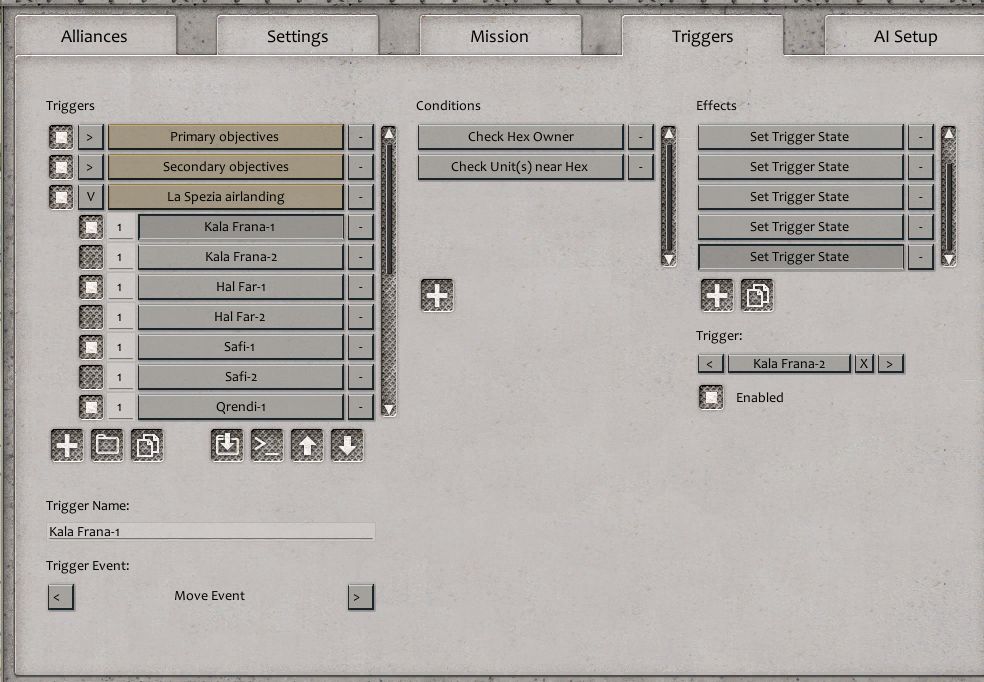
- trigger-1.jpg (101.23 KiB) Viewed 1380 times
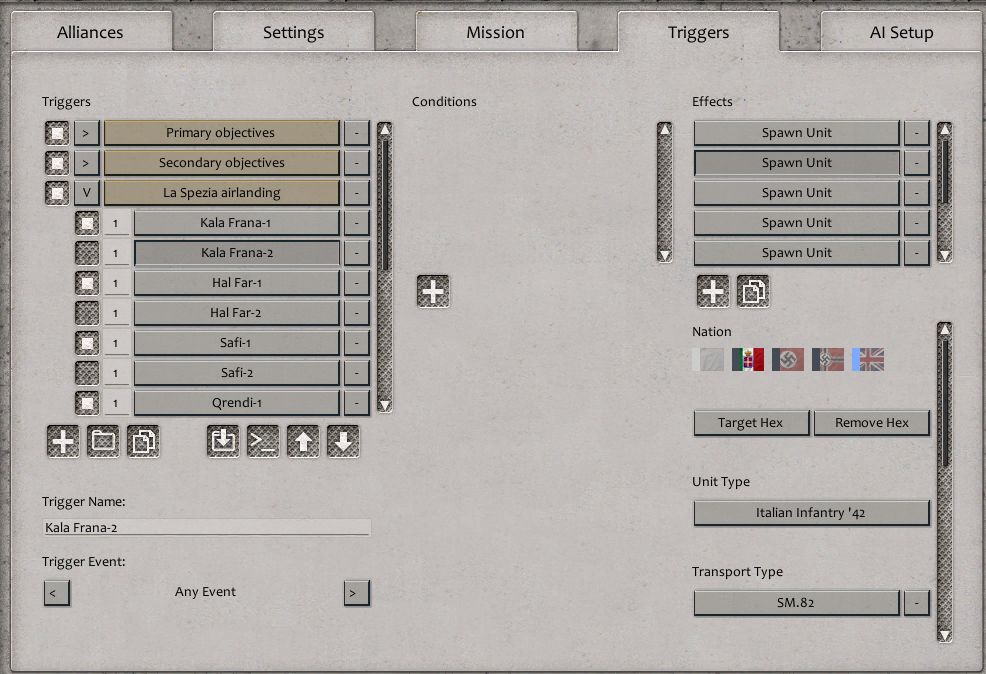
- trigger-2.jpg (102.3 KiB) Viewed 1380 times
Re: Set Trigger State
Posted: Thu Nov 19, 2020 12:54 pm
by conboy
Dayam! Good job, wish I coulda been more help. Thanks for passing this on, I'm sure I'll need it one day!
conboy
I still don't understand why it didn't work the way you had it to start with...