Page 1 of 1
Two extra files question
Posted: Wed Jul 15, 2020 10:33 pm
by PoorOldSpike
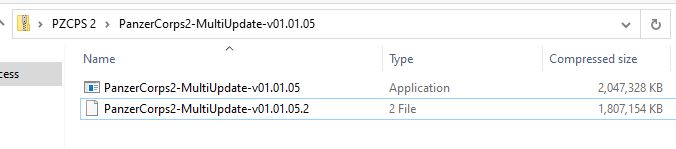
Stupid question- after downloading the update I clicked the top one (below) to install it and it runs fine, but what are those extra 2 files underneath for? Should I touch them or just ignore them? What do they do?
Re: Two extra files question
Posted: Wed Jul 15, 2020 11:05 pm
by dalfrede
The update is too large to fit onto a single DVD so the update file is broken into 2 files.
If you remember floppy disks the practice started there, when they went to CD, they just put all the floppy files onto a single CD.
If you use Usenet you will notice they have a max file size, resulting in the multipart downloads for large files.
Re: Two extra files question
Posted: Thu Jul 16, 2020 12:44 am
by PoorOldSpike
So do we completely ignore them or click on them or what?
If they serve no useful purpose shall we delete them?
Re: Two extra files question
Posted: Thu Jul 16, 2020 1:49 am
by dalfrede
You click the first one, the installer app.
It uses the second one.
After it has run, you delete both or neither, depending on whether you keep your old installer files.
You might keep this one and delete the older ones.
The installer is made up of both files.
An early version of Excel used 50 floppy disks to load the software.