Page 125 of 191
Re: Guille's PzCorps Support Base - Multipurpose Icons and m
Posted: Thu May 17, 2018 1:39 pm
by terminator
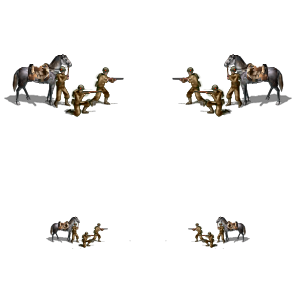
Why not simply return horizontally ?
- Sov_Cavalry-dism42b.png (27.24 KiB) Viewed 5475 times
Re: Guille's PzCorps Support Base - Multipurpose Icons and m
Posted: Thu May 17, 2018 2:19 pm
by guille1434
Yes, you can just "mirror" the left image to make it look to the other side (but the shadows will not look right), but I don´t like that, I prefer to make it a little more "real". Use the one you like best...
Re: Guille's PzCorps Support Base - Multipurpose Icons and m
Posted: Thu May 17, 2018 4:51 pm
by guille1434
Here is a new version of the dismounted cavalry icon... in which the soldier holding the horse, takes position in front of it when the icon faces to the left...

I think it looks better...
Re: Guille's PzCorps Support Base - Multipurpose Icons and m
Posted: Thu May 17, 2018 5:56 pm
by uzbek2012
guille1434 wrote:Here is a new version of the dismounted cavalry icon... in which the soldier holding the horse, takes position in front of it when the icon faces to the left...
I think it looks better...

Great thanks )
 http://photo.rgakfd.ru/generalSearch.do ... 0%BA%D0%B0
+
Will there be cars ?
Re: Guille's PzCorps Support Base - Multipurpose Icons and m
Posted: Thu May 17, 2018 9:57 pm
by terminator
guille1434 wrote:Here is a new version of the dismounted cavalry icon... in which the soldier holding the horse, takes position in front of it when the icon faces to the left...
I think it looks better...
Now, it's perfect
Thanks
I had never paid attention in the shadows

Re: Guille's PzCorps Support Base - Multipurpose Icons and m
Posted: Sat May 19, 2018 4:39 am
by captainjack
Someone posted a tachanka (machine gun cart) a year or so back. Not sure if Polish only or Polish and Russian.
Re: Guille's PzCorps Support Base - Multipurpose Icons and m
Posted: Sat May 19, 2018 1:14 pm
by guille1434
Yes, here is a Tachanka icon which was stored in my collection. I am now releasing it with some retouches. I hope it helps...
Re: Guille's PzCorps Support Base - Multipurpose Icons and m
Posted: Sun May 20, 2018 6:19 am
by uzbek2012
guille1434 wrote:Yes, here is a Tachanka icon which was stored in my collection. I am now releasing it with some retouches. I hope it helps...
Excellent)
The Unique battle of Moscow: guns of the 19th century against Nazi tanks
 https://aloban75.livejournal.com/416656.html
https://zen.yandex.ru/media/protanki/ca ... 2dd299a82f
https://aloban75.livejournal.com/416656.html
https://zen.yandex.ru/media/protanki/ca ... 2dd299a82f
 https://patriot-af.livejournal.com/59571.html
Re: Guille's PzCorps Support Base - Multipurpose Icons and m
Posted: Mon May 21, 2018 5:47 am
by captainjack
While it's not exeactly easy to hide or to aim, it would probably be bad news for the target if it did ever manage to score a hit.
Re: Guille's PzCorps Support Base - Multipurpose Icons and m
Posted: Mon May 21, 2018 12:52 pm
by guille1434
... And then, the poor crew members have to reload it...

Re: Guille's PzCorps Support Base - Multipurpose Icons and m
Posted: Mon May 21, 2018 3:09 pm
by terminator
guille1434 wrote:... And then, the poor crew members have to reload it...
I see no ammunition on the image. Serves only once ?
Re: Guille's PzCorps Support Base - Multipurpose Icons and m
Posted: Tue May 22, 2018 8:30 pm
by uzbek2012
terminator wrote:guille1434 wrote:... And then, the poor crew members have to reload it...
I see no ammunition on the image. Serves only once ?
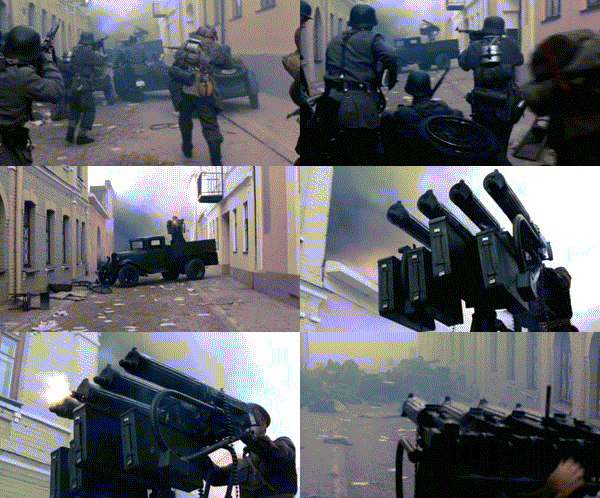
And no longer necessary, look how Rambo resting on the sidelines
Re: Guille's PzCorps Support Base - Multipurpose Icons and m
Posted: Wed May 23, 2018 11:53 am
by terminator
uzbek2012 wrote:terminator wrote:guille1434 wrote:... And then, the poor crew members have to reload it...
I see no ammunition on the image. Serves only once ?
And no longer necessary, look how Rambo resting on the sidelines
Wolfenstein III ?
Re: Guille's PzCorps Support Base - Multipurpose Icons and m
Posted: Wed May 23, 2018 2:17 pm
by uzbek2012
terminator wrote:
I see no ammunition on the image. Serves only once ?
And no longer necessary, look how Rambo resting on the sidelines[/quote]
Wolfenstein III ?
[/quote]
No , "The Dneprovsky boundary". Belarusfilm.
https://www.youtube.com/watch?v=snJVV2a0lUo
Re: Guille's PzCorps Support Base - Multipurpose Icons and m
Posted: Sat May 26, 2018 3:09 pm
by guille1434
Back to the main theme of this thread... Unit icons, of course!
More on the theme about cavalry units, an SS Kavallerie unit, in its mounted and dismounted variants, also the big unit portrait is included.
Re: Guille's PzCorps Support Base - Multipurpose Icons and m
Posted: Sat May 26, 2018 5:16 pm
by guille1434
Also, a middle war version of the dismounted unit icon...

Re: Guille's PzCorps Support Base - Multipurpose Icons and m
Posted: Tue May 29, 2018 6:53 pm
by guille1434
Hello Guys:
This time, the posting is about a "technical note": A quick way to transform any icon to a "German Captured" unit...
This method is achieved using Paint.Net software, but I think any other more or less serious image processing software will work the same.
1) Open any icon in Paint.Net
2) Convert it to a Black & White image. (Adjustments menu --> Black and White).
3) Convert the B&W image to sepia. (Adjustments menu --> Sepia).
4) Open the Adjustments menu --> Hue / Saturation, and give the following values: Hue = 14, Saturation = 45 (you can try slightly differing values to suit your taste)
Then, you can adjust the darkness/lightness of the icon.
5) Of course, after that quick "paintwork", you should copy and paste some details from the original (wheels, tools, stowage boxes, insignias, etc...)
You can see a pair of images attached to help with the explanation. I hope it helps...
Re: Guille's PzCorps Support Base - Multipurpose Icons and m
Posted: Tue May 29, 2018 9:20 pm
by Intenso82
Hi Guille1434!
I would like to divide the functions of Engineers (the so-called Combat Engineers) and the Sappers for the Red Army.
But only if I had an icon for sappers.
Maybe in your collection there is this or maybe you could create it?
Perhaps it might look like a modification of the Soviet engineer's icon, but instead of a soldier with a flamethrower, a soldier with a mine detector?
Also I think to add a new type of movement for the aerosleigh. Who would be able to move well only through the open terrain in winter. Maybe you have an icon for this type of movement?
Re: Guille's PzCorps Support Base - Multipurpose Icons and m
Posted: Tue May 29, 2018 11:09 pm
by guille1434
Hello Intenso! Nice to see some word from you here...
Very nice idea about implementing the Combat Sappers... And I also like the new movement type for the Aero Sleigh unit. I attach the possible icons for the sappers and the movement icon. I hope you like them!
Re: Guille's PzCorps Support Base - Multipurpose Icons and m
Posted: Tue Jun 05, 2018 5:17 pm
by guille1434
Hello to the few remaining here...

As I decided to start a GC45 East play through and face the Soviet steamroller, you will be seeing here a series of new, and reworked late war units. So, I hope you like them and as always use them as you please. We are starting with a Jagdtiger (with an AT and indirect fire switch). Enjoy!!