Page 12 of 13
Re: conboy's campaigns
Posted: Sat May 15, 2021 3:07 pm
by jeffoot77
hello Convoy,
I have started your US campaign and pretty fun and easy for the moment. Just one big bug for sicily scenario (palermo) , i was moving my airfield construct unit toward north and so my planes went to exit but when later the airfield was finished, i could'nt deploy my planes in .There was no deployment hex and my planes were just stuck in "deployment panel" . I won easily without the planes but i think it was a bug. You thought when doing the scenario that player will construct the airfield very fast and that he will put the planes in it and not use the exit hex?
Sorry for my bad english.
Re: conboy's campaigns
Posted: Sat May 15, 2021 3:12 pm
by GabeKnight
jeffoot77 wrote: Sat May 15, 2021 3:07 pm
[...] i was moving my airfield construct unit toward north and so my planes went to exit but when later the airfield was finished, i could'nt deploy my planes in.
I don't remember the specifics of that scen, but in OoB you can only
deploy air units into airstrips of the
same faction.
Still, there should be some "general" air deploy hexes somewhere. Sometimes you have to look for them on the map's edges (usually)...
Re: conboy's campaigns
Posted: Sun May 16, 2021 12:59 pm
by jeffoot77
sure i have searched for air deploy hexes somewhere and nothing found. The air construct ingeener was maybe in red or blue faction( i don't remember) but then why not in the same faction of the 3 planes?
Re: conboy's campaigns
Posted: Sun May 16, 2021 2:20 pm
by conboy
jeffoot77, Gabe,
I just checked it out. The construction battalion works just fine, US planes can land on it after it gets set up just fine -- no faction issues because all the planes are US and the construction battalion is US.
I have no idea why it doesn't work in your scenario, Jeffoot77.
I just played a few turns, it deployed, and I landed planes on it.
conboy
Re: conboy's campaigns
Posted: Sun May 16, 2021 3:44 pm
by GabeKnight
I don't know if you're playing some updated version, conboy, but I've just tried it with "US 3d Infantry Division v 2.0.1" and if we're all talking about the same scen, and that is "2 Lica" (Sicily: Licata to Palermo), then jeffoot77 is right and I can not redeploy planes that exited the scen.
My best guess is that those exit hexes are set to "no redeploy"
Re: conboy's campaigns
Posted: Sun May 16, 2021 9:33 pm
by conboy
jeffoot77, Gabe,
I misunderstood the premise of the question. The Construction Battalion Airfield works fine for the core air units -- but the non-core units only participate for one tank of fuel. Basically, when the Axis fighters are done (shot down), the non-core US air units aren't allowed to come back.
Sorry for the mixup in this thread, but I don't think the Allies need the extra planes after they exit. There's plenty of 3d division air support with the three planes that are core, and they can refuel at the mobile air strip or the airfield near Licata.
There's even a pop-up that explains on Turn 6:
The Seventh Army P-40s are running out of fuel and must report for other missions.
You still have the remaining TacAir support at your command.
Use land airfields or Division airstrip to land them.
conboy
Re: conboy's campaigns
Posted: Mon May 17, 2021 6:38 am
by GabeKnight
conboy wrote: Sun May 16, 2021 9:33 pm
Sorry for the mixup in this thread, but I don't think the Allies need the extra planes after they exit. There's plenty of 3d division air support with the three planes that are core, and they can refuel at the mobile air strip or the airfield near Licata.
(I don't know the correct english expression for this kind of "talking parallel but not about the same thing"...

)
It's not about the extra airpower/the aux units. I'm sure everything's fine when using the constr. group's airstrip or airfields to land/refuel planes, but the point was: If any of my
core planes uses the
exit hexes at the south edge of the map to refuel/repair, they can not be redeployed.
I did not read the text of the briefing this time, maybe there's some explanation. Still, if you want to keep it this way, I'd suggest to add some marker with text to them, saying something like "air exit no redeploy".
Re: conboy's campaigns
Posted: Mon May 17, 2021 1:08 pm
by conboy
Gabe, I finally get it.
I wish there were a word to express the meaning of what you described!
I would be the picture of it in the dictionary...
Thanks, I'll update the exit hexes so the core units can re-enter if they exit.
conboy
Re: conboy's campaigns
Posted: Tue May 18, 2021 11:11 am
by jeffoot77
Thxs to Gabe for explaining the pb
and thxs to Convoy for all your work.

Re: conboy's campaigns
Posted: Tue May 18, 2021 7:23 pm
by conboy
jeffoot77,
Thanks for playing and commenting -- hope you enjoy it!
conboy
Re: conboy's campaigns
Posted: Fri Sep 24, 2021 7:04 pm
by morge4
conboy,
Thanks for all the work you put in for this, really enjoying it.
updated to latest version 2.0.1 for 3rd ID, I believe, and I am no longer seeing the unit route markers in the game? Not sure why I can't see them any more. Scanned through the thread but did n't see anything on it, but maybe I overlooked it.
any ideas?
Thanks.
Al
Re: conboy's campaigns
Posted: Sat Sep 25, 2021 3:02 pm
by conboy
Al,
I didn't do anything to remove the route markers. Some scenarios have fewer than others, but all scenarios have some. The route markers are generally non-objective flags, some of them are even secondary and primary objectives -- I can't imagine why the game would remove them. Or even how - could it be a display error on your computer? If so, other scenarios in other campaigns may have Objective Flags missing.
Which scenario appears to be the problem? I think there's a logical explanation for it for the route markers not being visible or abundant. I'd like to avoid me erasing my campaign off my hard drive and re-downloading it from the OoB opening page. The one I have (2.0.1) was downloaded from that page in February to make sure I have what everyone else has.
Thanks for the compliment and thanks for playing!
conboy
Re: conboy's campaigns
Posted: Sun Sep 26, 2021 7:32 pm
by morge4
It appears to be in all scenarios. Maybe a setting is wrong on my OoB but, they used to be there and I can't think of anything I have changed.
Thanks for the response. I'll keep looking.
Re: conboy's campaigns
Posted: Mon Sep 27, 2021 7:50 am
by GabeKnight
morge4 wrote: Sun Sep 26, 2021 7:32 pm
Maybe a setting is wrong on my OoB but, they used to be there and I can't think of anything I have changed.
Personally I'm still not sure if I know what you mean by "unit route markers" exactly? The faction flags? The location names?
Re: conboy's campaigns
Posted: Mon Sep 27, 2021 1:31 pm
by conboy
Gabe,
The route markers were the flags (primary, secondary, and non-objective) that showed the player which locations were to be occupied by the respective regiments during the scenario, usually with some time-phased info. Some of them were non-objective markers that showed the recommended routes for each regimental combat team. I checked my version 2.0.1 and they are all there - primary, secondary, and non-objective.
conboy
Re: conboy's campaigns
Posted: Tue Sep 28, 2021 2:33 am
by GabeKnight
Okay, thanks conboy.
Completely forgot your excellent introductory scen of the campaign. Great for those of us with limited military knowledge IMO. Kudos!
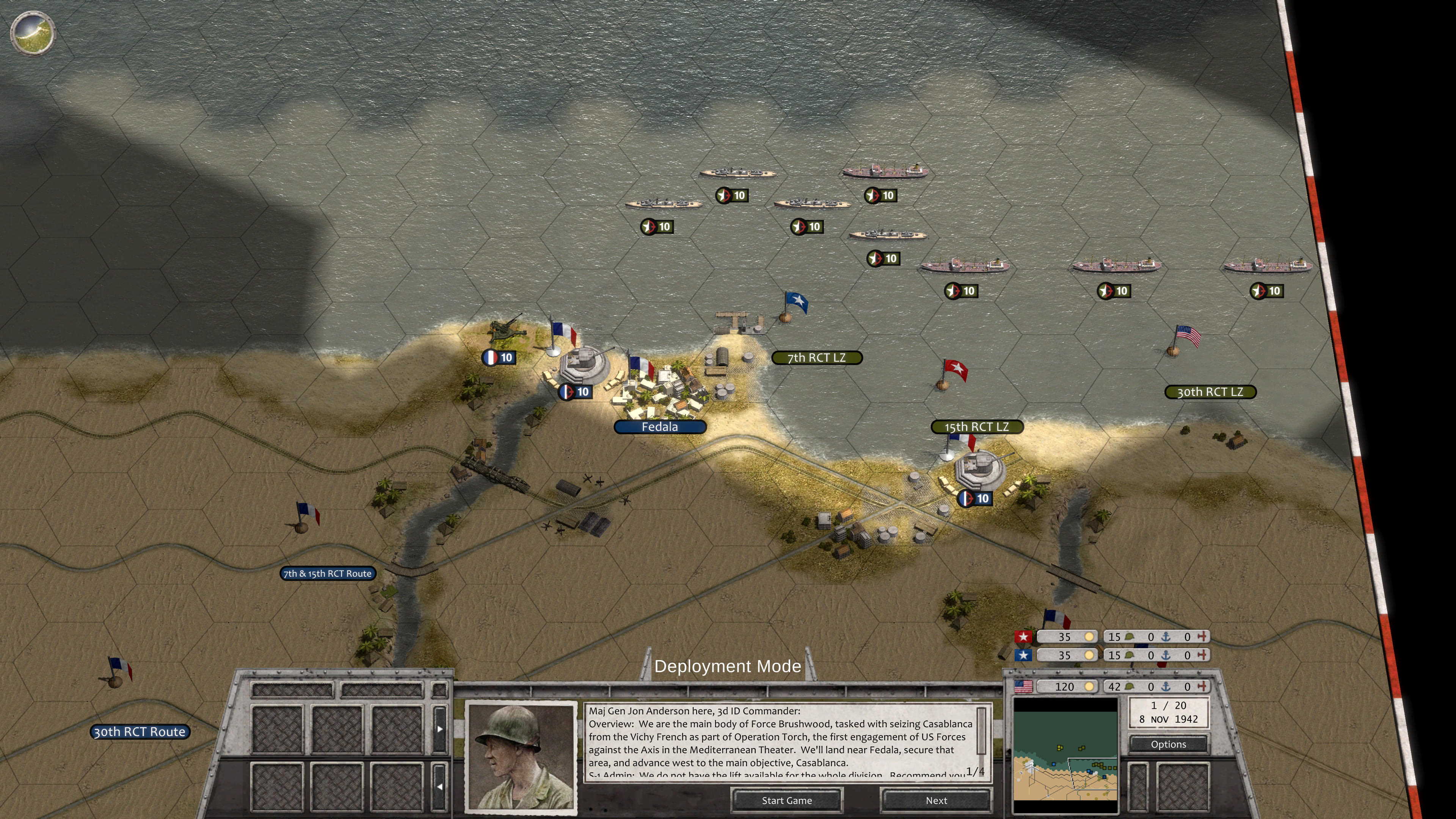
Nothing wrong with your campaign or the flags on my installation (campaign v2.01, vanilla OoB v9.03), though. Also I don't recall a game-option to turn them off or on.
- Screenshot 346.jpg (859.67 KiB) Viewed 4681 times
Re: conboy's campaigns
Posted: Tue Sep 28, 2021 12:59 pm
by conboy
Thanks for the feedback, Gabe. I appreciate it!
Al (morge4), the only way for the route markers to go away is to go into the editor and get rid of them. Unless there is a display issue. Does you opening screen for Casablanca look like Gabes? That shows the deployment hexes and route markers by RCT. Are yours gone? If so, it's a technical question for the Tech Support forum.
conboy
Re: conboy's campaigns
Posted: Thu Sep 30, 2021 6:40 am
by terminator
Post a screenshot of the problem, this will move things forward

I’m like Saint Thomas, I only believe what I see!
Re: conboy's campaigns
Posted: Mon Oct 04, 2021 6:39 pm
by morge4
terminator wrote: Thu Sep 30, 2021 6:40 am
Post a screenshot of the problem, this will move things forward
I’m like Saint Thomas, I only believe what I see!
conboy wrote: Tue Sep 28, 2021 12:59 pm
Thanks for the feedback, Gabe. I appreciate it!
Al (morge4), the only way for the route markers to go away is to go into the editor and get rid of them. Unless there is a display issue. Does you opening screen for Casablanca look like Gabes? That shows the deployment hexes and route markers by RCT. Are yours gone? If so, it's a technical question for the Tech Support forum.
conboy
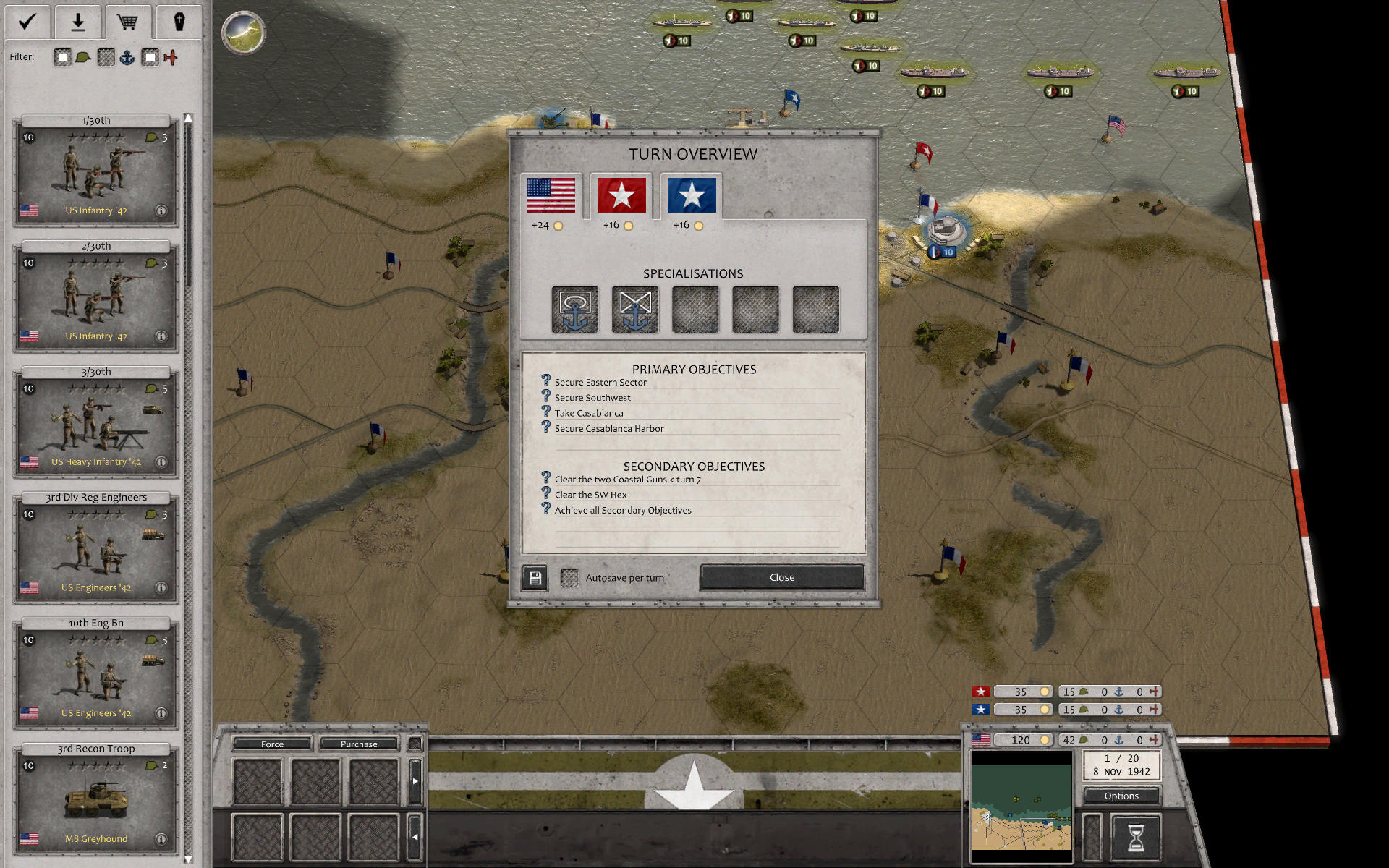
No, it does not look the same.
- Screenshot 3.jpg (397.52 KiB) Viewed 4567 times
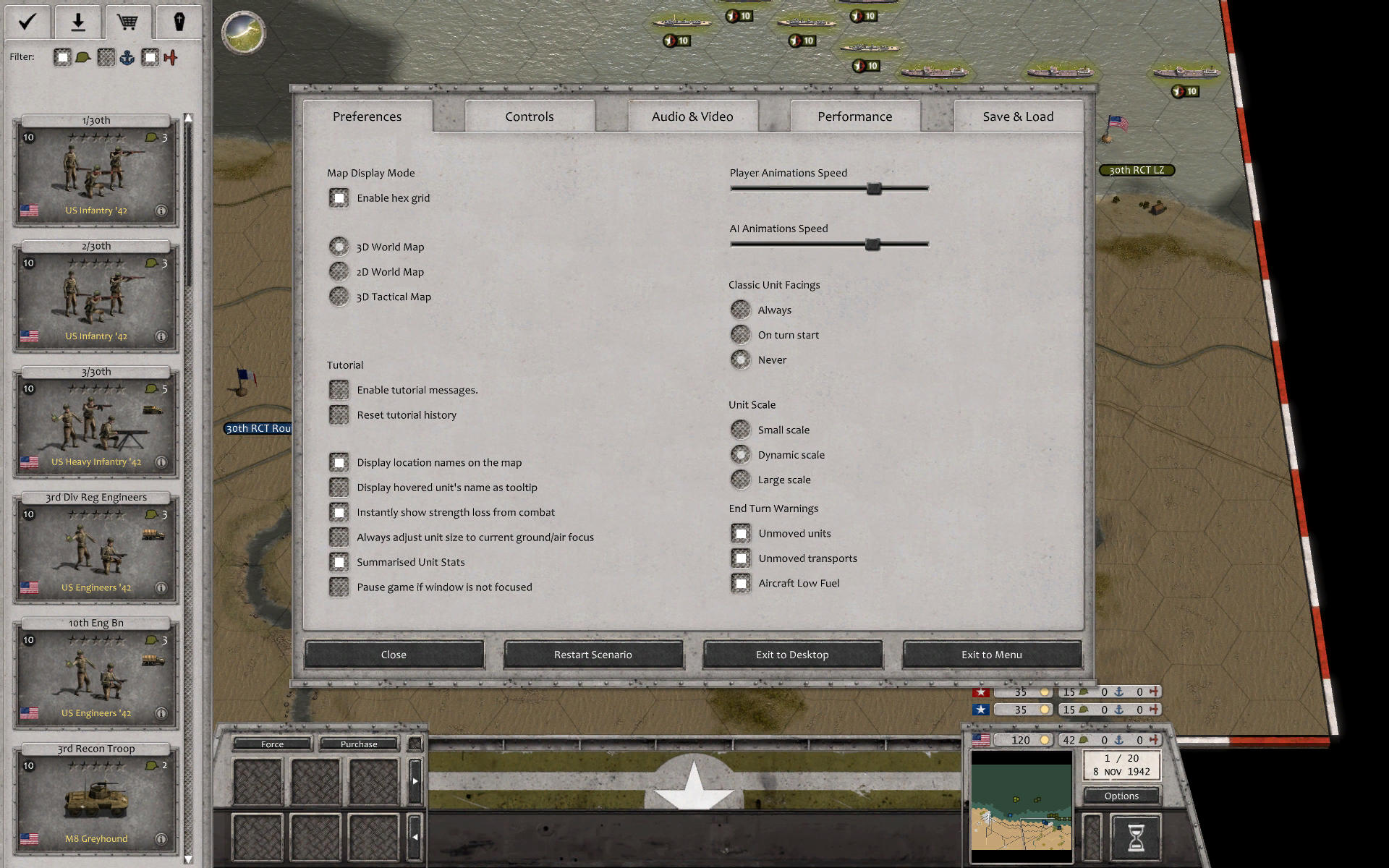
But I found the issue. Somehow my Display Location names box got unboxed. clicked it back on and now all is good. Not sure how it got turned off...but that fixed it.
- Screenshot 4.jpg (357.74 KiB) Viewed 4567 times
Thanks to you both for the assistance.
Re: conboy's campaigns
Posted: Mon Oct 04, 2021 11:13 pm
by conboy
Ah! The mystery is solved!
Thanks for filling us in.
Enjoy, and keep us posted.
conboy