Page 2 of 7
Posted: Thu Dec 10, 2009 2:05 pm
by KingHunter3059
Wolfe1759 wrote:Can't get it working either
Base game is the 1.0 Matrix release patched to 1.12
Installed GS to the matrix file location that CEaW is installed to, seemed to install fine and thought I'd have a look at the 1941 scenario (set with all options) from the Axis side. Started the scenario and only had 2 armoured, 1 mechanised and 1 infantry corps on the front line with Russia !
Quited to desktop then tried to restart, got to the GS loading screen but it wouldn't go any further.
After a couple of reinstalls found the same problem with the '41 scenario and could only load GS if I deleted any existing GS files from My Documents.
I was really looking forward to this so any help would be appreciated.
Have you tried downloading the ZIP file, then manually extracting the files in the ZIP to their locations in c:\Matrix Games\Commander Europe at War? This worked for me - Here is the link to the download the ZIP file:
http://rapidshare.com/files/313728646/GSVer1.00.zip
Jay
Posted: Thu Dec 10, 2009 7:02 pm
by Wolfe1759
Jay
Thanks for the suggestion.
Is there any way to download the zip file without having to set yourself up as a premium member of rapidshare ?
Posted: Thu Dec 10, 2009 7:13 pm
by rkr1958
Wolfe1759 wrote:Jay
Thanks for the suggestion.
Is there any way to download the zip file without having to set yourself up as a premium member of rapidshare ?
Yes. You just have to be patient and keep retrying if when you try to download it won't let you because the site is busy.
Posted: Thu Dec 10, 2009 8:27 pm
by bendamaster
I've installed the upgrade and tested it, and it all went fine, but today I tried to run it, only to have it freeze on the loading screen. Does anyone have any idea what the problem is.
Posted: Thu Dec 10, 2009 11:15 pm
by Wolfe1759
rkr1958
Thanks, eventualy got it to download.
However it's still not working.
Made a copy of my CEaW 1.12 folder and then copied across all the folders etc from the GS zip file.
Created a sortcut from Commander.exe
Started up fine and got into the 1939 scenario.
Applied the GS beta patch
Started fine, started up the 1939 scenario playing as Axis hit end turn without doing anything, came to the allied turn and Poland joined the allies so everything seems to have installed ok with the patch.
Tried to start it a third time and same problem as I was having with the Slitherine installer version of GS.
Got to the load screen (with Monty etc) after about 1 min the "Loading Game . . ." stoped flashing, waited another min or so but nothing more happened.
Only difference this time was when I brought up the task manager it didn't show any applications as running and I got a white screen, had to alt-tab and manualy close CEaW GS from my windows bar.
PS also tried to the new GS install running as administrator with my virus shield (Avast) paused but same result.
PPS when I delete the CEAW Grand Strategy folder from my Documents I can start the game again from the language select screen but therefor will have to wipe out any saved game data before I start playing and I don't think I'm upto playing the whole campaign in one sitting

PPPS I've also noticed that the very bottom of the text in the information popups in the game is cut off, still readable but missing the last millimeter or so of each letter
Posted: Thu Dec 10, 2009 11:31 pm
by rkr1958
Wolfe1759 wrote:rkr1958
Thanks, eventualy got it to download.
However it's still not working.
Made a copy of my CEaW 1.12 folder and then copied across all the folders etc from the GS zip file.
Created a sortcut from Commander.exe
Started up fine and got into the 1939 scenario.
Applied the GS beta patch
Started fine, started up the 1939 scenario playing as Axis hit end turn without doing anything, came to the allied turn and Poland joined the allies so everything seems to have installed ok with the patch.
Tried to start it a third time and same problem as I was having with the Slitherine installer version of GS.
Got to the load screen (with Monty etc) after about 1 min the "Loading Game . . ." stoped flashing, waited another min or so but nothing more happened.
Only difference this time was when I brought up the task manager it didn't show any applications as running and I got a white screen, had to alt-tab and manualy close CEaW GS from my windows bar.
PS also tried to the new GS install running as administrator with my virus shield (Avast) paused but same result.
Ahh ... you got a memory issue. Try killing the game and restarting. I bet everything will play just fine. How much RAM do you have? Also, trying closing all applications that you don't need.
Posted: Thu Dec 10, 2009 11:47 pm
by Wolfe1759
rkr1958
Think I was editing my post (PPS and PPPS) as you were replying
I've tried restarting the game, I've tried restarting my computer and then restarting the game but with the same results, all other applications closed in both instances.
I've got 2 GB of RAM
Posted: Fri Dec 11, 2009 5:34 am
by rkr1958
Wolfe1759 wrote:PPPS I've also noticed that the very bottom of the text in the information popups in the game is cut off, still readable but missing the last millimeter or so of each letter
Let's take the easy one first. If you install the Haettenschweiler font if will take care of this for you. It's a free font and one place you can download it from is:
http://www.font-zone.com/download.php?fid=846
Wolfe1759 wrote:PPS when I delete the CEAW Grand Strategy folder from my Documents I can start the game again from the language select screen but therefor will have to wipe out any saved game data before I start playing and I don't think I'm upto playing the whole campaign in one sitting Very Happy
Humor me on this one. What happens if you try the following? See
viewtopic.php?p=116716#116716
Posted: Fri Dec 11, 2009 10:50 am
by EarlyDoors
Hi team
Got grand Strategy last night and played once looks good...thanks for all your efforts
Like everyone else though I have the problem on subsequent startups whereby it freezes on load up page
I think its a Java version or memory issue.....
What version of java is it compiled against?
Posted: Fri Dec 11, 2009 10:50 am
by El_Condoro
I have the same problem as described here:
GS loaded on first installation (and I got to see what looks like a great game!) but will not load past the startup screen (got to Game Loading... and then nothing). Have uninstalled and reinstalled to no effect.
The Task Manager shows java.exe is running even after the game is quit (forced) but ending these processes does not fix the issue.
Posted: Fri Dec 11, 2009 12:10 pm
by rkr1958
It's complied with Java 1.4.
If you open a DOS prompt and type:
java -version
you'll see what version your O/S defaults to. You need version 1.4 or higher to run.
Also, what antivirus software and O/S are you running?
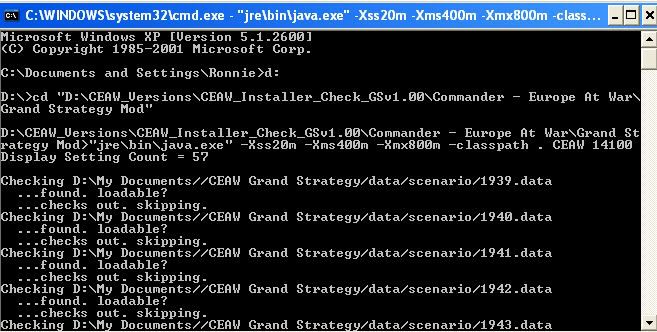
Note that the following is advance; but if anyone having problems and you can do this then this might help us track down the problem. Open a DOS prompt. Change directory to the folder where the mod is. In my case I used the installer and installed the mod to:
"D:\CEAW_Versions\CEAW_Installer_Check_GSv1.00\Commander - Europe At War\CEaW - Grand Strategy"
Start the game from a DOS prompt using the following command,
"jre\bin\java.exe" -Xss20m -Xms400m -Xmx800m -classpath . CEAW 14100"
Use "Alt-Tab"keys (at the same time) to select the DOS window when the game is starting up and then take and post a screen cap when you encounter an error.
Posted: Fri Dec 11, 2009 1:16 pm
by rkr1958
Also, what version of the standard game are you applying the expansion over? Is it 1.12 or is it 1.12.1?
If it's 1.12.1 then I made know what's happening.
Posted: Fri Dec 11, 2009 1:52 pm
by El_Condoro
I performed a clean install on my laptop and exactly the same occurred.
Java version 1.6 (both PC and LT)
Game version 1.12 before GS installed. Tested 1.12 was working correctly before GS.
GS ran normally on first install but hung on the flashing Loading Game... screen on subsequent attempts.
OS: XP SP3
Posted: Fri Dec 11, 2009 1:57 pm
by El_Condoro
The full DOS message when the problem occurs:
Microsoft Windows XP [Version 5.1.2600]
(C) Copyright 1985-2001 Microsoft Corp.
D:\Commander EAW\CEAW\Grand Strategy Mod>"jre\bin\java.exe" -Xss20m -Xms400m -Xm
x800m -classpath . CEAW 14100"
Display Setting Count = 36
Checking D:\data//CEAW Grand Strategy/data/scenario/1939.data
...found. loadable?
...checks out. skipping.
Checking D:\data//CEAW Grand Strategy/data/scenario/1940.data
...found. loadable?
Compiled scenario 1940
Checking D:\data//CEAW Grand Strategy/data/scenario/1941.data
...found. loadable?
Compiled scenario 1941
Checking D:\data//CEAW Grand Strategy/data/scenario/1942.data
...found. loadable?
Problem with main menu init
java.lang.ArrayIndexOutOfBoundsException: 7
at game.Game.createScenarios(Game.java:1455)
at game.Game.<init>(Game.java:157)
at gui.MainMenu.jbInit(MainMenu.java:246)
at gui.MainMenu.<init>(MainMenu.java:70)
at gui.TheScreen._$11000(TheScreen.java:80)
at gui.TheScreen.<init>(TheScreen.java:35)
at CEAW.main(CEAW.java:168)
Exception in thread "Thread-3" java.lang.NullPointerException
at game.MediaTrackerThread.run(MediaTrackerThread.java:806)
Exception in thread "AWT-EventQueue-0" java.lang.NullPointerException
at gui.MainMenu.paintComponent(MainMenu.java:441)
at javax.swing.JComponent.paint(Unknown Source)
at javax.swing.JComponent.paintChildren(Unknown Source)
at javax.swing.JComponent.paint(Unknown Source)
at javax.swing.JComponent.paintChildren(Unknown Source)
at javax.swing.JComponent.paint(Unknown Source)
at javax.swing.JComponent.paintChildren(Unknown Source)
at javax.swing.JComponent.paint(Unknown Source)
at javax.swing.JComponent.paintWithOffscreenBuffer(Unknown Source)
at javax.swing.JComponent.paintDoubleBuffered(Unknown Source)
at javax.swing.JComponent._paintImmediately(Unknown Source)
at javax.swing.JComponent.paintImmediately(Unknown Source)
at javax.swing.RepaintManager.paintDirtyRegions(Unknown Source)
at javax.swing.SystemEventQueueUtilities$ComponentWorkRequest.run(Unknow
n Source)
at java.awt.event.InvocationEvent.dispatch(Unknown Source)
at java.awt.EventQueue.dispatchEvent(Unknown Source)
at java.awt.EventDispatchThread.pumpOneEventForHierarchy(Unknown Source)
at java.awt.EventDispatchThread.pumpEventsForHierarchy(Unknown Source)
at java.awt.EventDispatchThread.pumpEvents(Unknown Source)
at java.awt.EventDispatchThread.pumpEvents(Unknown Source)
at java.awt.EventDispatchThread.run(Unknown Source)
Exception in thread "AWT-EventQueue-0" java.lang.NullPointerException
at gui.MainMenu.paintComponent(MainMenu.java:441)
at javax.swing.JComponent.paint(Unknown Source)
at javax.swing.JComponent.paintChildren(Unknown Source)
at javax.swing.JComponent.paint(Unknown Source)
at javax.swing.JComponent.paintChildren(Unknown Source)
at javax.swing.JComponent.paint(Unknown Source)
at javax.swing.JComponent.paintChildren(Unknown Source)
at javax.swing.JComponent.paint(Unknown Source)
at javax.swing.JComponent.paintChildren(Unknown Source)
at javax.swing.JComponent.paint(Unknown Source)
at javax.swing.JLayeredPane.paint(Unknown Source)
at javax.swing.JComponent.paintChildren(Unknown Source)
at javax.swing.JComponent.paint(Unknown Source)
at javax.swing.JComponent.paintWithOffscreenBuffer(Unknown Source)
at javax.swing.JComponent.paintDoubleBuffered(Unknown Source)
at javax.swing.JComponent._paintImmediately(Unknown Source)
at javax.swing.JComponent.paintImmediately(Unknown Source)
at javax.swing.RepaintManager.paintDirtyRegions(Unknown Source)
at javax.swing.SystemEventQueueUtilities$ComponentWorkRequest.run(Unknow
n Source)
at java.awt.event.InvocationEvent.dispatch(Unknown Source)
at java.awt.EventQueue.dispatchEvent(Unknown Source)
at java.awt.EventDispatchThread.pumpOneEventForHierarchy(Unknown Source)
at java.awt.EventDispatchThread.pumpEventsForHierarchy(Unknown Source)
at java.awt.EventDispatchThread.pumpEvents(Unknown Source)
at java.awt.EventDispatchThread.pumpEvents(Unknown Source)
at java.awt.EventDispatchThread.run(Unknown Source)
Exception in thread "AWT-EventQueue-0" java.lang.NullPointerException
at gui.MainMenu.paintComponent(MainMenu.java:441)
at javax.swing.JComponent.paint(Unknown Source)
at javax.swing.JComponent.paintChildren(Unknown Source)
at javax.swing.JComponent.paint(Unknown Source)
at javax.swing.JComponent.paintChildren(Unknown Source)
at javax.swing.JComponent.paint(Unknown Source)
at javax.swing.JComponent.paintChildren(Unknown Source)
at javax.swing.JComponent.paint(Unknown Source)
at javax.swing.JComponent.paintChildren(Unknown Source)
at javax.swing.JComponent.paint(Unknown Source)
at javax.swing.JLayeredPane.paint(Unknown Source)
at javax.swing.JComponent.paintChildren(Unknown Source)
at javax.swing.JComponent.paint(Unknown Source)
at javax.swing.JComponent.paintWithOffscreenBuffer(Unknown Source)
at javax.swing.JComponent.paintDoubleBuffered(Unknown Source)
at javax.swing.JComponent._paintImmediately(Unknown Source)
at javax.swing.JComponent.paintImmediately(Unknown Source)
at javax.swing.RepaintManager.paintDirtyRegions(Unknown Source)
at javax.swing.SystemEventQueueUtilities$ComponentWorkRequest.run(Unknow
n Source)
at java.awt.event.InvocationEvent.dispatch(Unknown Source)
at java.awt.EventQueue.dispatchEvent(Unknown Source)
at java.awt.EventDispatchThread.pumpOneEventForHierarchy(Unknown Source)
at java.awt.EventDispatchThread.pumpEventsForHierarchy(Unknown Source)
at java.awt.EventDispatchThread.pumpEvents(Unknown Source)
at java.awt.EventDispatchThread.pumpEvents(Unknown Source)
at java.awt.EventDispatchThread.run(Unknown Source)
Exception in thread "AWT-EventQueue-0" java.lang.NullPointerException
at gui.MainMenu.paintComponent(MainMenu.java:441)
at javax.swing.JComponent.paint(Unknown Source)
at javax.swing.JComponent.paintChildren(Unknown Source)
at javax.swing.JComponent.paint(Unknown Source)
at javax.swing.JComponent.paintChildren(Unknown Source)
at javax.swing.JComponent.paint(Unknown Source)
at javax.swing.JComponent.paintChildren(Unknown Source)
at javax.swing.JComponent.paint(Unknown Source)
at javax.swing.JComponent.paintChildren(Unknown Source)
at javax.swing.JComponent.paint(Unknown Source)
at javax.swing.JLayeredPane.paint(Unknown Source)
at javax.swing.JComponent.paintChildren(Unknown Source)
at javax.swing.JComponent.paintWithOffscreenBuffer(Unknown Source)
at javax.swing.JComponent.paintDoubleBuffered(Unknown Source)
at javax.swing.JComponent.paint(Unknown Source)
at java.awt.GraphicsCallback$PaintCallback.run(Unknown Source)
at sun.awt.SunGraphicsCallback.runOneComponent(Unknown Source)
at sun.awt.SunGraphicsCallback.runComponents(Unknown Source)
at java.awt.Container.paint(Unknown Source)
at sun.awt.RepaintArea.paintComponent(Unknown Source)
at sun.awt.RepaintArea.paint(Unknown Source)
at sun.awt.windows.WComponentPeer.handleEvent(Unknown Source)
at java.awt.Component.dispatchEventImpl(Unknown Source)
at java.awt.Container.dispatchEventImpl(Unknown Source)
at java.awt.Window.dispatchEventImpl(Unknown Source)
at java.awt.Component.dispatchEvent(Unknown Source)
at java.awt.EventQueue.dispatchEvent(Unknown Source)
at java.awt.EventDispatchThread.pumpOneEventForHierarchy(Unknown Source)
at java.awt.EventDispatchThread.pumpEventsForHierarchy(Unknown Source)
at java.awt.EventDispatchThread.pumpEvents(Unknown Source)
at java.awt.EventDispatchThread.pumpEvents(Unknown Source)
at java.awt.EventDispatchThread.run(Unknown Source)
Exception in thread "AWT-EventQueue-0" java.lang.NullPointerException
at gui.MainMenu.paintComponent(MainMenu.java:441)
at javax.swing.JComponent.paint(Unknown Source)
at javax.swing.JComponent.paintChildren(Unknown Source)
at javax.swing.JComponent.paint(Unknown Source)
at javax.swing.JComponent.paintChildren(Unknown Source)
at javax.swing.JComponent.paint(Unknown Source)
at javax.swing.JComponent.paintChildren(Unknown Source)
at javax.swing.JComponent.paint(Unknown Source)
at javax.swing.JComponent.paintChildren(Unknown Source)
at javax.swing.JComponent.paint(Unknown Source)
at javax.swing.JLayeredPane.paint(Unknown Source)
at javax.swing.JComponent.paintChildren(Unknown Source)
at javax.swing.JComponent.paintWithOffscreenBuffer(Unknown Source)
at javax.swing.JComponent.paintDoubleBuffered(Unknown Source)
at javax.swing.JComponent.paint(Unknown Source)
at java.awt.GraphicsCallback$PaintCallback.run(Unknown Source)
at sun.awt.SunGraphicsCallback.runOneComponent(Unknown Source)
at sun.awt.SunGraphicsCallback.runComponents(Unknown Source)
at java.awt.Container.paint(Unknown Source)
at sun.awt.RepaintArea.paintComponent(Unknown Source)
at sun.awt.RepaintArea.paint(Unknown Source)
at sun.awt.windows.WComponentPeer.handleEvent(Unknown Source)
at java.awt.Component.dispatchEventImpl(Unknown Source)
at java.awt.Container.dispatchEventImpl(Unknown Source)
at java.awt.Window.dispatchEventImpl(Unknown Source)
at java.awt.Component.dispatchEvent(Unknown Source)
at java.awt.EventQueue.dispatchEvent(Unknown Source)
at java.awt.EventDispatchThread.pumpOneEventForHierarchy(Unknown Source)
at java.awt.EventDispatchThread.pumpEventsForHierarchy(Unknown Source)
at java.awt.EventDispatchThread.pumpEvents(Unknown Source)
at java.awt.EventDispatchThread.pumpEvents(Unknown Source)
at java.awt.EventDispatchThread.run(Unknown Source)
Exception in thread "AWT-EventQueue-0" java.lang.NullPointerException
at gui.MainMenu.paintComponent(MainMenu.java:441)
at javax.swing.JComponent.paint(Unknown Source)
at javax.swing.JComponent.paintChildren(Unknown Source)
at javax.swing.JComponent.paint(Unknown Source)
at javax.swing.JComponent.paintChildren(Unknown Source)
at javax.swing.JComponent.paint(Unknown Source)
at javax.swing.JComponent.paintChildren(Unknown Source)
at javax.swing.JComponent.paint(Unknown Source)
at javax.swing.JComponent.paintChildren(Unknown Source)
at javax.swing.JComponent.paint(Unknown Source)
at javax.swing.JLayeredPane.paint(Unknown Source)
at javax.swing.JComponent.paintChildren(Unknown Source)
at javax.swing.JComponent.paint(Unknown Source)
at javax.swing.JComponent.paintWithOffscreenBuffer(Unknown Source)
at javax.swing.JComponent.paintDoubleBuffered(Unknown Source)
at javax.swing.JComponent._paintImmediately(Unknown Source)
at javax.swing.JComponent.paintImmediately(Unknown Source)
at javax.swing.RepaintManager.paintDirtyRegions(Unknown Source)
at javax.swing.SystemEventQueueUtilities$ComponentWorkRequest.run(Unknow
n Source)
at java.awt.event.InvocationEvent.dispatch(Unknown Source)
at java.awt.EventQueue.dispatchEvent(Unknown Source)
at java.awt.EventDispatchThread.pumpOneEventForHierarchy(Unknown Source)
at java.awt.EventDispatchThread.pumpEventsForHierarchy(Unknown Source)
at java.awt.EventDispatchThread.pumpEvents(Unknown Source)
at java.awt.EventDispatchThread.pumpEvents(Unknown Source)
at java.awt.EventDispatchThread.run(Unknown Source)
Hope it helps[/img]
Posted: Fri Dec 11, 2009 2:04 pm
by Wolfe1759
rkr1958 wrote:Wolfe1759 wrote:PPPS I've also noticed that the very bottom of the text in the information popups in the game is cut off, still readable but missing the last millimeter or so of each letter
Let's take the easy one first. If you install the Haettenschweiler font if will take care of this for you. It's a free font and one place you can download it from is:
http://www.font-zone.com/download.php?fid=846
Wolfe1759 wrote:PPS when I delete the CEAW Grand Strategy folder from my Documents I can start the game again from the language select screen but therefor will have to wipe out any saved game data before I start playing and I don't think I'm upto playing the whole campaign in one sitting Very Happy
Humor me on this one. What happens if you try the following? See
viewtopic.php?p=116716#116716
I'll download the font so that should solve the first one.
Disabled the Hide extensions but still have the same problem i.e. hangs on the loading game screen
Posted: Fri Dec 11, 2009 2:21 pm
by Peter Stauffenberg
It seems the game has problems with the 1942.scn file. Maybe it's corrupted or something.
I uploaded all the files that should be in the scenario folder. Can you please download the zip file and put the content in the following folder:
C:\Program Files\Slitherine\Commander - Europe at War\CEAW Grand Strategy\data\scenario (or similar if you have MH CEAW).
http://rapidshare.com/files/319411432/scenario.zip.html
Also try to delete all the data files in the following folder:
My Documents\CEAW Grand Strategy\data\scenario
What's the date and file size of your 1942.scn file? It should have 25.11.2009 with size 631 kb
I just downloaded the installer and installed it. The game works like a charm after installation. So I don't think the files are corrupted in the installer. I was installing on-top of CEAW 1.12 (not 1.12.1).
Posted: Fri Dec 11, 2009 3:03 pm
by Wolfe1759
Stauffenberg
Brilliant that seems to have done the trick.
Also have now been able to use the Slitherine installer (pointed to install to the Matrix Games location of CEaW) then with the above applied to the scenario folder it works perfectly.
Posted: Fri Dec 11, 2009 3:06 pm
by Peter Stauffenberg
Another question about the problems with running Grand Strategy. You don't have any other scenarios in the scenario folder than the following?
* 1939.scn
* 1940.scn
* 1941.scn
* 1942.scn
* 1943.scn
* 1944.scn
* ww2.map
If yes, then remove the other files that shouldn't be there and try to run the game again.
Posted: Fri Dec 11, 2009 3:54 pm
by rkr1958
Stauffenberg wrote:Another question about the problems with running Grand Strategy. You don't have any other scenarios in the scenario folder than the following?
* 1939.scn
* 1940.scn
* 1941.scn
* 1942.scn
* 1943.scn
* 1944.scn
* ww2.map
If yes, then remove the other files that shouldn't be there and try to run the game again.
Ahh ... I think I'm beginning to see something here.
Good catch Borger! I knew I called the cavalry in for a reason.

Either with the installer or for a manual install, a copy of the vanilla game, which includes the data/scenario folder and its contents, is first created over which the expansion is then applied. If the data/scenario folder contains scenarios other than the ones above or if for some reason one or more of the original scenarios are not getting over written then that would cause the load error.
Posted: Fri Dec 11, 2009 4:05 pm
by rkr1958
All,
If you're having the problem described above,
GS loaded on first installation but will not load past the startup screen for subsequent runs
then try this.
Go to the scenario data folder in the expansion (e.g., "*/Grand Strategy Mod/data/scenario") and in that folder you should see the files,
1939.scn
1940.scn
1941.scn
1942.scn
1943.scn
1944.scn
ww2.map
Make a backup copy of all these files. Then delete all files; EXCEPT 1939.scn & ww2.map
See if that solves your problem. If it does then you can add back the other scenario files (i.e., 1940.scn, 1941.scn, 1942.scn, 1943.scn & 1944.scn) ONE AT A TIME until you encounter the above problem. When that happens delete that file and let us know. For now, just play the expansion without that, or those, scenario file(s).
Also, for folks having problems and try this let us know what happens.