Page 1 of 8
Historical Flag and Insignia Mod Gold
Posted: Wed Dec 21, 2011 4:40 am
by Wargamer74
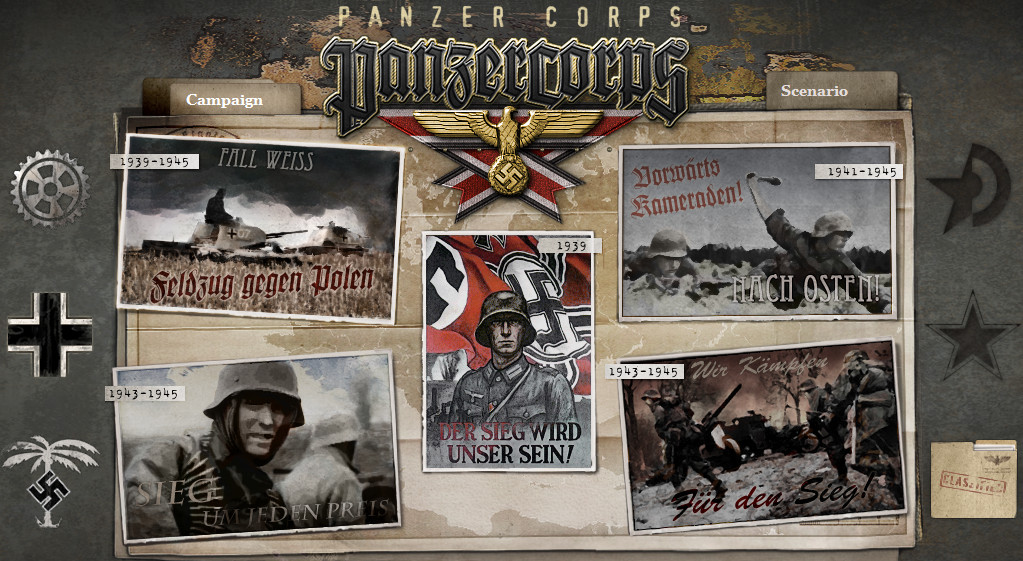
- New Game Screen.jpg (228.69 KiB) Viewed 30579 times
The Historical Flag and Insiginia Mod has been updated for PanzerCorp Gold
After alot of work
and thanks to VPaulus's assistance this is a German
flag and Insignia Mod that makes the game look more historically accurate.
The
mod includes:
-An officer visor eagle
insignia for both in game
and the logo for all the Wehrmacht/Afrika Korps scenario selection screens
-The original propaganda poster in the middle of the campaign selection screen
-The
historical German, Italian
and Bulgarian flags in the game
and all the scenario selection screens. Also for the pop ups on the side bar
-German, Allied,
and Soviet rubber stamps on the scenario selection screens
-Uncensored
and improved Iron Cross Medals
-The
mod also comes with the library German plane images from the
1.10 patch before the swastika emblems were removed in 1.11
-I included a modified version of the panzer_taskwindow_02_03.png that is loosely based on actual WWII German military documents that I figure not everybody will like, if you don't want it make sure to delete the image before installing the
mod
Download
https://www.mediafire.com/file/tfnxfepn ... d.zip/file
To install the
mod you can use the Generic
Mod Enabler. Full instructions on how to use GME can be found here
viewtopic.php?f=147&t=27158. If you're using GME, extract the zip file to "C:\Program Files (x86)\Slitherine\Panzer Corps\MODS" or from within GME click on tasks then import
mod. I highly recommend using GME since the
mod can be easily disabled so if you want to post screenshots of the game on the forum or playing the game in front of someone who might get their panties in a knot seeing swastikas,lol, you can disable it
and then afterwards you can re-enable the
mod
You can also install the
mod manually by copying
and pasting the contents of each folder with the same name in your Panzer Corps install folder.
A few notes about the
mod:
With PC Gold the
mod will switch from the modified logo to the original logo when clicking on the Allied Corps or Soviet icons on the campaign selection screen.
Some will probably notice the eagle faces to the left rather than the right. It's supposed to be a Officer Visor Cap
insignia which historically along with Wehrmacht breast eagles always faced left. I thought it was perfect since from a roleplay point of view you're a German Officer or General. For a
historical comparison you can look here
https://www.germandaggers.com/Gallery/EG.php
Technically it should be a chrome or silver color but this eagle fits the original color scheme of the interface perfectly so that's why it's gold.
Posted: Wed Dec 21, 2011 5:12 am
by Wargamer74
Afrika Korps Add On
This is a optional add on that can be used with the
historical flag and insignia mod when playing the AK expansion. It replaces the eagle in the headbase
and purchase screen with a Afrika korps
insignia. It also includes a briefing letter with a AK rubber stamp. With the 1.20 patch the add on can be used along with the
historical flag and insignia mod, when you click on the ak icon
and load up a scenario or campaign it will use the AK headbase.

AK Add On Download Mirror 1
http://www.gamefront.com/files/23556958 ... .20A.zipAK Add On
Download Mirror 2
http://www.mediafire.com/?7xgl6gzm6m22528
Posted: Wed Dec 21, 2011 10:36 am
by kop101
good job! thank you
Posted: Wed Dec 21, 2011 11:21 am
by VPaulus
Great job.

Maybe you could add an option with the whole package include in one download. I'm sure some people people will want the whole package.

Posted: Wed Dec 21, 2011 9:33 pm
by Wargamer74
Great job.
Maybe you could add an option with the whole package include in one download. I'm sure some people people will want the whole package.
Thanks!
The second version is the whole package but with the additional changes. Also the only difference between the two downloads of each package is one includes your flags
and the other doesn't.
Posted: Wed Dec 21, 2011 10:58 pm
by VPaulus
Ok.
You've retouched the medals, didn't you?
They look much better, now.
And the Wehrmacht eagle, after so many indecisions, really end up being the best solution.
Congratulations, it's very good.
Please could you also post in the Matrix forums, as well?
Posted: Wed Dec 21, 2011 11:31 pm
by Wargamer74
You've retouched the medals, didn't you?
There all new medals, I found a bitmap image of a Iron Cross on Google images
and copied then pasted the whole inner part of the medal into the original. I think it turned out very good.
Posted: Wed Dec 21, 2011 11:36 pm
by VPaulus
Indeed.
Posted: Thu Dec 22, 2011 9:30 pm
by marlon2300
Very good!
Posted: Fri Jan 27, 2012 7:41 pm
by Wargamer74
The full historical 1.06 mod has been updated with VPaulus's new Slovakian flag.
Posted: Fri Jan 27, 2012 8:55 pm
by VPaulus
Great!
Re: New Historical Flag and Insignia Mod
Posted: Sat Jul 21, 2012 12:59 am
by VPaulus
Scott, we will need your skills for extending your mod to Afrika Korps.
Re: New Historical Flag and Insignia Mod
Posted: Sat Jul 21, 2012 11:39 am
by Wargamer74
I do have something that might work for Afrika Korps but from looking at the screenshots it looks like it still uses the same headbase and flag from the core game. To be honest I haven't been keep up on the details for AK. Do you know how much the new add on will cost for existing PC owners?
Re: New Historical Flag and Insignia Mod
Posted: Sat Jul 21, 2012 12:49 pm
by VPaulus
Scott900091 wrote:I do have something that might work for Afrika Korps but from looking at the screenshots it looks like it still uses the same headbase and flag from the core game. To be honest I haven't been keep up on the details for AK. Do you know how much the new add on will cost for existing PC owners?
We don't know yet.
I only know for sure what differences we will have in the final version of AK. But besides the maps
and the main menu screen, the rest might not need to be changed.
I can do the adaptation myself (with your approval of course), or even given you the screens for you to work, in case you can't buy AK.
I could use my
mod, but I think your
mod is better than mine.
Re: New Historical Flag and Insignia Mod
Posted: Sat Jul 21, 2012 12:59 pm
by Chris10
While we are here I wanted to ask you if you would mind if I make your
mod the default UI setting for Panzercorps East ?
I havent ask before because its still far from release but I think its time to get some basic things done before continuing after AK release..
viewtopic.php?f=147&t=33244
Re: New Historical Flag and Insignia Mod
Posted: Sat Jul 21, 2012 1:31 pm
by Wargamer74
As long as I get credit for my work anyone can use the
mod as they please.
I didn't upload it just for people to look at.

I've never understood why some people are so stingy with their mods. If people want to use my work, I consider it a compliment.
Re: New Historical Flag and Insignia Mod
Posted: Sat Jul 21, 2012 2:04 pm
by Chris10
Scott900091 wrote:As long as I get credit for my work ............
the obvious is the obvious

Re: New Historical Flag and Insignia Mod
Posted: Sat Jul 21, 2012 2:27 pm
by VPaulus
Scott900091 wrote: I've never understood why some people are so stingy with their mods.
Re: New Historical Flag and Insignia Mod
Posted: Thu Aug 09, 2012 7:55 am
by Wargamer74
The historical flag and insignia mod has been updated for the 1.10 patch and Afrika Korps.
Re: New Historical Flag and Insignia Mod
Posted: Thu Aug 09, 2012 8:27 am
by kop101
thanks mate! I was looking for this thread immediately after download of Africa Korps.