

Which USB ports?
Moderators: The Artistocrats, Order of Battle Moderators
-
PoorOldSpike
- Sr. Colonel - Battleship

- Posts: 1661
- Joined: Sun Aug 08, 2010 6:06 pm
- Location: Plymouth, England
Which USB ports?
Hi, PC dummy here again- I only accidentally found out recently that some of the USB ports on our PC's are better than others, so how do we know which ones to plug our mouse,keyboard and other stuff into for best performance?
-
terminator
- Field Marshal - Gustav

- Posts: 6181
- Joined: Mon Aug 15, 2011 12:48 pm
- Location: the land of freedom
Re: Which USB ports?
Different types of USB ports :
- USB 2.0
- USB 3.1 Gen 1
- USB 3.1 Gen 2
- USB 2.0
- USB 3.1 Gen 1
- USB 3.1 Gen 2

Re: Which USB ports?
Often they have different colors. If that is the case it should be described somewhere which is which, or maybe ask where you bought/ordered it.PoorOldSpike wrote: Fri Aug 02, 2019 3:29 am Hi, PC dummy here again- I only accidentally found out recently that some of the USB ports on our PC's are better than others, so how do we know which ones to plug our mouse,keyboard and other stuff into for best performance?

Re: Which USB ports?
USB 3 ports are blue (it is in the specs). They are much faster than USB 2, but since not much data is transferred when you use a mouse or keyboard, there is no benefit. Storage devices such as flash drives, external hard drives and portable SSDs on the other hand benefit a lot so those you should definitely connect to USB 3 ports.PoorOldSpike wrote: Fri Aug 02, 2019 3:29 am Hi, PC dummy here again- I only accidentally found out recently that some of the USB ports on our PC's are better than others, so how do we know which ones to plug our mouse,keyboard and other stuff into for best performance?
-
PoorOldSpike
- Sr. Colonel - Battleship
- Posts: 1661
- Joined: Sun Aug 08, 2010 6:06 pm
- Location: Plymouth, England
Re: Which USB ports?
Thanks guys I've got 4x blue USB ports on my PC and a couple of black ones, so l might as well use the blue ones at all times as they're the fastest.
This raises the question- Why don't PC manufacturers make ALL the ports blue?
This raises the question- Why don't PC manufacturers make ALL the ports blue?

Re: Which USB ports?
here you go,
Code: Select all
https://www.lifewire.com/what-is-a-usb-port-818166Re: Which USB ports?
Dunno about the manufacturers, maybe it's a cost thing. But for some purposes you don't need the fast ports.PoorOldSpike wrote: Fri Aug 02, 2019 4:33 pm This raises the question- Why don't PC manufacturers make ALL the ports blue?
They are most important when you transfer large data or files. For example, if you want to shuiffle lots of stuff onto a USB stick or external HD, like for a backup or so.
Otoh keyboard or mouse do well on standard ports, so you usually do not need to "waste" a 3er USB for this (if you have lots of stuff to connect).
Re: Which USB ports?
USB2 costs less is probably the #1 reason. It also takes less space on motherboard and uses less power and bandwidth. Like I said and also Bebro noted, with many peripherals there is no need for better than USB2. Modern PCs should have more than enough USB 3.x ports anyway. Even my over four yrs old rig has six (+ eight USB2s), albeit they are only 3.0.PoorOldSpike wrote: Fri Aug 02, 2019 4:33 pm This raises the question- Why don't PC manufacturers make ALL the ports blue?
-
PoorOldSpike
- Sr. Colonel - Battleship
- Posts: 1661
- Joined: Sun Aug 08, 2010 6:06 pm
- Location: Plymouth, England
Re: Which USB ports?
Thanks guys you've cleared up the mystery of USB's..
Can I now ask you to do the same with the other ports in these screenshots of the back of my PC and the underside of my monitor?
1- I've red-circled the two HDMI ports on the PC, are they both exactly the same and can I use any?
2- What's the green-circled port on the PC for? It's labelled 'DP' whatever that means, and it's not quite the same shape as the HDMI ports.
3- On the monitor shot, the yellow-circled port is labelled DP, so I presume it's exactly the same as the green-circled one, but what's it for?
(The red-circled port on the monitor is the HDMI of course)
Thanks

Can I now ask you to do the same with the other ports in these screenshots of the back of my PC and the underside of my monitor?
1- I've red-circled the two HDMI ports on the PC, are they both exactly the same and can I use any?
2- What's the green-circled port on the PC for? It's labelled 'DP' whatever that means, and it's not quite the same shape as the HDMI ports.
3- On the monitor shot, the yellow-circled port is labelled DP, so I presume it's exactly the same as the green-circled one, but what's it for?
(The red-circled port on the monitor is the HDMI of course)
Thanks
Re: Which USB ports?
Certainly.PoorOldSpike wrote: Wed Aug 07, 2019 2:30 am Thanks guys you've cleared up the mystery of USB's..
Can I now ask you to do the same with the other ports in these screenshots of the back of my PC and the underside of my monitor?
This is your new PC, right? Anyway, here goes:
1) The port in the upper pic is connected to the crappy integrated graphics chip of you PC. The one in the lower pic is for your dedicated graphics card. Definitely use that one.
2) It is a DisplayPort connector.
3. Yes, it is the same. You can use it to connect your graphics card and monitor instead of HDMI. Actually it is often the preferred choice. You need an appropriate cable of course. More of the subject for instance in this short article: https://www.pcgamer.com/displayport-vs- ... y-monitor/.
-
PoorOldSpike
- Sr. Colonel - Battleship
- Posts: 1661
- Joined: Sun Aug 08, 2010 6:06 pm
- Location: Plymouth, England
Re: Which USB ports?
Thanx guys, that about answers everything (and incidentally the pics I posted are of my old PC but the ports are exactly the same on my new PC)
Can I just toss the following important question into the playpen?-
There's only one HDMI port on my monitor (below), so I have to keep switching the HDMI cable from one PC to the other, depending which PC I want to use.
(I use the old one for general surfing and stuff, and the new one for games and flight sims)
Is it possible to buy an adapter or something at the monitor end that would allow me to buy a second HDMI cable so that I could keep both cables plugged into the monitor so I wouldn't have to keep switching?

Can I just toss the following important question into the playpen?-
There's only one HDMI port on my monitor (below), so I have to keep switching the HDMI cable from one PC to the other, depending which PC I want to use.
(I use the old one for general surfing and stuff, and the new one for games and flight sims)
Is it possible to buy an adapter or something at the monitor end that would allow me to buy a second HDMI cable so that I could keep both cables plugged into the monitor so I wouldn't have to keep switching?
Re: Which USB ports?
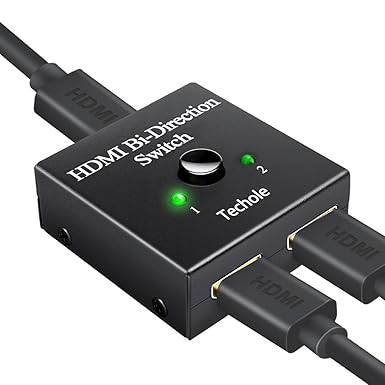
Yep. You just need an HDMI Switch. There are many, many models available. Another possibility is to use DisplayPort for you new PC and HDMI for the old one since your monitor has both.PoorOldSpike wrote: Thu Aug 08, 2019 2:54 am Is it possible to buy an adapter or something at the monitor end that would allow me to buy a second HDMI cable so that I could keep both cables plugged into the monitor so I wouldn't have to keep switching?
-
PoorOldSpike
- Sr. Colonel - Battleship
- Posts: 1661
- Joined: Sun Aug 08, 2010 6:06 pm
- Location: Plymouth, England
Re: Which USB ports?
Thanks for the recommendation CoolDTA, so I've just ordered the exact same switch from Amazon as the one in your pic..
PS- to digress, a poster said he liked my PzIVF2 avatar a few days ago (I forget which thread), but I see the forum software has now changed it to what looks like a few guys having a wimpy barbecue, grrrr, so I apologise to the guy but there's nothing we can do about it because our avatars automatically change every time we hit a certain number of posts (sniffle)
PS- to digress, a poster said he liked my PzIVF2 avatar a few days ago (I forget which thread), but I see the forum software has now changed it to what looks like a few guys having a wimpy barbecue, grrrr, so I apologise to the guy but there's nothing we can do about it because our avatars automatically change every time we hit a certain number of posts (sniffle)
-
PoorOldSpike
- Sr. Colonel - Battleship
- Posts: 1661
- Joined: Sun Aug 08, 2010 6:06 pm
- Location: Plymouth, England
Re: Which USB ports?
There's only about 12 inches between my two PCs and monitor (below) which is fine, but my HDMI leads are 5 feet long and what with all the other leads it looks like a plate of spaghetti back there, so I've been googling for "short HDMI leads"..

and these 30cm 4K ULTRA HD HDMI CABLE jobs look okay, what do you think, and does "Ultra HD" mean anything?
https://www.amazon.co.uk/SHORT-15cm-HDM ... =8-16&th=1
PS- I also need a tiny dual junction box (if that's the right word ) to plug speaker leads from both PC's into so I don't have to keep unplugging / plugging the speakers from one PC to the other. Can you recommend such a box?
and these 30cm 4K ULTRA HD HDMI CABLE jobs look okay, what do you think, and does "Ultra HD" mean anything?
https://www.amazon.co.uk/SHORT-15cm-HDM ... =8-16&th=1
PS- I also need a tiny dual junction box (if that's the right word ) to plug speaker leads from both PC's into so I don't have to keep unplugging / plugging the speakers from one PC to the other. Can you recommend such a box?
Re: Which USB ports?
It means the cable supports up to 3,840 x 2,160 pixels resolution. Looks good. A short cable like that certainly reduces the clutter in your lab. I don't want to even think about the spaghetti behind my table...PoorOldSpike wrote: Sun Aug 11, 2019 5:29 pmand these 30cm 4K ULTRA HD HDMI CABLE jobs look okay, what do you think, and does "Ultra HD" mean anything?

Hmmm..., not a recommedation per se, but I think you mean sthg like this :PoorOldSpike wrote: Sun Aug 11, 2019 5:29 pm PS- I also need a tiny dual junction box (if that's the right word ) to plug speaker leads from both PC's into so I don't have to keep unplugging / plugging the speakers from one PC to the other. Can you recommend such a box?
https://www.amazon.co.uk/STEREO-Manual- ... B073GWCRP3
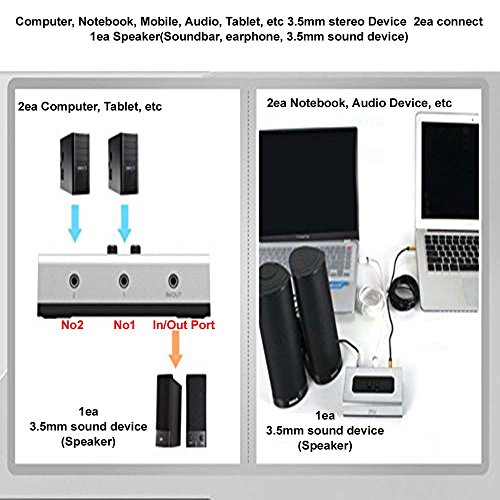
I guess a simple Y-cable would do the trick also (audio stereo y splitter).
-
PoorOldSpike
- Sr. Colonel - Battleship
- Posts: 1661
- Joined: Sun Aug 08, 2010 6:06 pm
- Location: Plymouth, England
Re: Which USB ports?
Thanks, i'll order some of those short HDMI cables..
Meanwhile about my speakers (below), let's see if I've got this right-
Do I have to buy a junction box (blue) to plug my green L-shaped speaker plug into,
then buy two more leads (one from both computers), each with an L-shaped plug on the PC ends, and plug them into the box?
What type of plug needs to be on the box end?
PS- you mentioned a Y-lead instead, it certainly sounds easier and cheaper, but there's nowhere to plug it into on the speakers as far as I can tell.

Meanwhile about my speakers (below), let's see if I've got this right-
Do I have to buy a junction box (blue) to plug my green L-shaped speaker plug into,
then buy two more leads (one from both computers), each with an L-shaped plug on the PC ends, and plug them into the box?
What type of plug needs to be on the box end?
PS- you mentioned a Y-lead instead, it certainly sounds easier and cheaper, but there's nowhere to plug it into on the speakers as far as I can tell.
Re: Which USB ports?
Yes, you need two more leads with a regular 3.5mm plug. There are many to choose from here.
-
PoorOldSpike
- Sr. Colonel - Battleship
- Posts: 1661
- Joined: Sun Aug 08, 2010 6:06 pm
- Location: Plymouth, England